





Unlock Pokecut VIP for just
23
:
59
:
55

Dehaze Photo Instantly for Clear Images with Pokecut
Easily remove haze from photo for a crisp, vibrant look. Perfect for fixing foggy, blurry, or faded images in just a few clicks. No technical skills needed.


Upload Image
or drop a file here
CTRL+V to paste image or URL
Supported formats: JPEG, JPG, PNG, WebP, BMP


No image? Try one of these


By uploading an image or URL you agree to our Terms of Use and Privacy Policy
How to Remove Haze from Photo with Pokecut
Step 1: Upload Your Hazy Photo
Select and upload a foggy image from your device. Pokecut's online tool accepts common photo formats, like JPEG, JPG, PNG, WebP, BMP. Begin to remove haze from photo in seconds.
Step 2: Instantly Dehaze with AI
Let the AI photo upscaler automatically analyze and dehaze your photo. Watch as image haze is removed instantly, improving photo quality and sharpness.
Step 3: Download Your Clear Photo
Download your dehazed photo with one click. Enjoy your clearer, vibrant image and easily share it anywhere. No watermark or quality loss.


Remove Haze from Photo Instantly Using AI
With Pokecut, you can remove haze from photo in seconds. Its advanced photo smoother technology utilizes deep learning to analyze and correct foggy pictures, giving you crisp, detailed results with a single click.
No more struggling with complicated software. The AI instantly detects image haze and restores clarity for natural, vibrant photos. Get started now and experience the power of AI to get rid of haze in photos.

Dehaze Photo Online Easily with No Skills Required
With Pokecut, you can dehaze photo online without any technical expertise. Simply upload your image, and its advanced tools will unblur images automatically, which is much easier than editing with Photoshop or other complex software.
This process is perfect for anyone who wants to correct hazy pictures without hassle. Pokecut's intuitive interface allows you to make a foggy picture clearer and restore details with just a few clicks.

Restore Color and Detail by Dehazing Photos
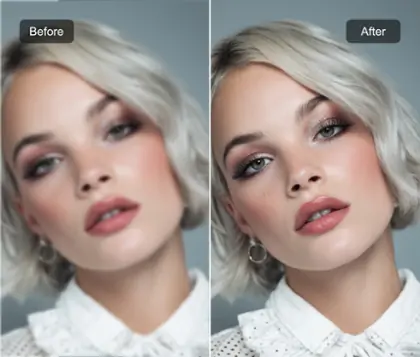
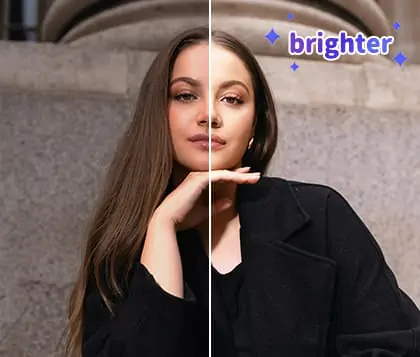
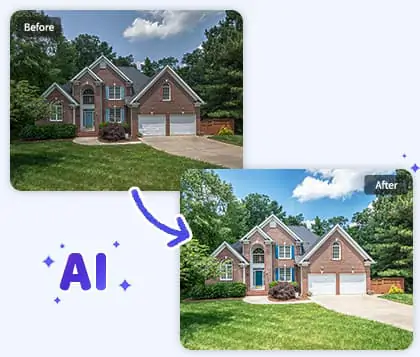
Pokecut helps you remove haze from photo and bring back the vibrant colors hidden beneath the fog. With just a few clicks, you can correct hazy pictures of cityscapes, landscapes, and nature shots, making them look natural and full of life again.
This tool is perfect for anyone wanting to make a foggy picture clearer or remove cloudiness from a photo. Experience how to get rid of haze in photos and restore lost detail, giving your images a refreshed, radiant appearance.

Batch Correct Hazy Photos for High Efficiency
Pokecut allows you to remove haze from photo online in bulk, so you can fix hazy photos without repeating the process for each image. Simply upload multiple pictures and watch as the tool dehazes a photo collection at once, saving you valuable time.
This efficient workflow is perfect for photographers and creators who need to correct hazy pictures or defog a picture set with speed. Increase productivity and make a foggy picture clearer across your entire gallery effortlessly.

Unlock More Possibilities with Pokecut
Once you use Pokecut's photo dehaze feature, you unlock a world of creative options. For eaxmple, you can try generative fill tool to replace or adjust anything in the photo, or use the image stretch feature to enhance your pictures even further with advanced AI technology.
All of this is powered by Pokecut’s advanced AI technology, delivering fast, non-destructive edits that integrate seamlessly into your workflow. More possibilities, fewer limits— unleash your creativity today.
Why Choose Pokecut to Dehaze Photo
Quickly correct hazy pictures and make a foggy picture clearer with advanced AI technology for stunning clarity
100% Free
Dehaze photo online free with no cost or hidden fees. Easily correct hazy pictures with Pokecut's AI photo enhancer.

High-Definition Results
Get crystal-clear results and improve photo quality. Fix hazy photos for vibrant, sharp images. Dehaze a photo to make it clearer in high definition.

Multi-Device Support
Defog a picture from your phone, tablet, or computer. Pokecut supports dehaze photo online on all major devices. Try to remove cloudiness from a photo anywhere.

Privacy and Security
Pokecut ensures your images are handled with the highest level of security. When you remove haze from photo online, your data remains private and protected at all times. Discover how to dehaze a photo while enjoying complete peace of mind and safe image processing.
Frequently Asked Questions
Can Pokecut help me enhance image clarity and sharpen blurry photos?
Yes, Pokecut uses advanced AI photo enhancer technology to improve photo quality. It can remove blur from image, increase photo sharpness, and restore lost details. Your pictures will look clearer and more vibrant after processing.
How does Pokecut remove haze from photo for better quality?
Pokecut uses AI image dehazing online. It can correct hazy pictures so that enhance image clarity. The process is automatic and delivers high-definition results.
Is it possible to dehaze photo online for free with Pokecut?
Yes, you can dehaze photo online free with Pokecut. There are no hidden charges. Simply upload your image to remove fog from photo and improve clarity instantly at no cost.
Can I restore old photos with Pokecut?
Pokecut lets you restore old photos using AI photo enhancer. It removes cloudiness from a photo, sharpens blurry images, and revives faded memories easily.
Explore more free Al tools




 POKECUT




Copyright © 2026 Pokecut All Rights Reserved.