





Generative AI Replace: Seamless Image Editing with AI Fill
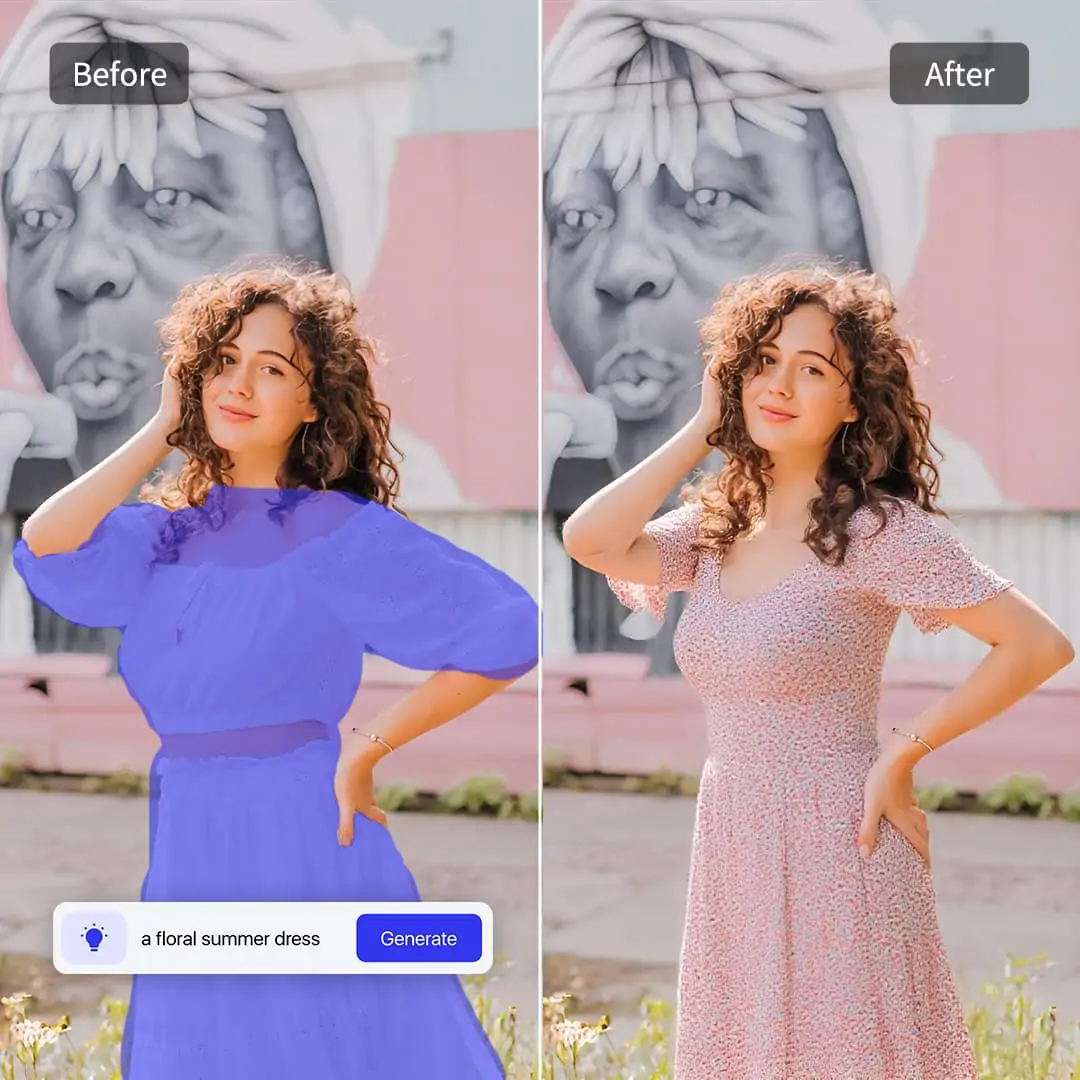
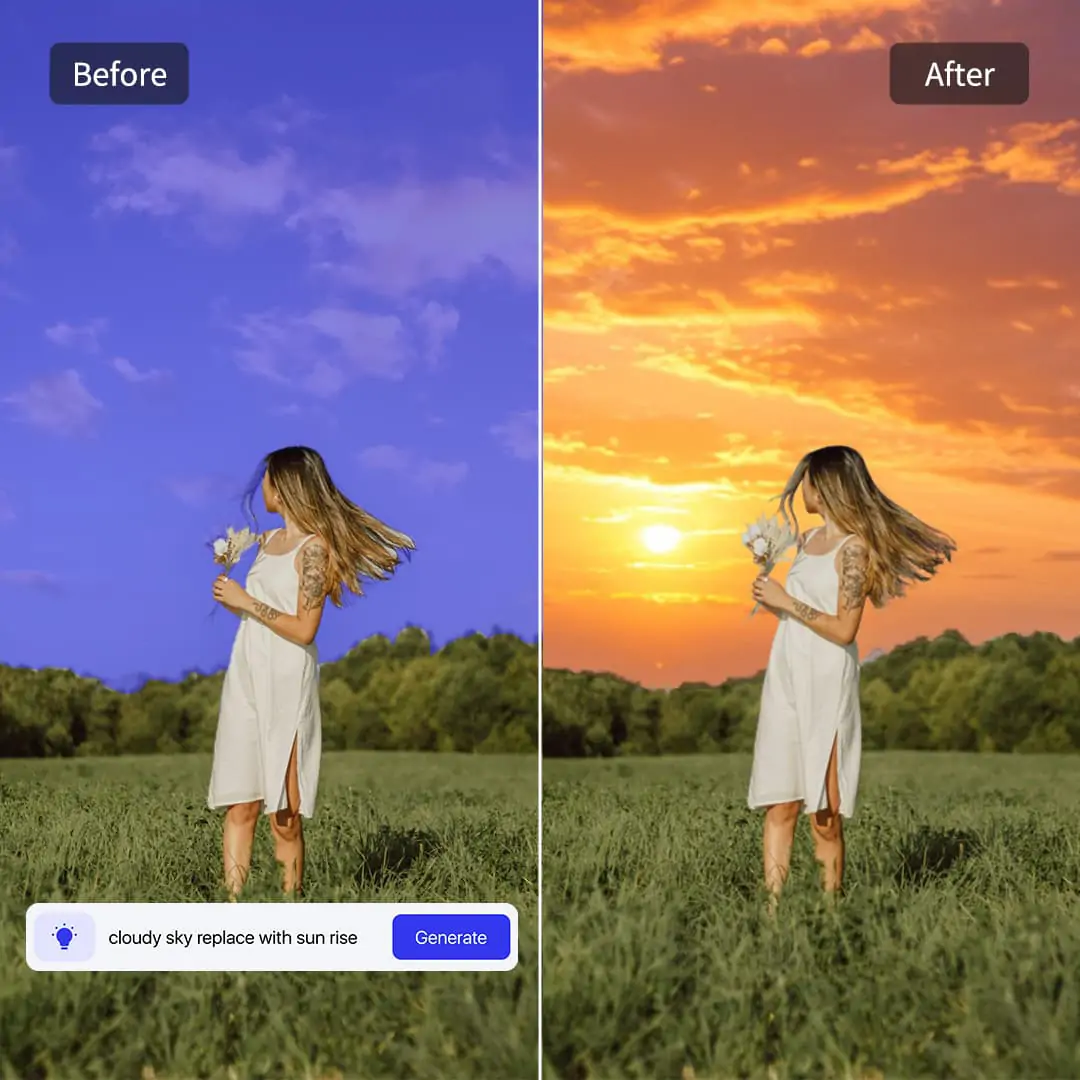
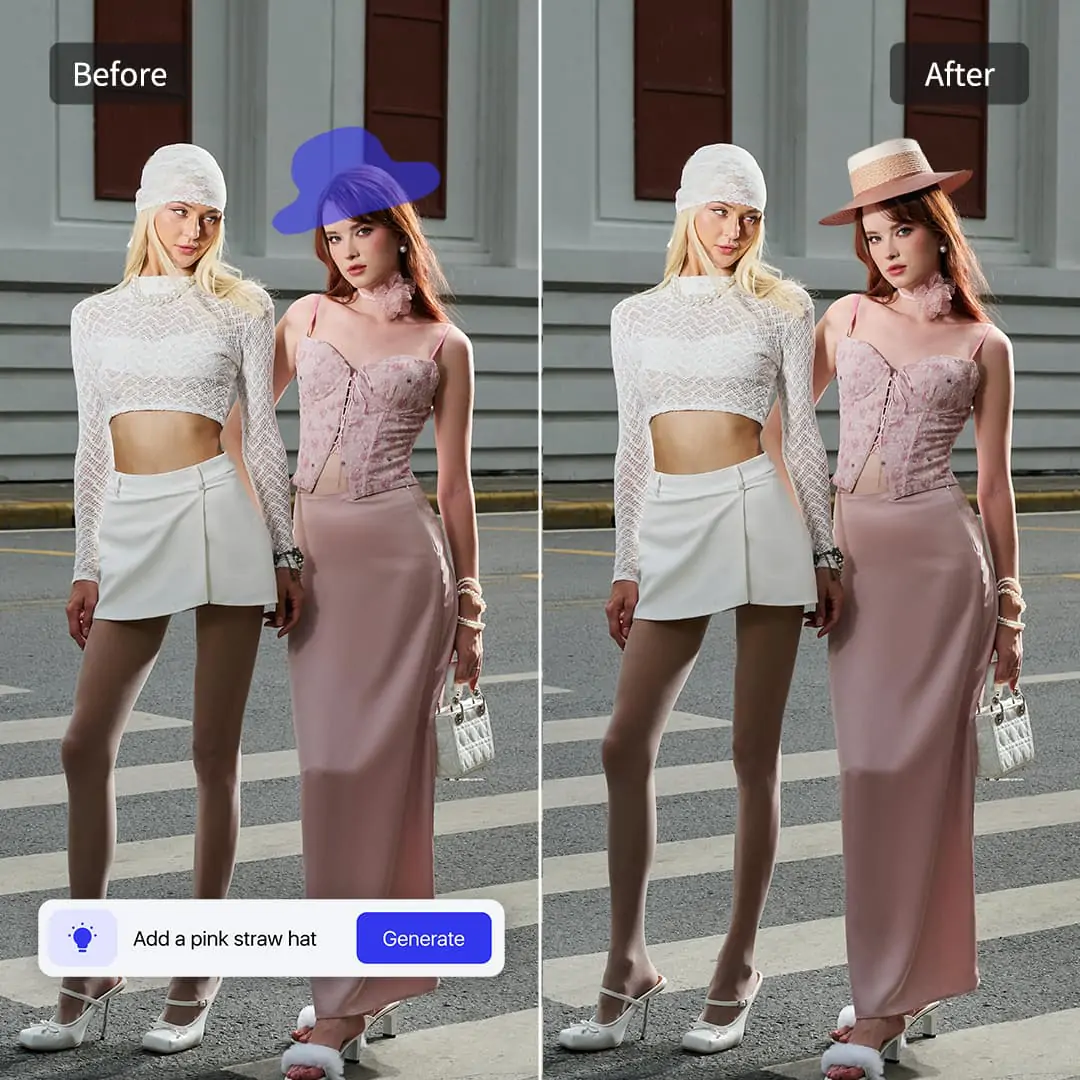
Experience the power of AI in photo editing. With Pokecut's AI Replacer, you can try virtual outfit swaps, simulate product try-ons, or change partial scenes for creative or commercial use.






By uploading an image or URL you agree to our Terms of Use and Privacy Policy
Why Choose Pokecut AI Replacer for Your Photo Edits?
Brush and Replace Instantly
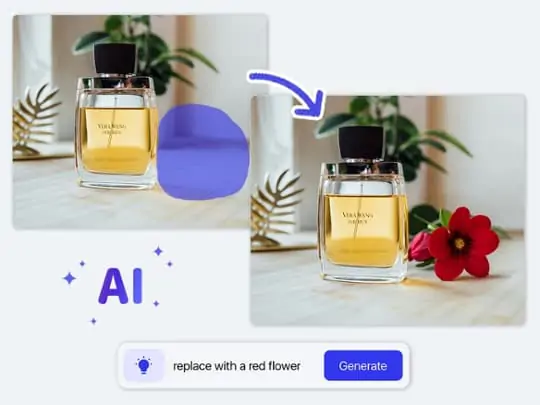
You don't need to be a design expert to use this AI replacement tool. Simply brush over the area you want to change, type your idea, and get a perfect picture in seconds. Forget about complex layers and masks!

Seamless Commercial-Grade Blending
Say goodbye to fake-looking edits and rough edges. Our AI object replacer smartly matches the original lighting, shadows, and perspective. The new elements blend naturally into your background, making it look exactly like a real, professional photograph.
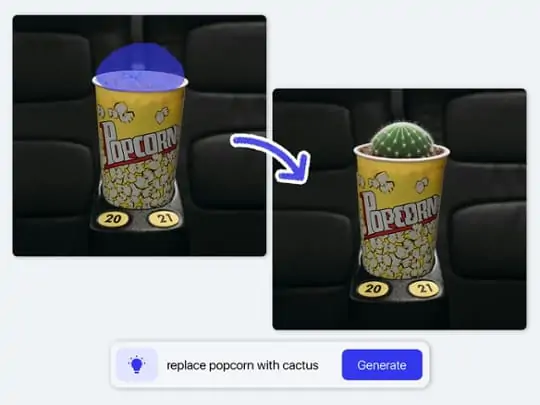
Replace Anything to Unleash Creativity
Whether you want to change a model's outfit, upgrade a product background, or add objects to photos for fun, the possibilities are endless. Break the limits of real photography and give your old pictures fresh commercial and social value.
Where Can You Apply the AI Replace Feature in Real Life?

Boost Sales by Adding Props with the AI Image Replacer
Turn plain product images into lifestyle shots instantly. Boring, solid backgrounds often fail to attract buyers' attention. Instead of building costly physical sets, you can easily add objects to photos to make them look more appealing and real.
Build lively scenes to increase your page conversion rates. Just brush next to a perfume bottle and type to insert wet rose petals or a book. This smart AI photo replacer helps you create the perfect vibe at zero cost, driving more clicks.

Upgrade Empty Rooms Fast Using an AI Image Change
Instantly furnish empty or outdated houses to attract buyers with Pokecut's room paint visualizer. Unfinished or poorly decorated rooms look dull and rarely catch a client's eye. Now, you can rely on a quick AI image changer to show off the true potential of any property layout.
Fill blank spaces with cozy, modern furniture in seconds. Simply add things to pictures, like a Nordic sofa or green plants, to create a warm home vibe. This helps potential buyers fall in love with the space at first sight.

Save Travel Shots When You Replace an Object in a Photo
Rescue your vacation pictures by removing unwanted tourists. It is frustrating to visit a famous spot only to have strangers ruin your perfect shot. Just use an AI erase and replace feature to wipe out those photobombers smoothly and naturally.
Turn crowded backgrounds into stunning, clear landscapes. With a simple brush stroke, you can seamlessly replace objects in photos with beautiful natural scenery. Your ruined memories will instantly become high-quality posts for social media.

Create Funny Memes Easily with an AI Replacer
Make hilarious social media posts with zero design skills. If you want to share something unique and funny with friends, a reliable AI replacement tool is all you need. You can create custom memes easily without learning complex editing software.
Swap everyday items with crazy props to spark interactions. Just select a friend's water cup and turn it into a frying pan using Pokeuct's AI photo replacer. Pair it with a wild background to become a viral meme creator in just a few seconds.

Try New Roles Safely via a Free AI Image Replacer
Experience different lives by swapping faces effortlessly. Have you ever wondered what you would look like in ancient clothes or as a movie star? A free AI image replacer allows you to try on various creative roles safely and playfully.
Blend your face perfectly onto another body without traces. Just upload your selfie, and the tool will capture your features for a smooth face swap. It naturally matches your skin tone and lighting, giving you endless fun with new looks.
What Can You Transform with the Pokecut AI Replace Tool?


How Can You Edit Photos with Our AI Replacer?

Way 1: Use Preset Templates
Just pick a style from our rich library to transform your photo instantly. You can easily apply trendy hairstyles, fresh backgrounds, or new outfits. This AI image replacer does the magic in one click without any typing.

Way 2: Type Custom Prompts
Bring your specific ideas to life by typing exactly what you need. From adding luxury bags and jewelry to changing hair colors, it is the easiest way to replace objects in photo scenes. You get full creative control over every detail.

Way 3: Upload Reference Photos
Try on your own specific items virtually by uploading a reference picture. Whether it is a unique bag, elegant accessory, or a custom dress, this AI image change ensures the generated result matches your exact design perfectly.

How Does Pokecut Stand Out Among AI Replace Tools?
Unlike basic editors that only offer manual brushing, Pokecut provides a professional suite of one-click solutions tailored for e-commerce, fashion, and social media. With dedicated AI modes, template libraries, and the ability to upload reference images, Pokecut saves you hours of manual editing while delivering superior, commercial-grade results.
What Do People Say About Our AI Image Replacer?
Join thousands of happy creators, sellers, and social media users. See how they save time and get incredibly realistic photos with zero editing skills.


Sarah T.

"I used this to add some flowers next to my perfume bottles. It looks so real! My online store sales actually went up."
Mark J.
"Changing my shirt color was crazy fast. I just typed "red dress" and it fit perfectly. Saved me from doing another whole photoshoot."
Chloe R.
"Adding a modern sofa to an empty living room took me two clicks. My clients love the new look. Best AI replacer ever."
David L.
"I swapped my buddy's phone with a banana for a joke. The shadows matched so well that everyone thought it was a real picture!"
Jake M.
"I wanted to go blonde but was scared. Tested it here first, and the hair edges looked totally natural. Definitely booking the salon now."
Emily W.
"I know nothing about Photoshop, but I replaced a messy room background with a clean office space instantly. It's totally foolproof and super fast."
Sarah T.
"I used this to add some flowers next to my perfume bottles. It looks so real! My online store sales actually went up."
Mark J.
"Changing my shirt color was crazy fast. I just typed "red dress" and it fit perfectly. Saved me from doing another whole photoshoot."
Chloe R.
"Adding a modern sofa to an empty living room took me two clicks. My clients love the new look. Best AI replacer ever."
David L.
"I swapped my buddy's phone with a banana for a joke. The shadows matched so well that everyone thought it was a real picture!"
Jake M.
"I wanted to go blonde but was scared. Tested it here first, and the hair edges looked totally natural. Definitely booking the salon now."
Emily W.
"I know nothing about Photoshop, but I replaced a messy room background with a clean office space instantly. It's totally foolproof and super fast."
Sarah T.
"I used this to add some flowers next to my perfume bottles. It looks so real! My online store sales actually went up."
Mark J.
"Changing my shirt color was crazy fast. I just typed "red dress" and it fit perfectly. Saved me from doing another whole photoshoot."
Chloe R.
"Adding a modern sofa to an empty living room took me two clicks. My clients love the new look. Best AI replacer ever."
David L.
"I swapped my buddy's phone with a banana for a joke. The shadows matched so well that everyone thought it was a real picture!"
Jake M.
"I wanted to go blonde but was scared. Tested it here first, and the hair edges looked totally natural. Definitely booking the salon now."
Emily W.
"I know nothing about Photoshop, but I replaced a messy room background with a clean office space instantly. It's totally foolproof and super fast."
Sarah T.
"I used this to add some flowers next to my perfume bottles. It looks so real! My online store sales actually went up."
Mark J.
"Changing my shirt color was crazy fast. I just typed "red dress" and it fit perfectly. Saved me from doing another whole photoshoot."
Chloe R.
"Adding a modern sofa to an empty living room took me two clicks. My clients love the new look. Best AI replacer ever."
David L.
"I swapped my buddy's phone with a banana for a joke. The shadows matched so well that everyone thought it was a real picture!"
Jake M.
"I wanted to go blonde but was scared. Tested it here first, and the hair edges looked totally natural. Definitely booking the salon now."
Emily W.
"I know nothing about Photoshop, but I replaced a messy room background with a clean office space instantly. It's totally foolproof and super fast."
Sarah T.
"I used this to add some flowers next to my perfume bottles. It looks so real! My online store sales actually went up."
Mark J.
"Changing my shirt color was crazy fast. I just typed "red dress" and it fit perfectly. Saved me from doing another whole photoshoot."
Chloe R.
"Adding a modern sofa to an empty living room took me two clicks. My clients love the new look. Best AI replacer ever."
David L.
"I swapped my buddy's phone with a banana for a joke. The shadows matched so well that everyone thought it was a real picture!"
Jake M.
"I wanted to go blonde but was scared. Tested it here first, and the hair edges looked totally natural. Definitely booking the salon now."
Emily W.
"I know nothing about Photoshop, but I replaced a messy room background with a clean office space instantly. It's totally foolproof and super fast."
David L.
"I swapped my buddy's phone with a banana for a joke. The shadows matched so well that everyone thought it was a real picture!"
Jake M.
"I wanted to go blonde but was scared. Tested it here first, and the hair edges looked totally natural. Definitely booking the salon now."
Emily W.
"I know nothing about Photoshop, but I replaced a messy room background with a clean office space instantly. It's totally foolproof and super fast."
Sarah T.
"I used this to add some flowers next to my perfume bottles. It looks so real! My online store sales actually went up."
Mark J.
"Changing my shirt color was crazy fast. I just typed "red dress" and it fit perfectly. Saved me from doing another whole photoshoot."
Chloe R.
"Adding a modern sofa to an empty living room took me two clicks. My clients love the new look. Best AI replacer ever."
David L.
"I swapped my buddy's phone with a banana for a joke. The shadows matched so well that everyone thought it was a real picture!"
Jake M.
"I wanted to go blonde but was scared. Tested it here first, and the hair edges looked totally natural. Definitely booking the salon now."
Emily W.
"I know nothing about Photoshop, but I replaced a messy room background with a clean office space instantly. It's totally foolproof and super fast."
Sarah T.
"I used this to add some flowers next to my perfume bottles. It looks so real! My online store sales actually went up."
Mark J.
"Changing my shirt color was crazy fast. I just typed "red dress" and it fit perfectly. Saved me from doing another whole photoshoot."
Chloe R.
"Adding a modern sofa to an empty living room took me two clicks. My clients love the new look. Best AI replacer ever."
David L.
"I swapped my buddy's phone with a banana for a joke. The shadows matched so well that everyone thought it was a real picture!"
Jake M.
"I wanted to go blonde but was scared. Tested it here first, and the hair edges looked totally natural. Definitely booking the salon now."
Emily W.
"I know nothing about Photoshop, but I replaced a messy room background with a clean office space instantly. It's totally foolproof and super fast."
Sarah T.
"I used this to add some flowers next to my perfume bottles. It looks so real! My online store sales actually went up."
Mark J.
"Changing my shirt color was crazy fast. I just typed "red dress" and it fit perfectly. Saved me from doing another whole photoshoot."
Chloe R.
"Adding a modern sofa to an empty living room took me two clicks. My clients love the new look. Best AI replacer ever."
David L.
"I swapped my buddy's phone with a banana for a joke. The shadows matched so well that everyone thought it was a real picture!"
Jake M.
"I wanted to go blonde but was scared. Tested it here first, and the hair edges looked totally natural. Definitely booking the salon now."
Emily W.
"I know nothing about Photoshop, but I replaced a messy room background with a clean office space instantly. It's totally foolproof and super fast."
Sarah T.
"I used this to add some flowers next to my perfume bottles. It looks so real! My online store sales actually went up."
Mark J.
"Changing my shirt color was crazy fast. I just typed "red dress" and it fit perfectly. Saved me from doing another whole photoshoot."
Chloe R.
"Adding a modern sofa to an empty living room took me two clicks. My clients love the new look. Best AI replacer ever."
David L.
"I swapped my buddy's phone with a banana for a joke. The shadows matched so well that everyone thought it was a real picture!"
Jake M.
"I wanted to go blonde but was scared. Tested it here first, and the hair edges looked totally natural. Definitely booking the salon now."
Emily W.
"I know nothing about Photoshop, but I replaced a messy room background with a clean office space instantly. It's totally foolproof and super fast."
Sarah T.
"I used this to add some flowers next to my perfume bottles. It looks so real! My online store sales actually went up."
Mark J.
"Changing my shirt color was crazy fast. I just typed "red dress" and it fit perfectly. Saved me from doing another whole photoshoot."
Chloe R.
"Adding a modern sofa to an empty living room took me two clicks. My clients love the new look. Best AI replacer ever."
Reviews from: Reddit, Product Hunt, G2, TrustRadius, Google Play, App Store, and more.
FAQ About AI Replacement
Q1: Is the AI replacement tool completely free to use?
Yes, Pokecut offers a free plan for everyday users. You can access core editing features online with 20 free credits. For high-volume commercial needs, we also provide affordable premium plans with ultra-high-resolution outputs and batch processing.
Q2: Will it look natural if I add objects to photos?
Absolutely. When you add objects to photos, our advanced AI analyzes the original lighting, shadows, and perspective. The newly generated items blend seamlessly into your background, leaving no harsh edges or fake-looking "pasted" effects.
Q3: Can I use this feature as an AI clothes replacer?
Yes! It works flawlessly as an AI clothes changer. Just brush over your current outfit and type the style you want, like "red silk dress" or "business suit." The AI naturally adapts to your body shape and fabric folds.
Q4: How does the AI replacer handle complex edges like hair or glass?
Our AI object replacer is trained to recognize tricky boundaries. Even with complex textures like human hair, transparent glass, or lace, the smart edge-detection ensures a clean, smooth transition without annoying white halos or blurry spots.
Q5: Do I need any Photoshop skills to replace an object in a photo?
Not at all. To replace object in photo scenes, you simply brush over the unwanted item and type a text prompt. The AI handles all the complex layering and masking automatically. It takes just seconds, even for absolute beginners.
Q6: Are my uploaded photos safe and private?
Your privacy is our top priority. When using our AI replace photo editor, all uploaded files are safely encrypted. We strictly guarantee that your personal photos or unreleased product images are never used to train our AI models.
Q7: Can I use the generated images for commercial e-commerce purposes?
Yes, the seamless AI image change results are perfect for commercial use. E-commerce sellers frequently use our tool to add lifestyle props or swap backgrounds for product listings, significantly boosting click-through rates without expensive photoshoots.
Pokecut's AI Replace Tool Trusted by Professionals and Users

1M+ Users Worldwide
Pokecut generates over 500,000 images every day

#2 on Product Hunt
Pokecut was voted #2 Product of the Day on launch

Professional Privacy Protection
Ensure 100% data privacy for every photo

Trusted by Well-Known Brands
Apple, Google, PayPal, Stripe, Product Hunt, G2, TrustRadius





