





Unblur Image: Make Blurry Pictures Clear in One Click with AI
Pokecut's AI helps you fix blurry photos caused by motion, low light, or focus issues. Whether you're dealing with blurriness in portraits, travel photos, or everyday snapshots, our smart model restores edges, textures, and facial details automatically.




By uploading an image or URL you agree to our Terms of Use and Privacy Policy
Why Choose Pokecut to Unblur Image Online Free?
Unblur Image Online with AI Precision
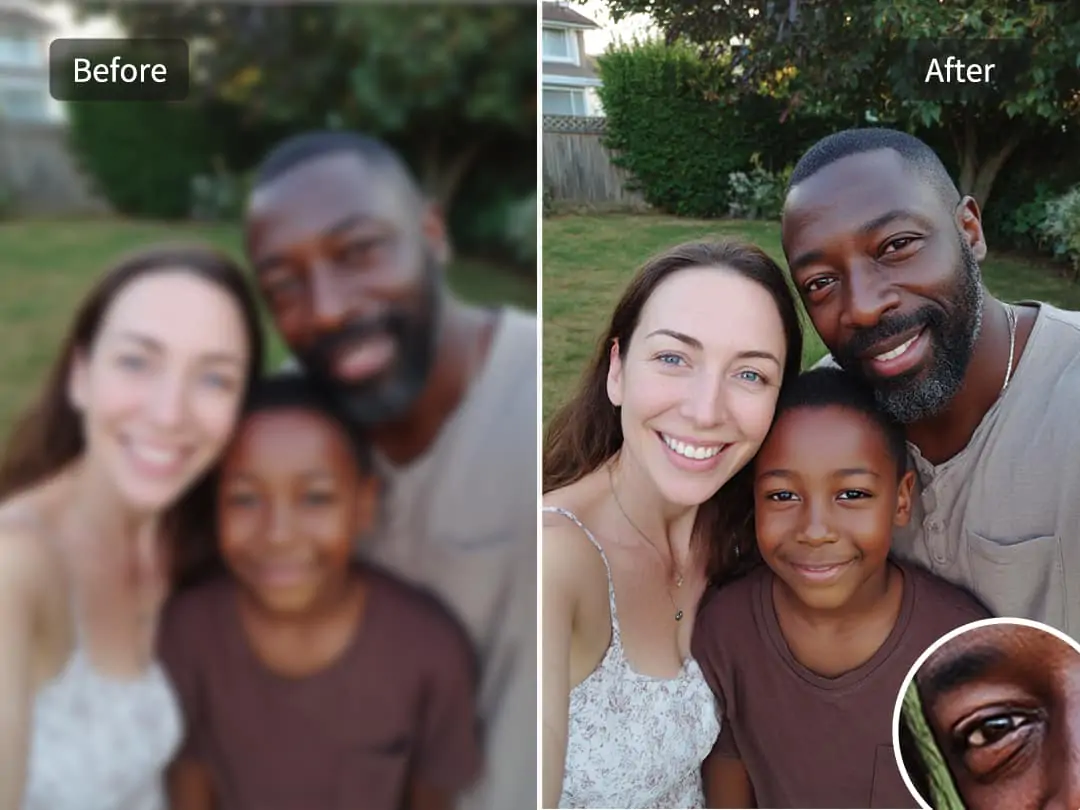
Blurry images can be frustrating, especially when you don't have advanced photo editing skills. Pokecut's HD picture converter uses cutting-edge AI technology to automatically detect and enhance blurry areas, making your photos look sharp and vivid without manual adjustments.
With just one click, this AI photo enhancer restores photo clarity by sharpening edges and reconstructing lost details. Whether you're trying to unblur an image for social media or fix a precious memory, Pokecut makes it effortless and effective.

Batch Unblur Pictures for Fast Photo Enhancement
Unblurring photos one by one can be time-consuming, especially when you're dealing with large image sets. Pokecut's batch photo enhancer lets you fix blur across up to 50 images at once with a single upload. Powered by AI, the system automatically detects motion blur, focus issues, and compression artifacts, then restores clarity consistently across all photos.
This batch blur remover is ideal for photographers, e-commerce sellers, and content teams who need to fix blurry photos efficiently. By processing multiple images in parallel, you can reduce editing time by over 80%, while maintaining high-quality, natural-looking clarity.

Provide Different AI Models to Unblur Photos
Select from 4 specialized AI models to get the best results for your specific needs.
•Standard Model: This is the versatile choice for everyday fixes. It perfectly balances processing speed and high quality to remove general blur from any photo quickly.
•Ultra Model: Designed for high-resolution shots that need an extra boost. This model provides extreme clarity and professional-grade sharpening for your most demanding visual tasks.
•Portrait Model: This model focuses specifically on facial reconstruction. It restores life to people shots by ensuring skin textures and eyes look natural rather than artificial.
•Text Model: A powerful sharpener built for work-related files. It makes blurry screenshots, scanned notes, or messy documents crisp and readable again.
When Do You Need to Unblur an Image?
Unblur Text to Improve Readability
The text-focused AI model corrects pixel diffusion to turn unreadable screenshots and scans into crisp documents. You can easily make blurry text readable by removing the "ghosting" effect that often happens with low-resolution captures or shaky camera shots. This ensures that every word, number, and character is sharp enough for professional use or personal filing.
Save time in the workplace by using a reliable tool to unblur text in image for receipts, PPT slides, or notes. Instead of struggling with pixelated files, let our AI balance the contrast between the text and background for effortless reading. It is the perfect lifesaver for those "one-copy-only" documents that are too important to be lost to blur or distortion.
Unblur Night Photos with Low-Light Denoising
Night shots often suffer from noise and blur. Pokecut's AI model excels at removing grain while retaining the scene's original atmosphere, making this 4k image upscaler perfect for denoise photos of fireworks, neon signs, or city nightscapes.
This AI enhances sharpness and contrast even in dark scenes, letting you restore clarity to your favorite night photos without sacrificing color accuracy.
Unblur Product Photos for E-Commerce Success
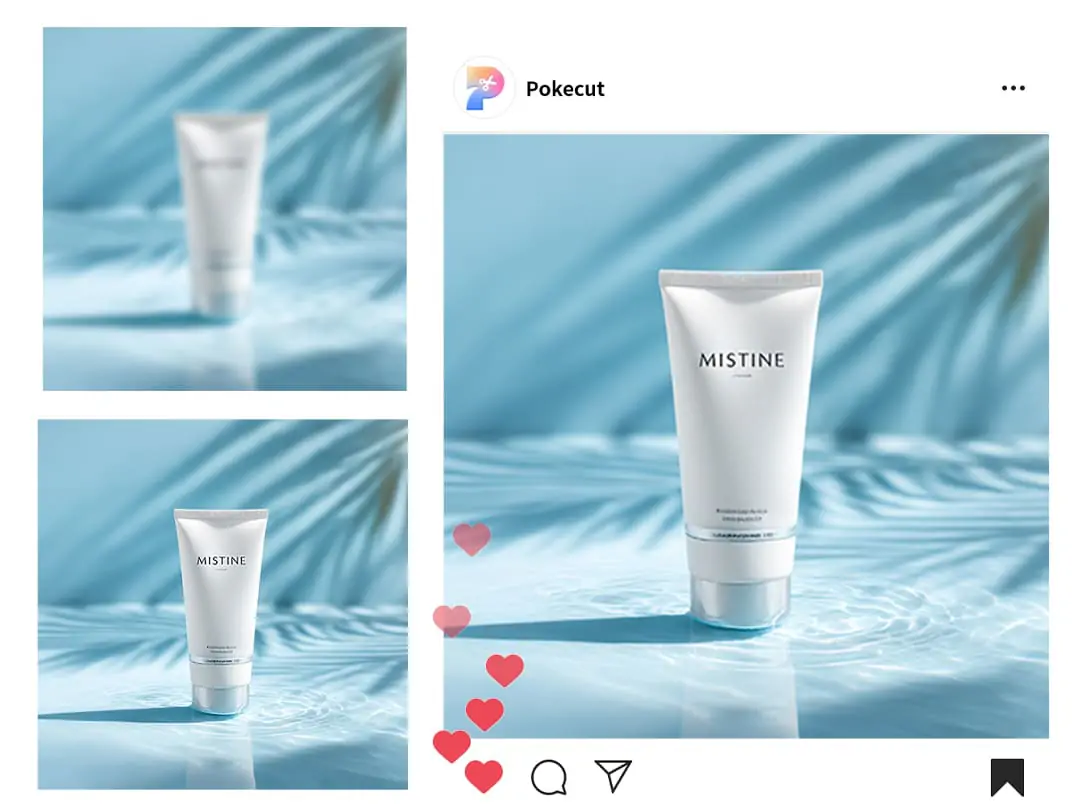
Blurry product photos can significantly reduce customer trust and hurt your conversion rates. With Pokecut, you can easily sharpen product images up to 4K and restore clarity to brand logos, tags, or key selling points, making your visuals look more professional and polished instantly.
Whether you're selling on e-commerce platforms or promoting on social media, high-resolution, sharp images drive engagement. This blur removal tool helps unblur an image in seconds, making your product photos stand out, grab attention, and ultimately increase sales.

How to Unblur Images with Pokecut
Step 1
Upload Your Blurry Picture
Upload a blurry or unfocused photo from your device. Pokecut supports portraits, text images, products, and everyday photos.
Step 2
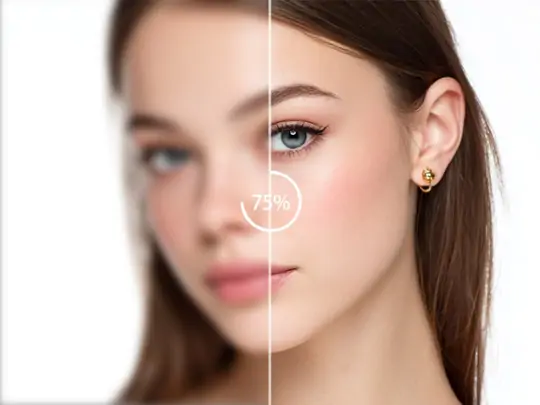
Auto-Unblur With Smart AI
Pokecut's AI image deblurrer analyzes the blur type and restores sharpness, edges, and lost details automatically, without manual adjustment needed.
Step 3
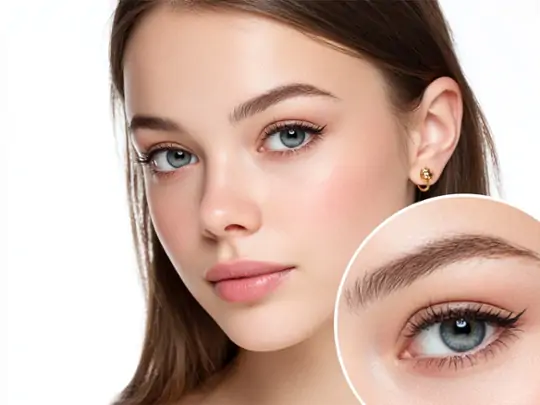
Download the Enhanced Image
Preview the unblurred image instantly. Once satisfied, download the clear, enhanced photo in high quality.
What Do Our Users Say About Unblurring Their Images?
See how millions of people are using our AI to rescue their blurry photos, enhance product details, and clear up important documents in seconds.


Sarah J.

"I was so upset when I saw my favorite wedding shot was blurry. This tool fixed the focus perfectly. I'm honestly shocked at how clear it looks now!"
Marco R.
"I use the Text model for all my product labels. It makes the small print so sharp and readable. My online store looks much more professional now."
Elena F.
"I often take quick screenshots of lectures, but they usually come out messy. This AI cleans up the text so I can actually study my notes later."
Liam O.
"I have a bit of a shaky hand when taking sunset photos. The Standard model fixed the motion blur on my last trip photos instantly. Truly a lifesaver!"
Chloe D.
"I used to struggle with complicated editing apps just to sharpen a picture. This is way faster and the Ultra model gives much better results for my prints."
David T.
"Whenever I capture a cool moment that's slightly out of focus, I run it through Pokecut. It makes my Instagram feed look crisp and high-quality every time."
Sarah J.
"I was so upset when I saw my favorite wedding shot was blurry. This tool fixed the focus perfectly. I'm honestly shocked at how clear it looks now!"
Marco R.
"I use the Text model for all my product labels. It makes the small print so sharp and readable. My online store looks much more professional now."
Elena F.
"I often take quick screenshots of lectures, but they usually come out messy. This AI cleans up the text so I can actually study my notes later."
Liam O.
"I have a bit of a shaky hand when taking sunset photos. The Standard model fixed the motion blur on my last trip photos instantly. Truly a lifesaver!"
Chloe D.
"I used to struggle with complicated editing apps just to sharpen a picture. This is way faster and the Ultra model gives much better results for my prints."
David T.
"Whenever I capture a cool moment that's slightly out of focus, I run it through Pokecut. It makes my Instagram feed look crisp and high-quality every time."
Sarah J.
"I was so upset when I saw my favorite wedding shot was blurry. This tool fixed the focus perfectly. I'm honestly shocked at how clear it looks now!"
Marco R.
"I use the Text model for all my product labels. It makes the small print so sharp and readable. My online store looks much more professional now."
Elena F.
"I often take quick screenshots of lectures, but they usually come out messy. This AI cleans up the text so I can actually study my notes later."
Liam O.
"I have a bit of a shaky hand when taking sunset photos. The Standard model fixed the motion blur on my last trip photos instantly. Truly a lifesaver!"
Chloe D.
"I used to struggle with complicated editing apps just to sharpen a picture. This is way faster and the Ultra model gives much better results for my prints."
David T.
"Whenever I capture a cool moment that's slightly out of focus, I run it through Pokecut. It makes my Instagram feed look crisp and high-quality every time."
Sarah J.
"I was so upset when I saw my favorite wedding shot was blurry. This tool fixed the focus perfectly. I'm honestly shocked at how clear it looks now!"
Marco R.
"I use the Text model for all my product labels. It makes the small print so sharp and readable. My online store looks much more professional now."
Elena F.
"I often take quick screenshots of lectures, but they usually come out messy. This AI cleans up the text so I can actually study my notes later."
Liam O.
"I have a bit of a shaky hand when taking sunset photos. The Standard model fixed the motion blur on my last trip photos instantly. Truly a lifesaver!"
Chloe D.
"I used to struggle with complicated editing apps just to sharpen a picture. This is way faster and the Ultra model gives much better results for my prints."
David T.
"Whenever I capture a cool moment that's slightly out of focus, I run it through Pokecut. It makes my Instagram feed look crisp and high-quality every time."
Sarah J.
"I was so upset when I saw my favorite wedding shot was blurry. This tool fixed the focus perfectly. I'm honestly shocked at how clear it looks now!"
Marco R.
"I use the Text model for all my product labels. It makes the small print so sharp and readable. My online store looks much more professional now."
Elena F.
"I often take quick screenshots of lectures, but they usually come out messy. This AI cleans up the text so I can actually study my notes later."
Liam O.
"I have a bit of a shaky hand when taking sunset photos. The Standard model fixed the motion blur on my last trip photos instantly. Truly a lifesaver!"
Chloe D.
"I used to struggle with complicated editing apps just to sharpen a picture. This is way faster and the Ultra model gives much better results for my prints."
David T.
"Whenever I capture a cool moment that's slightly out of focus, I run it through Pokecut. It makes my Instagram feed look crisp and high-quality every time."
Liam O.
"I have a bit of a shaky hand when taking sunset photos. The Standard model fixed the motion blur on my last trip photos instantly. Truly a lifesaver!"
Chloe D.
"I used to struggle with complicated editing apps just to sharpen a picture. This is way faster and the Ultra model gives much better results for my prints."
David T.
"Whenever I capture a cool moment that's slightly out of focus, I run it through Pokecut. It makes my Instagram feed look crisp and high-quality every time."
Sarah J.
"I was so upset when I saw my favorite wedding shot was blurry. This tool fixed the focus perfectly. I'm honestly shocked at how clear it looks now!"
Marco R.
"I use the Text model for all my product labels. It makes the small print so sharp and readable. My online store looks much more professional now."
Elena F.
"I often take quick screenshots of lectures, but they usually come out messy. This AI cleans up the text so I can actually study my notes later."
Liam O.
"I have a bit of a shaky hand when taking sunset photos. The Standard model fixed the motion blur on my last trip photos instantly. Truly a lifesaver!"
Chloe D.
"I used to struggle with complicated editing apps just to sharpen a picture. This is way faster and the Ultra model gives much better results for my prints."
David T.
"Whenever I capture a cool moment that's slightly out of focus, I run it through Pokecut. It makes my Instagram feed look crisp and high-quality every time."
Sarah J.
"I was so upset when I saw my favorite wedding shot was blurry. This tool fixed the focus perfectly. I'm honestly shocked at how clear it looks now!"
Marco R.
"I use the Text model for all my product labels. It makes the small print so sharp and readable. My online store looks much more professional now."
Elena F.
"I often take quick screenshots of lectures, but they usually come out messy. This AI cleans up the text so I can actually study my notes later."
Liam O.
"I have a bit of a shaky hand when taking sunset photos. The Standard model fixed the motion blur on my last trip photos instantly. Truly a lifesaver!"
Chloe D.
"I used to struggle with complicated editing apps just to sharpen a picture. This is way faster and the Ultra model gives much better results for my prints."
David T.
"Whenever I capture a cool moment that's slightly out of focus, I run it through Pokecut. It makes my Instagram feed look crisp and high-quality every time."
Sarah J.
"I was so upset when I saw my favorite wedding shot was blurry. This tool fixed the focus perfectly. I'm honestly shocked at how clear it looks now!"
Marco R.
"I use the Text model for all my product labels. It makes the small print so sharp and readable. My online store looks much more professional now."
Elena F.
"I often take quick screenshots of lectures, but they usually come out messy. This AI cleans up the text so I can actually study my notes later."
Liam O.
"I have a bit of a shaky hand when taking sunset photos. The Standard model fixed the motion blur on my last trip photos instantly. Truly a lifesaver!"
Chloe D.
"I used to struggle with complicated editing apps just to sharpen a picture. This is way faster and the Ultra model gives much better results for my prints."
David T.
"Whenever I capture a cool moment that's slightly out of focus, I run it through Pokecut. It makes my Instagram feed look crisp and high-quality every time."
Sarah J.
"I was so upset when I saw my favorite wedding shot was blurry. This tool fixed the focus perfectly. I'm honestly shocked at how clear it looks now!"
Marco R.
"I use the Text model for all my product labels. It makes the small print so sharp and readable. My online store looks much more professional now."
Elena F.
"I often take quick screenshots of lectures, but they usually come out messy. This AI cleans up the text so I can actually study my notes later."
Liam O.
"I have a bit of a shaky hand when taking sunset photos. The Standard model fixed the motion blur on my last trip photos instantly. Truly a lifesaver!"
Chloe D.
"I used to struggle with complicated editing apps just to sharpen a picture. This is way faster and the Ultra model gives much better results for my prints."
David T.
"Whenever I capture a cool moment that's slightly out of focus, I run it through Pokecut. It makes my Instagram feed look crisp and high-quality every time."
Sarah J.
"I was so upset when I saw my favorite wedding shot was blurry. This tool fixed the focus perfectly. I'm honestly shocked at how clear it looks now!"
Marco R.
"I use the Text model for all my product labels. It makes the small print so sharp and readable. My online store looks much more professional now."
Elena F.
"I often take quick screenshots of lectures, but they usually come out messy. This AI cleans up the text so I can actually study my notes later."
Reviews from: Reddit, Product Hunt, G2, TrustRadius, Google Play, App Store, and more.
Pokecut Trusted by Millions of Leaders and Users

1M+ Users Worldwide
Pokecut generates over 500,000 images every day

#2 on Product Hunt
Pokecut launched and won #2 product of the day

Professional Privacy Protection
Ensure 100% data privacy for every photo

Trusted by Well-known Brands
Apple, Google, PayPal, Stripe, Product Hunt, G2, TrustRadius
FAQs
What causes an image to look blurry?
Images can become blurry due to camera shake, motion, poor focus, low light, or compression. Pokecut's AI detects these blur patterns and reconstructs missing details to restore clarity automatically.
Will unblurring reduce image quality?
No. Pokecut is designed to enhance blurry photos while preserving image quality. The AI avoids excessive sharpening and focuses on natural detail recovery.
Is Pokecut better than traditional blur removers?
Traditional tools rely on manual sharpening, which can cause noise. Pokecut uses AI image deblurring to intelligently restore structure and detail, producing more natural and professional results.
Is Pokecut free to use?
Pokecut offers free access for unblurring images online. Some advanced features may require an upgrade, but basic unblur image functions are available without login.
Can I unblur images in batch with Pokecut?
Yes. Pokecut supports batch unblur image, allowing you to upload and enhance 50 blurry photos at once. This is ideal for photographers, eCommerce sellers, and content creators who need to fix blurry pictures efficiently without repeating the same steps for each image.





