





Free Online White Background Photo Editor - AI Studio Quality
Change your photo background to white instantly with our free online white background editor. Suitable for personal, professional designs, and e-commerce product images.




By uploading an image or URL you agree to our Terms of Use and Privacy Policy
Why Trust Pokecut for Professional White Background Photo Editing?
Highlight Products Instantly with Clean White Backgrounds
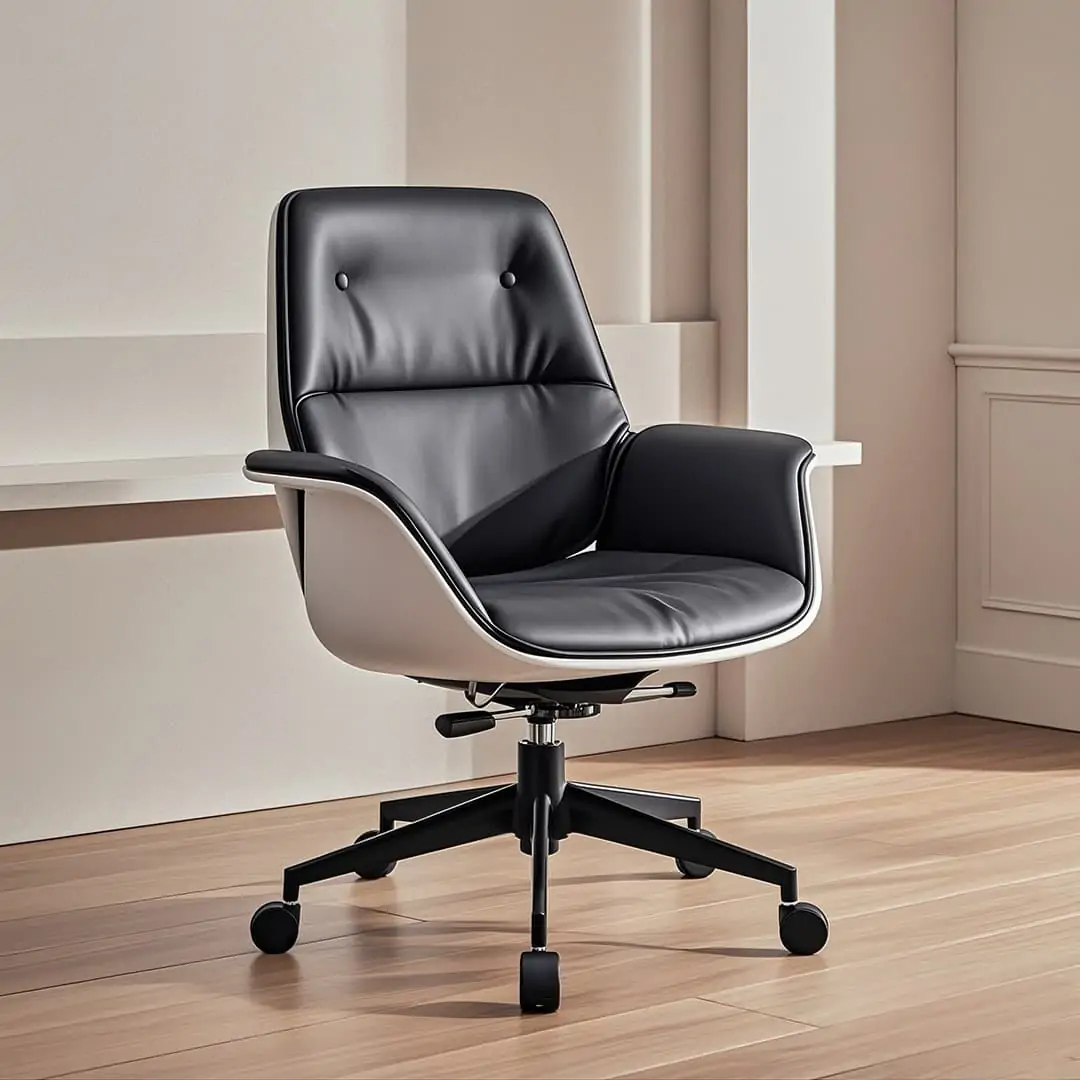
With Pokecut Background Color Changer, you can remove cluttered backgrounds and add a pure white background to products in one click. This enhances the product's focus, making it ideal for ecommerce listings and social media promotions.
Whether you're creating a product catalog or preparing for an online store, achieve professional-grade results quickly and efficiently, saving time and effort with Pokecut. This tool is designed to simplify your workflow and improve visual appeal.

Preserve Hair & Edge Details with Precision AI Models
Pokecut's AI Background Remover offers three models to suit different image types. The General model is ideal for most pictures, the Head & Face model is tailored for portraits, and the Text model is perfect for text and logo images. This ensures that even the finest details, like hair, facial outlines, or text edges, are optimized for a seamless white background.
Our product automatically enhances edge details based on image type. Whether dealing with intricate hairlines or text contours, Pokecut delivers clean and natural results, ensuring every image looks professional.

Scale Your Workflow with Bulk Background Editing
When handling a large volume of images, editing each one individually can be time-consuming. With the bulk background changer, you can uniformly change multiple image backgrounds to white, significantly boosting the efficiency of creating marketing materials. This is ideal for ad campaigns, product promotions, or brand event preparations.
Streamline your workflow with Pokecut's tool and enhance your marketing strategy. The bulk background changer is designed to save time and ensure consistency across all your visual content.
Versatile White Background Photo Editing for Every User

Boost Ecommerce Conversions with Clean Product Photos
For e-commerce sellers, a consistent white background enhances the professionalism of product images. Begin by using our tool to change the background to white, then easily resize product photo to meet diverse platform requirements. This ensures your products are displayed clearly and attractively.
With Pokecut, streamline your image editing process and make your product listings more compelling. The ability to resize product photo allows you to adapt to different platform standards without hassle, improving your online store's visual appeal.

Craft Professional Headshots & ID Photos for Personal Use
Whether it's for a resume, ID photo, or social media profile, a white background is the safest choice. With our ID photo maker, you can quickly transform ordinary portraits into professional white background photos without the need for a reshoot or complex editing. Even beginners can achieve excellent results easily.
Pokecut makes it simple to enhance your personal images for any requirement. The ID photo editing tool ensures that your portraits appear polished and suitable for any formal or casual use.

Accelerate Creative Workflows for Designers & Artists
For professional designers, using white background images is perfect for layout, composition, and brand design, as they reduce post-production costs and improve the overall presentation.
Whether it's for commercial photography or creative projects, knowing how to change photo background to white can make your work appear more refined and unified. Pokecut's tools allow you to make background white with precision and style, offering the ideal backdrop for any design.
How to Add White Background to Photo Using Pokecut
Step 1: Upload Your Image
Click the upload button to add your image to Pokecut. Ensure it's the one you want to change to a white background for optimal results.
Step 2: Let AI Intelligently Remove Background
Pokecut will automatically erase the original background, allowing a clean white backdrop. Choose from three AI models to fit your image needs.
Step 3: Confirm and Save Your White Background Image
After AI removes the background, click confirm. Pokecut applies the white background. Edit further if needed, then click download to save your HD image.

FAQs About Changing Photo Background to White Online
How does Pokecut ensure a precise white background change?
Pokecut uses advanced AI algorithms to accurately remove the original background. It applies a clean white background with pinpoint precision. This process is suitable for personal, professional, and e-commerce product images, enhancing clarity and focus without manual editing.
Can Pokecut handle images with complex backgrounds?
Yes, Pokecut efficiently manages complex backgrounds using AI technology. It removes intricate details and applies a white background smoothly. This feature is perfect for enhancing personal portraits, professional designs, and e-commerce product photos.
Can I change background to white for many images at once?
Yes, use our bulk feature. Upload multiple product photos together. The tool processes them simultaneously. This saves you hours of work. It is perfect for sellers updating their online store catalogs.
Can I add white background to png files with transparent parts?
Yes. Upload your transparent PNG logos or icons. The editor fills the empty space with solid white. This makes your graphics visible on dark modes. It is great for standardizing your brand assets.
Can I use the photo editor white background on my phone?
Yes, our tool works on mobile browsers. You do not need to install an app. Just open Pokecut's website on your phone. Snap a photo and edit it on the go. It is fast and convenient for quick edits anywhere.
Why Users Love Pokecut's White Background Photo Editing Tool
Our advanced AI delivers precise edge detection and professional white backgrounds in seconds, providing a high-quality, efficient alternative to manual masking.


Sarah J.

"I was stressing about my Amazon listings because the deadline was tight. This tool saved me! It turned my messy room background into pure white in seconds. Way better than I expected!"
Mike R.
"Honestly, I was skeptical at first, but the edge detection is wild. Even with curly hair, it clipped perfectly without looking fake. It saved me hours of manual masking. Total lifesaver."
Emily C.
"I have zero Photoshop skills, so this was a game changer for my Etsy shop. Just one click and the background is gone. My product photos finally look professional without hiring a pro."
David L.
"Used this for my LinkedIn headshot because I didn't have time for a studio. It cut me out perfectly from my living room wall. It looks so legit, nobody can tell it was just a selfie."
Jessica P.
"Really solid tool. The AI is smarter than other apps I've tried. It struggled a tiny bit with a white shirt on a light wall, but the manual touch-up fixed it fast. Still very impressive."
Tom H.
"I had to edit about 50 photos for a client catalog. Thought it would take all day, but I finished in 20 minutes. The bulk mode is insanely fast and the quality is consistent. Highly recommend."
Sarah J.
"I was stressing about my Amazon listings because the deadline was tight. This tool saved me! It turned my messy room background into pure white in seconds. Way better than I expected!"
Mike R.
"Honestly, I was skeptical at first, but the edge detection is wild. Even with curly hair, it clipped perfectly without looking fake. It saved me hours of manual masking. Total lifesaver."
Emily C.
"I have zero Photoshop skills, so this was a game changer for my Etsy shop. Just one click and the background is gone. My product photos finally look professional without hiring a pro."
David L.
"Used this for my LinkedIn headshot because I didn't have time for a studio. It cut me out perfectly from my living room wall. It looks so legit, nobody can tell it was just a selfie."
Jessica P.
"Really solid tool. The AI is smarter than other apps I've tried. It struggled a tiny bit with a white shirt on a light wall, but the manual touch-up fixed it fast. Still very impressive."
Tom H.
"I had to edit about 50 photos for a client catalog. Thought it would take all day, but I finished in 20 minutes. The bulk mode is insanely fast and the quality is consistent. Highly recommend."
Sarah J.
"I was stressing about my Amazon listings because the deadline was tight. This tool saved me! It turned my messy room background into pure white in seconds. Way better than I expected!"
Mike R.
"Honestly, I was skeptical at first, but the edge detection is wild. Even with curly hair, it clipped perfectly without looking fake. It saved me hours of manual masking. Total lifesaver."
Emily C.
"I have zero Photoshop skills, so this was a game changer for my Etsy shop. Just one click and the background is gone. My product photos finally look professional without hiring a pro."
David L.
"Used this for my LinkedIn headshot because I didn't have time for a studio. It cut me out perfectly from my living room wall. It looks so legit, nobody can tell it was just a selfie."
Jessica P.
"Really solid tool. The AI is smarter than other apps I've tried. It struggled a tiny bit with a white shirt on a light wall, but the manual touch-up fixed it fast. Still very impressive."
Tom H.
"I had to edit about 50 photos for a client catalog. Thought it would take all day, but I finished in 20 minutes. The bulk mode is insanely fast and the quality is consistent. Highly recommend."
Sarah J.
"I was stressing about my Amazon listings because the deadline was tight. This tool saved me! It turned my messy room background into pure white in seconds. Way better than I expected!"
Mike R.
"Honestly, I was skeptical at first, but the edge detection is wild. Even with curly hair, it clipped perfectly without looking fake. It saved me hours of manual masking. Total lifesaver."
Emily C.
"I have zero Photoshop skills, so this was a game changer for my Etsy shop. Just one click and the background is gone. My product photos finally look professional without hiring a pro."
David L.
"Used this for my LinkedIn headshot because I didn't have time for a studio. It cut me out perfectly from my living room wall. It looks so legit, nobody can tell it was just a selfie."
Jessica P.
"Really solid tool. The AI is smarter than other apps I've tried. It struggled a tiny bit with a white shirt on a light wall, but the manual touch-up fixed it fast. Still very impressive."
Tom H.
"I had to edit about 50 photos for a client catalog. Thought it would take all day, but I finished in 20 minutes. The bulk mode is insanely fast and the quality is consistent. Highly recommend."
Sarah J.
"I was stressing about my Amazon listings because the deadline was tight. This tool saved me! It turned my messy room background into pure white in seconds. Way better than I expected!"
Mike R.
"Honestly, I was skeptical at first, but the edge detection is wild. Even with curly hair, it clipped perfectly without looking fake. It saved me hours of manual masking. Total lifesaver."
Emily C.
"I have zero Photoshop skills, so this was a game changer for my Etsy shop. Just one click and the background is gone. My product photos finally look professional without hiring a pro."
David L.
"Used this for my LinkedIn headshot because I didn't have time for a studio. It cut me out perfectly from my living room wall. It looks so legit, nobody can tell it was just a selfie."
Jessica P.
"Really solid tool. The AI is smarter than other apps I've tried. It struggled a tiny bit with a white shirt on a light wall, but the manual touch-up fixed it fast. Still very impressive."
Tom H.
"I had to edit about 50 photos for a client catalog. Thought it would take all day, but I finished in 20 minutes. The bulk mode is insanely fast and the quality is consistent. Highly recommend."
David L.
"Used this for my LinkedIn headshot because I didn't have time for a studio. It cut me out perfectly from my living room wall. It looks so legit, nobody can tell it was just a selfie."
Jessica P.
"Really solid tool. The AI is smarter than other apps I've tried. It struggled a tiny bit with a white shirt on a light wall, but the manual touch-up fixed it fast. Still very impressive."
Tom H.
"I had to edit about 50 photos for a client catalog. Thought it would take all day, but I finished in 20 minutes. The bulk mode is insanely fast and the quality is consistent. Highly recommend."
Sarah J.
"I was stressing about my Amazon listings because the deadline was tight. This tool saved me! It turned my messy room background into pure white in seconds. Way better than I expected!"
Mike R.
"Honestly, I was skeptical at first, but the edge detection is wild. Even with curly hair, it clipped perfectly without looking fake. It saved me hours of manual masking. Total lifesaver."
Emily C.
"I have zero Photoshop skills, so this was a game changer for my Etsy shop. Just one click and the background is gone. My product photos finally look professional without hiring a pro."
David L.
"Used this for my LinkedIn headshot because I didn't have time for a studio. It cut me out perfectly from my living room wall. It looks so legit, nobody can tell it was just a selfie."
Jessica P.
"Really solid tool. The AI is smarter than other apps I've tried. It struggled a tiny bit with a white shirt on a light wall, but the manual touch-up fixed it fast. Still very impressive."
Tom H.
"I had to edit about 50 photos for a client catalog. Thought it would take all day, but I finished in 20 minutes. The bulk mode is insanely fast and the quality is consistent. Highly recommend."
Sarah J.
"I was stressing about my Amazon listings because the deadline was tight. This tool saved me! It turned my messy room background into pure white in seconds. Way better than I expected!"
Mike R.
"Honestly, I was skeptical at first, but the edge detection is wild. Even with curly hair, it clipped perfectly without looking fake. It saved me hours of manual masking. Total lifesaver."
Emily C.
"I have zero Photoshop skills, so this was a game changer for my Etsy shop. Just one click and the background is gone. My product photos finally look professional without hiring a pro."
David L.
"Used this for my LinkedIn headshot because I didn't have time for a studio. It cut me out perfectly from my living room wall. It looks so legit, nobody can tell it was just a selfie."
Jessica P.
"Really solid tool. The AI is smarter than other apps I've tried. It struggled a tiny bit with a white shirt on a light wall, but the manual touch-up fixed it fast. Still very impressive."
Tom H.
"I had to edit about 50 photos for a client catalog. Thought it would take all day, but I finished in 20 minutes. The bulk mode is insanely fast and the quality is consistent. Highly recommend."
Sarah J.
"I was stressing about my Amazon listings because the deadline was tight. This tool saved me! It turned my messy room background into pure white in seconds. Way better than I expected!"
Mike R.
"Honestly, I was skeptical at first, but the edge detection is wild. Even with curly hair, it clipped perfectly without looking fake. It saved me hours of manual masking. Total lifesaver."
Emily C.
"I have zero Photoshop skills, so this was a game changer for my Etsy shop. Just one click and the background is gone. My product photos finally look professional without hiring a pro."
David L.
"Used this for my LinkedIn headshot because I didn't have time for a studio. It cut me out perfectly from my living room wall. It looks so legit, nobody can tell it was just a selfie."
Jessica P.
"Really solid tool. The AI is smarter than other apps I've tried. It struggled a tiny bit with a white shirt on a light wall, but the manual touch-up fixed it fast. Still very impressive."
Tom H.
"I had to edit about 50 photos for a client catalog. Thought it would take all day, but I finished in 20 minutes. The bulk mode is insanely fast and the quality is consistent. Highly recommend."
Sarah J.
"I was stressing about my Amazon listings because the deadline was tight. This tool saved me! It turned my messy room background into pure white in seconds. Way better than I expected!"
Mike R.
"Honestly, I was skeptical at first, but the edge detection is wild. Even with curly hair, it clipped perfectly without looking fake. It saved me hours of manual masking. Total lifesaver."
Emily C.
"I have zero Photoshop skills, so this was a game changer for my Etsy shop. Just one click and the background is gone. My product photos finally look professional without hiring a pro."
David L.
"Used this for my LinkedIn headshot because I didn't have time for a studio. It cut me out perfectly from my living room wall. It looks so legit, nobody can tell it was just a selfie."
Jessica P.
"Really solid tool. The AI is smarter than other apps I've tried. It struggled a tiny bit with a white shirt on a light wall, but the manual touch-up fixed it fast. Still very impressive."
Tom H.
"I had to edit about 50 photos for a client catalog. Thought it would take all day, but I finished in 20 minutes. The bulk mode is insanely fast and the quality is consistent. Highly recommend."
Sarah J.
"I was stressing about my Amazon listings because the deadline was tight. This tool saved me! It turned my messy room background into pure white in seconds. Way better than I expected!"
Mike R.
"Honestly, I was skeptical at first, but the edge detection is wild. Even with curly hair, it clipped perfectly without looking fake. It saved me hours of manual masking. Total lifesaver."
Emily C.
"I have zero Photoshop skills, so this was a game changer for my Etsy shop. Just one click and the background is gone. My product photos finally look professional without hiring a pro."
Reviews from: Reddit, Product Hunt, G2, TrustRadius, Google Play, App Store, and more.







