Free Online Image Resizer: Change Size of Image With AI
Resize images online with Pokecut using AI intelligent cropping or expanding. Enjoy multiple preset sizes for personal ID photos, social media, and eCommerce product images.


By uploading an image or URL you agree to our Terms of Use and Privacy Policy
Why Choose Pokecut Free Online Image Resizer?

Change Photo Pixel & Enhance Quality with AI
No worries about blurring after resizing. You can use our photo enhancer to boost quality first, then use Pokecut to change photo pixel freely. Whether you're enlarging a small blurry image for a poster or reducing dimensions to fit high-resolution screens, we ensure the image remains sharp and clear.
With pixel-level precision control, details are preserved, and the enlarged quality can even surpass the original. Pokecut makes sure that no detail is lost, providing superior results.

Smart AI Expand: Resize & Never Stretch Images
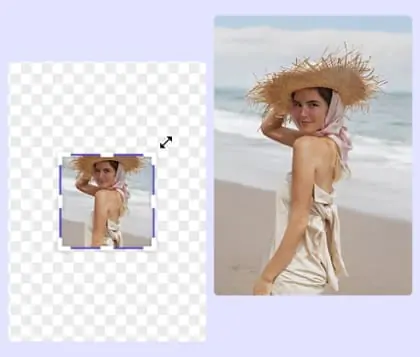
Using traditional methods to change size of image often results in stretch images, causing distortion or forcing you to crop important background elements. Pokecut's generative fill acts like a magic wand. When you change the aspect ratio, AI automatically identifies the content and smartly extends the missing background. The composition looks as natural as the original shot, making every image perfectly adaptable.
Every photo is seamlessly integrated and enhanced, ensuring no important details are lost. Pokecut's intelligent technology ensures your resized images maintain their quality and integrity.

Boost Efficiency with Fast Bulk Image Resizer
Managing eCommerce product images or event photos individually can be overwhelming. Discover our bulk image resizer online! It allows you to upload up to 50 images simultaneously, apply consistent settings, and export swiftly. This photo size converter ensures your store's images are uniform, saving designers and operators significant time. Let AI tackle the mundane tasks so you can focus on creativity, instantly boosting your productivity.
Pokecut's image size reducer revolutionizes the way you quickly and efficiently adjust image sizes.
What Can You Do with Pokecut's Free Online Image Resizer?

All-in-One Social Media Resizer
Effortlessly resize image online for all social media platforms. Use our image pixel resizer to ensure every post looks perfect on Instagram, Facebook, Youtube and more. Enjoy preset image dimensions for quick adjustments.

Professional E-commerce Photo Resizer
Pokecut's photo size converter helps you meet strict Amazon or Shopify requirements easily. We offer ready-to-use presets to resize image for any e-commerce platform. You can change aspect ratio of image batches to create a uniform catalog. Make your store look professional without expensive software.

Perfect for IDs, Passports & Printing
Adjust passport and ID photo sizes with precision. Our photo pixel editor offers exact controls for editing photo dimensions. Ensure your documents comply with the necessary standards for clear, accurate prints. You can safely convert photo to passport size for printing at home.
How to Use Our Online Image Resizer
Step 1: Select and Upload Your Image
Hit the upload button to bring your desired image into Pokecut for resizing. Choose from various file formats and ensure your image is ready for transformation.
Step 2: Enhance Image Quality and Resize
Pokecut provides a photo enhancer to improve image clarity. Use it to sharpen details first, then freely adjust dimensions or select our preset pixel sizes.
Step 3: Download Your Resized Image
With your image resized, feel free to add a personal touch with filters, stickers, or text. Explore our creative templates for extra flair, then simply hit download to save your work.

FAQs About Changing Size of Image Online
How can I ensure my resized images maintain high quality?
Scaling down is usually safe, but enlarging might cause blur. Pokecut solves this with our Photo Enhancer. You can use it to sharpen details after you resize, ensuring your image stays clear and crisp.
Can I resize multiple images at once with Pokecut?
Yes, Pokecut offers a bulk image resizer feature. You can upload multiple images and apply changes simultaneously. This is ideal for e-commerce product images or social media photos, saving you time by resizing all at once with consistent quality.
What file formats does Pokecut support for resizing?
Pokecut supports a wide range of image formats including JPG, JPEG, PNG, WebP and BMP. You can easily upload these formats to resize images online. This flexibility ensures that you can work with most standard image types for personal IDs, social media, and e-commerce needs.
Is it possible to make image bigger using this online tool?
Yes. You can directly adjust pixel dimensions to make image bigger quickly. If you want to see more scenery or extend the background, try our AI Image Extender. It intelligently fills in new content naturally.
Is the photo size converter completely free to use online?
Yes, Pokecut is a free online image resizer. You can access all basic features without paying a cent. We help you fix dimensions for social media or work. Just upload and start editing now.
See What Users Say About Pokecut's Photo Size Converter
Our advanced technology delivers precise resizing and bulk processing with exceptional clarity, providing a fast, professional alternative to manual editing.


Sarah J.

"I manage three different Insta accounts and this tool saved my life. I used to guess dimensions, but the presets here are spot on. Literally takes seconds."
Mike T.
"The bulk resize feature is actually insane. I processed an entire batch of product photos for my shop in one go. Saved me hours of boring manual work."
Elena R.
"I was honestly worried my photos would get pixelated when I made them bigger, but the quality stayed sharp. It is way better than other free tools I tried."
David K.
"Had to shrink a huge report cover for a client email right before a deadline. It reduced the file size perfectly without ruining the text. Highly recommend."
Tom H.
"Really solid tool for quick edits. The AI expand is magic, though it took a moment to process my extra large files. Still, for a free tool, it is impressive."
Priya M.
"Resizing my passport photo was stressing me out, but this made it super simple. I printed the result at home and my application got accepted with no issues."
Sarah J.
"I manage three different Insta accounts and this tool saved my life. I used to guess dimensions, but the presets here are spot on. Literally takes seconds."
Mike T.
"The bulk resize feature is actually insane. I processed an entire batch of product photos for my shop in one go. Saved me hours of boring manual work."
Elena R.
"I was honestly worried my photos would get pixelated when I made them bigger, but the quality stayed sharp. It is way better than other free tools I tried."
David K.
"Had to shrink a huge report cover for a client email right before a deadline. It reduced the file size perfectly without ruining the text. Highly recommend."
Tom H.
"Really solid tool for quick edits. The AI expand is magic, though it took a moment to process my extra large files. Still, for a free tool, it is impressive."
Priya M.
"Resizing my passport photo was stressing me out, but this made it super simple. I printed the result at home and my application got accepted with no issues."
Sarah J.
"I manage three different Insta accounts and this tool saved my life. I used to guess dimensions, but the presets here are spot on. Literally takes seconds."
Mike T.
"The bulk resize feature is actually insane. I processed an entire batch of product photos for my shop in one go. Saved me hours of boring manual work."
Elena R.
"I was honestly worried my photos would get pixelated when I made them bigger, but the quality stayed sharp. It is way better than other free tools I tried."
David K.
"Had to shrink a huge report cover for a client email right before a deadline. It reduced the file size perfectly without ruining the text. Highly recommend."
Tom H.
"Really solid tool for quick edits. The AI expand is magic, though it took a moment to process my extra large files. Still, for a free tool, it is impressive."
Priya M.
"Resizing my passport photo was stressing me out, but this made it super simple. I printed the result at home and my application got accepted with no issues."
Sarah J.
"I manage three different Insta accounts and this tool saved my life. I used to guess dimensions, but the presets here are spot on. Literally takes seconds."
Mike T.
"The bulk resize feature is actually insane. I processed an entire batch of product photos for my shop in one go. Saved me hours of boring manual work."
Elena R.
"I was honestly worried my photos would get pixelated when I made them bigger, but the quality stayed sharp. It is way better than other free tools I tried."
David K.
"Had to shrink a huge report cover for a client email right before a deadline. It reduced the file size perfectly without ruining the text. Highly recommend."
Tom H.
"Really solid tool for quick edits. The AI expand is magic, though it took a moment to process my extra large files. Still, for a free tool, it is impressive."
Priya M.
"Resizing my passport photo was stressing me out, but this made it super simple. I printed the result at home and my application got accepted with no issues."
Sarah J.
"I manage three different Insta accounts and this tool saved my life. I used to guess dimensions, but the presets here are spot on. Literally takes seconds."
Mike T.
"The bulk resize feature is actually insane. I processed an entire batch of product photos for my shop in one go. Saved me hours of boring manual work."
Elena R.
"I was honestly worried my photos would get pixelated when I made them bigger, but the quality stayed sharp. It is way better than other free tools I tried."
David K.
"Had to shrink a huge report cover for a client email right before a deadline. It reduced the file size perfectly without ruining the text. Highly recommend."
Tom H.
"Really solid tool for quick edits. The AI expand is magic, though it took a moment to process my extra large files. Still, for a free tool, it is impressive."
Priya M.
"Resizing my passport photo was stressing me out, but this made it super simple. I printed the result at home and my application got accepted with no issues."
David K.
"Had to shrink a huge report cover for a client email right before a deadline. It reduced the file size perfectly without ruining the text. Highly recommend."
Tom H.
"Really solid tool for quick edits. The AI expand is magic, though it took a moment to process my extra large files. Still, for a free tool, it is impressive."
Priya M.
"Resizing my passport photo was stressing me out, but this made it super simple. I printed the result at home and my application got accepted with no issues."
Sarah J.
"I manage three different Insta accounts and this tool saved my life. I used to guess dimensions, but the presets here are spot on. Literally takes seconds."
Mike T.
"The bulk resize feature is actually insane. I processed an entire batch of product photos for my shop in one go. Saved me hours of boring manual work."
Elena R.
"I was honestly worried my photos would get pixelated when I made them bigger, but the quality stayed sharp. It is way better than other free tools I tried."
David K.
"Had to shrink a huge report cover for a client email right before a deadline. It reduced the file size perfectly without ruining the text. Highly recommend."
Tom H.
"Really solid tool for quick edits. The AI expand is magic, though it took a moment to process my extra large files. Still, for a free tool, it is impressive."
Priya M.
"Resizing my passport photo was stressing me out, but this made it super simple. I printed the result at home and my application got accepted with no issues."
Sarah J.
"I manage three different Insta accounts and this tool saved my life. I used to guess dimensions, but the presets here are spot on. Literally takes seconds."
Mike T.
"The bulk resize feature is actually insane. I processed an entire batch of product photos for my shop in one go. Saved me hours of boring manual work."
Elena R.
"I was honestly worried my photos would get pixelated when I made them bigger, but the quality stayed sharp. It is way better than other free tools I tried."
David K.
"Had to shrink a huge report cover for a client email right before a deadline. It reduced the file size perfectly without ruining the text. Highly recommend."
Tom H.
"Really solid tool for quick edits. The AI expand is magic, though it took a moment to process my extra large files. Still, for a free tool, it is impressive."
Priya M.
"Resizing my passport photo was stressing me out, but this made it super simple. I printed the result at home and my application got accepted with no issues."
Sarah J.
"I manage three different Insta accounts and this tool saved my life. I used to guess dimensions, but the presets here are spot on. Literally takes seconds."
Mike T.
"The bulk resize feature is actually insane. I processed an entire batch of product photos for my shop in one go. Saved me hours of boring manual work."
Elena R.
"I was honestly worried my photos would get pixelated when I made them bigger, but the quality stayed sharp. It is way better than other free tools I tried."
David K.
"Had to shrink a huge report cover for a client email right before a deadline. It reduced the file size perfectly without ruining the text. Highly recommend."
Tom H.
"Really solid tool for quick edits. The AI expand is magic, though it took a moment to process my extra large files. Still, for a free tool, it is impressive."
Priya M.
"Resizing my passport photo was stressing me out, but this made it super simple. I printed the result at home and my application got accepted with no issues."
Sarah J.
"I manage three different Insta accounts and this tool saved my life. I used to guess dimensions, but the presets here are spot on. Literally takes seconds."
Mike T.
"The bulk resize feature is actually insane. I processed an entire batch of product photos for my shop in one go. Saved me hours of boring manual work."
Elena R.
"I was honestly worried my photos would get pixelated when I made them bigger, but the quality stayed sharp. It is way better than other free tools I tried."
David K.
"Had to shrink a huge report cover for a client email right before a deadline. It reduced the file size perfectly without ruining the text. Highly recommend."
Tom H.
"Really solid tool for quick edits. The AI expand is magic, though it took a moment to process my extra large files. Still, for a free tool, it is impressive."
Priya M.
"Resizing my passport photo was stressing me out, but this made it super simple. I printed the result at home and my application got accepted with no issues."
Sarah J.
"I manage three different Insta accounts and this tool saved my life. I used to guess dimensions, but the presets here are spot on. Literally takes seconds."
Mike T.
"The bulk resize feature is actually insane. I processed an entire batch of product photos for my shop in one go. Saved me hours of boring manual work."
Elena R.
"I was honestly worried my photos would get pixelated when I made them bigger, but the quality stayed sharp. It is way better than other free tools I tried."
Reviews from: Reddit, Product Hunt, G2, TrustRadius, Google Play, App Store, and more.