Resize JPEG Images Online with Pokecut's Advanced AI Tool
With Pokecut's jpeg resizer, you can quickly change image dimensions without losing clarity. Whether resizing for social media, documents, or print, this tool makes it simple to adjust any jpeg photo to fit your needs perfectly.


By uploading an image or URL you agree to our Terms of Use and Privacy Policy
How to Resize JPEG Image Easily with Powerful JPEG Resizer
Step1: Upload Your JPEG Image
Choose your jpeg image from your device. Pokecut's jpeg resizer supports fast and secure uploads. You can upload in three ways: directly click the Upload button, drag and drop your file into the blue box, or simply copy and paste the JPEG image into the upload area.
Step2: Set Desired Size or Dimensions
Enter the width and height you need or select from preset options. Instantly change size of jpeg image with Pokecut for accurate results every time.
Step3: Download the Resized JPEG
Click the download button to save your resized jpeg. Enjoy high-quality results with this jpeg resizer. Your new file is ready for web, print, or sharing.


JPEG Resizer for Effortlessly Changing Picture Size
Pokecut is a user-friendly online free resizer for multiple formats, like JPG, PNG, JPEG, WebP, BMP, etc. No registration is needed and you can instantly upload any image to change picture size without hassle. The process is straightforward, just select your jpeg, and quickly resize jpeg image to meet your specific requirements.
Whether you need a resizer for JPEG or want to adjust dimensions for social media or presentations, Pokecut provides a flexible solution. Enjoy the convenience of changing picture size online while maintaining image quality and clarity. Try resizing images in seconds and meet all your size needs with this powerful platform.

Resize JPEG Image Without Losing Quality
Resizing JPEG images often causes unwanted blurriness or pixelation. With Pokecut's advanced jpeg image resizer, you can confidently reduce or increase image size without losing visual quality.
This jpeg photo resize feature ensures your files remain sharp and clear, even when you crop images of jpeg. Pokecut makes it effortless to maintain high fidelity while you adjust images for websites, emails, or print.

Batch JPEG Resizer for Bulk Image Resizing
Pokecut makes it simple to resize a jpeg or resize jpegs in bulk with its batch jpeg resizer tool. Effortlessly upload multiple images and adjust their dimensions all at once, saving you valuable time and keeping your image sizes consistent. Whether you manage business assets or personal albums, this platform streamlines the process. If you're wondering how to resize jpegs for large projects, Pokecut provides a fast, user-friendly way for any bulk image resizing need.
What Can Pokecut's JPEG Resizer Do?

Resize JPEG for Social Media
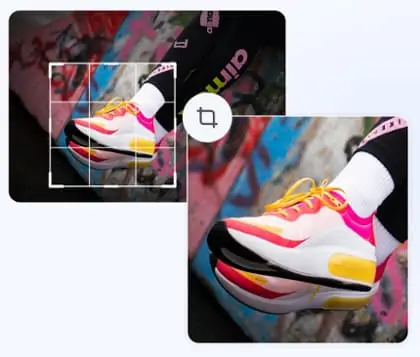
For Instagram, Facebook, or Twitter, you can resize jpeg images to the exact recommended dimensions. Pokecut ensures your content looks perfect without cropping or distortion. Use Pokecut to keep your profile consistent and appealing while saving time on manual editing.

Ecommerce JPEG Image Optimization
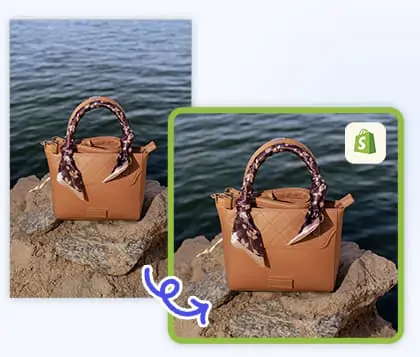
Pokecut's batch jpeg resizer helps sellers adjust size of images in bulk for Shopify, Amazon, eBay, or Shopee. Quickly crop jpegs to meet platform standards, ensuring faster uploads and professional-looking product photos. This makes your online store more attractive and search-friendly.

Resume and ID Photo JPEG Editor
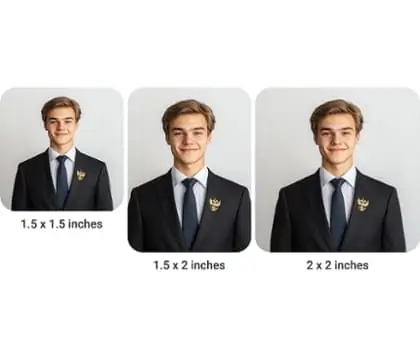
Need a professional headshot or ID photo? Pokecut's jpeg image resizer lets you change dimensions of photos to meet job portals or application requirements. From resumes to passport-size images, resizing is instant and accurate, ensuring your photos are always the right fit.
Frequently Asked Questions
How can I batch resize multiple JPEG images at once with Pokecut?
With Pokecut, use the batch jpeg resizer to process several files simultaneously. Upload all your images (up to 50 images), set the new dimensions, and quickly download the resized results.
Will resizing a jpeg image with Pokecut reduce its visual quality?
Pokecut uses advanced jpeg image resize technology to maintain the original quality. Adjust size of jpeg image or change dimensions without visible loss or pixelation.
What's the difference between jpeg resize and crop?
Resizing changes the image's dimensions while keeping content intact, whereas cropping removes parts of the photo. Pokecut supports both resize jpeg and crop features.
Is it possible to adjust size of jpeg image without registration?
Pokecut allows you to resize jpeg image online without creating an account. Upload your file, use the jpeg resizer, and download instantly. No sign-up is required.
Can I use Pokecut to resize jpeg images on my mobile device?
Yes, you can use Pokecut directly from your mobile device. Simply open the tool in your browser, upload your jpeg images, and resize them quickly and efficiently wherever you are.