





Create Your US Visa Photo Online for Free with Pokecut
Transform any photo into a compliant US visa image using Pokecut's US visa photo tool online for free. Perfect for anyone needing quick and reliable visa photos.
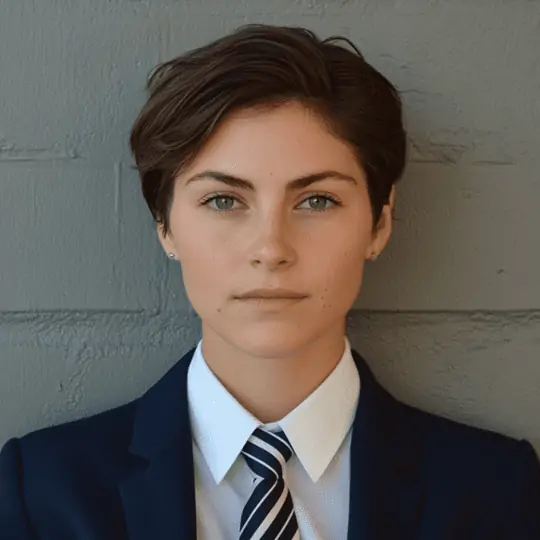






By uploading an image or URL you agree to our Terms of Use and Privacy Policy
How to Use Pokecut's US Visa Photo Editor
Step 1: Upload Your Portrait Photo
Click the upload button to add your photo to Pokecut for US visa processing. Choose a formal, front-facing portrait. Use our AI Clothes Changer to apply formal attire if needed.
Step 2: Adjust Photo Size and Position
Once uploaded, Pokecut removes the background and applies a clean white one. Our tool auto-adjusts to US visa size. Simply drag to refine the portrait's size and position for optimal results.
Step 3: Download Your US Visa Photo
After adjustments, click the download button to save your visa photo in high resolution. Photos created with Pokecut meet official standards and are ready for your application.


Effortless US Visa Photo Tool for Online Use
If you don't want to deal with complex visa photo rules, this free online US visa photo tool makes the process easy. Upload a regular photo, and our visa photo maker quickly turns it into a compliant ID photo that meets US visa requirements. Everything can be done online in just minutes.
Pokecut provides a smart solution for those needing quick and reliable visa photos. With our user-friendly interface, you can ensure your photos are compliant with US standards without any hassle. It's a seamless experience designed to make your visa application process smoother.
AI-Enhanced US Visa Photo Editor for Flawless Backgrounds
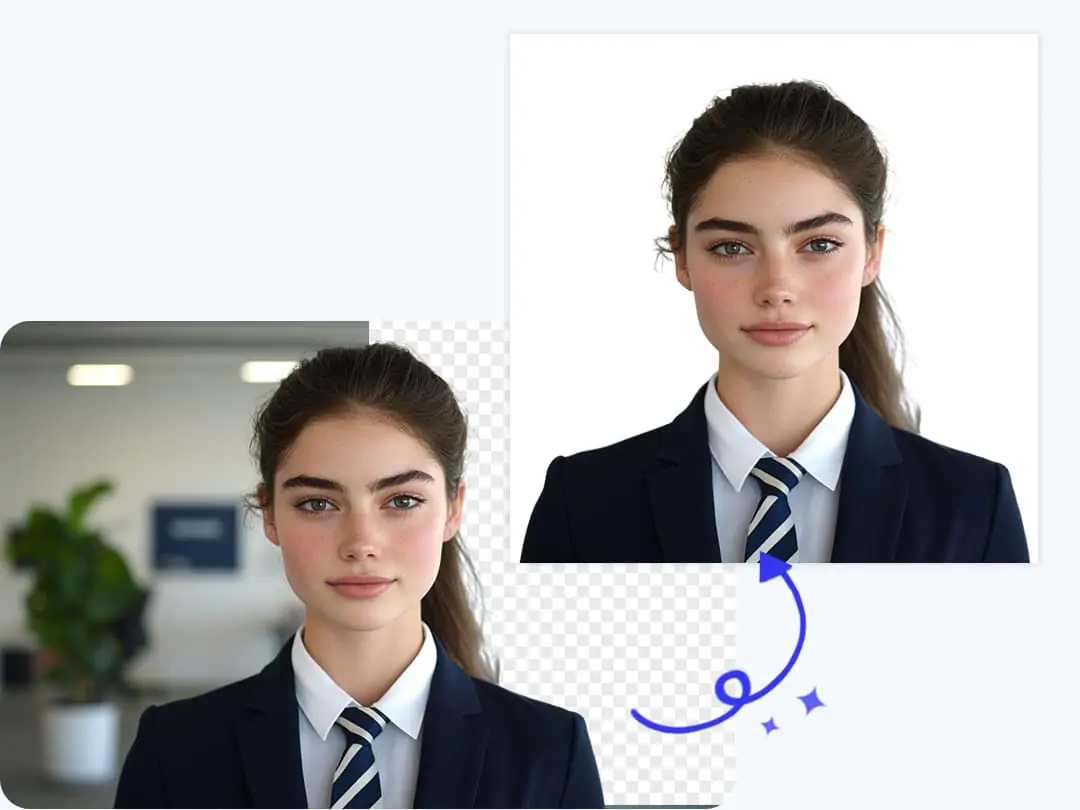
US visa photos have strict background requirements, cluttered or off-color backgrounds can affect your approval. Our US visa photo editor uses advanced AI technology to remove the cluttered background and apply a clean, compliant solid color. Pokecut ensures your visa photo looks professional and meets all necessary standards.
With Pokecut, you can achieve a seamless and efficient visa photo editing experience. The tool is designed to make the process smooth, eliminating the need for manual adjustments, providing you with a perfect result every time.

One-Click US Visa Photo Cropping Tool for Correct Size
Incorrect photo size is one of the most common issues with visa applications. With Pokecut's US visa photo cropping tool, you can easily resize visa photo to meet the official US visa dimensions with just one click. Our AI automatically crops your photo to the specified standard, ensuring it meets upload requirements.
Pokecut makes the process seamless and efficient, allowing you to focus on other important aspects of your visa application. Our tool's precision helps you avoid unnecessary delays and ensures compliance with visa photo standards.

US Visa Photo Checker with Facial Retouching
Ensure your ID photo meets visa requirements with AI photo retouch technology. This tool addresses issues like blurriness, shadows, and uneven lighting, guaranteeing a compliant passport photo. It also acts as a blemish remover to fix facial imperfections, eliminating acne and wrinkles for a clean and professional visa photo.
Pokecut's advanced features make it easy to prepare your visa photo at home. With automatic adjustments, you can achieve a flawless result, saving time and avoiding common pitfalls in the visa application process.

AI-Driven American Visa Photo Maker for Formal Attire
There's no need to retake your photo if you're not in formal attire. Our US visa photo tool includes a formal attire editor that lets you transform casual clothing into a professional look with a single click. This is perfect for those who need to prepare visa materials quickly or don't have the means to retake photos, ensuring your photo is suitable for official use.
Pokecut offers an effective solution for improving your US visa photo. Utilizing our AI technology, you can easily achieve the formal appearance required, simplifying and enhancing your application process.
Why Choose Pokecut as Your US Visa Photo Tool?

Smart US Visa Photo Cropper
Easily crop photo for US visa with our intelligent tool. Ensure your photos meet the precise US visa photo size requirements with automatic adjustments and cropping.

Seamless AI Background Retouch
Enhance your photo with AI photo retouch. Automatically remove the cluttered background for a clean, professional appearance to meet official requirements.

Effortless Formal Attire Editor
Easily convert casual attire to a formal look using our American visa photo tool. This photo tool for American visa ensures a polished appearance, suitable for any visa application.

High-Quality Export Without Watermarks
Download your finished visa photo in clear, high quality without watermarks. Each image is ready for submission, so you can upload it directly without extra edits or adjustments.
See What Users Say About Pokecut's US Visa Photo Tool
Our advanced technology provides automated cropping and compliance checks that deliver professional results, ensuring a fast and stress-free visa photo process.


Daniel R.

"I was honestly stressed about visa photo rules, but this tool made it easy. I uploaded a normal photo at home and it handled the size and crop automatically. It saved me time and a trip to a photo studio."
Emily T.
"I used this US visa photo tool late at night before my application deadline. The process was quick, clear, and worked smoothly on my laptop. Seeing a compliant photo right away was a huge relief for me."
Jason M.
"The tool worked well and helped me get a valid visa photo fast. I had to retake my photo once due to lighting, but after that it went smoothly. Overall, it still saved me effort compared to other tools."
Michael L.
"I tried a few other tools before, but this one felt simpler. The cropping and background adjustment were automatic, and I didn't need any editing skills. It gave me confidence that my photo met US visa standards."
Natalie B.
"I liked how straightforward the process was. The photo checker gave me peace of mind before submission. I wish there were more preview tips, but the final result met the requirements and was accepted."
Sophia K.
"As someone applying from campus, this tool was perfect. I used my phone browser and finished everything in minutes. The results looked professional, and I didn't worry about missing any photo requirements."
Daniel R.
"I was honestly stressed about visa photo rules, but this tool made it easy. I uploaded a normal photo at home and it handled the size and crop automatically. It saved me time and a trip to a photo studio."
Emily T.
"I used this US visa photo tool late at night before my application deadline. The process was quick, clear, and worked smoothly on my laptop. Seeing a compliant photo right away was a huge relief for me."
Jason M.
"The tool worked well and helped me get a valid visa photo fast. I had to retake my photo once due to lighting, but after that it went smoothly. Overall, it still saved me effort compared to other tools."
Michael L.
"I tried a few other tools before, but this one felt simpler. The cropping and background adjustment were automatic, and I didn't need any editing skills. It gave me confidence that my photo met US visa standards."
Natalie B.
"I liked how straightforward the process was. The photo checker gave me peace of mind before submission. I wish there were more preview tips, but the final result met the requirements and was accepted."
Sophia K.
"As someone applying from campus, this tool was perfect. I used my phone browser and finished everything in minutes. The results looked professional, and I didn't worry about missing any photo requirements."
Daniel R.
"I was honestly stressed about visa photo rules, but this tool made it easy. I uploaded a normal photo at home and it handled the size and crop automatically. It saved me time and a trip to a photo studio."
Emily T.
"I used this US visa photo tool late at night before my application deadline. The process was quick, clear, and worked smoothly on my laptop. Seeing a compliant photo right away was a huge relief for me."
Jason M.
"The tool worked well and helped me get a valid visa photo fast. I had to retake my photo once due to lighting, but after that it went smoothly. Overall, it still saved me effort compared to other tools."
Michael L.
"I tried a few other tools before, but this one felt simpler. The cropping and background adjustment were automatic, and I didn't need any editing skills. It gave me confidence that my photo met US visa standards."
Natalie B.
"I liked how straightforward the process was. The photo checker gave me peace of mind before submission. I wish there were more preview tips, but the final result met the requirements and was accepted."
Sophia K.
"As someone applying from campus, this tool was perfect. I used my phone browser and finished everything in minutes. The results looked professional, and I didn't worry about missing any photo requirements."
Daniel R.
"I was honestly stressed about visa photo rules, but this tool made it easy. I uploaded a normal photo at home and it handled the size and crop automatically. It saved me time and a trip to a photo studio."
Emily T.
"I used this US visa photo tool late at night before my application deadline. The process was quick, clear, and worked smoothly on my laptop. Seeing a compliant photo right away was a huge relief for me."
Jason M.
"The tool worked well and helped me get a valid visa photo fast. I had to retake my photo once due to lighting, but after that it went smoothly. Overall, it still saved me effort compared to other tools."
Michael L.
"I tried a few other tools before, but this one felt simpler. The cropping and background adjustment were automatic, and I didn't need any editing skills. It gave me confidence that my photo met US visa standards."
Natalie B.
"I liked how straightforward the process was. The photo checker gave me peace of mind before submission. I wish there were more preview tips, but the final result met the requirements and was accepted."
Sophia K.
"As someone applying from campus, this tool was perfect. I used my phone browser and finished everything in minutes. The results looked professional, and I didn't worry about missing any photo requirements."
Daniel R.
"I was honestly stressed about visa photo rules, but this tool made it easy. I uploaded a normal photo at home and it handled the size and crop automatically. It saved me time and a trip to a photo studio."
Emily T.
"I used this US visa photo tool late at night before my application deadline. The process was quick, clear, and worked smoothly on my laptop. Seeing a compliant photo right away was a huge relief for me."
Jason M.
"The tool worked well and helped me get a valid visa photo fast. I had to retake my photo once due to lighting, but after that it went smoothly. Overall, it still saved me effort compared to other tools."
Michael L.
"I tried a few other tools before, but this one felt simpler. The cropping and background adjustment were automatic, and I didn't need any editing skills. It gave me confidence that my photo met US visa standards."
Natalie B.
"I liked how straightforward the process was. The photo checker gave me peace of mind before submission. I wish there were more preview tips, but the final result met the requirements and was accepted."
Sophia K.
"As someone applying from campus, this tool was perfect. I used my phone browser and finished everything in minutes. The results looked professional, and I didn't worry about missing any photo requirements."
Michael L.
"I tried a few other tools before, but this one felt simpler. The cropping and background adjustment were automatic, and I didn't need any editing skills. It gave me confidence that my photo met US visa standards."
Natalie B.
"I liked how straightforward the process was. The photo checker gave me peace of mind before submission. I wish there were more preview tips, but the final result met the requirements and was accepted."
Sophia K.
"As someone applying from campus, this tool was perfect. I used my phone browser and finished everything in minutes. The results looked professional, and I didn't worry about missing any photo requirements."
Daniel R.
"I was honestly stressed about visa photo rules, but this tool made it easy. I uploaded a normal photo at home and it handled the size and crop automatically. It saved me time and a trip to a photo studio."
Emily T.
"I used this US visa photo tool late at night before my application deadline. The process was quick, clear, and worked smoothly on my laptop. Seeing a compliant photo right away was a huge relief for me."
Jason M.
"The tool worked well and helped me get a valid visa photo fast. I had to retake my photo once due to lighting, but after that it went smoothly. Overall, it still saved me effort compared to other tools."
Michael L.
"I tried a few other tools before, but this one felt simpler. The cropping and background adjustment were automatic, and I didn't need any editing skills. It gave me confidence that my photo met US visa standards."
Natalie B.
"I liked how straightforward the process was. The photo checker gave me peace of mind before submission. I wish there were more preview tips, but the final result met the requirements and was accepted."
Sophia K.
"As someone applying from campus, this tool was perfect. I used my phone browser and finished everything in minutes. The results looked professional, and I didn't worry about missing any photo requirements."
Daniel R.
"I was honestly stressed about visa photo rules, but this tool made it easy. I uploaded a normal photo at home and it handled the size and crop automatically. It saved me time and a trip to a photo studio."
Emily T.
"I used this US visa photo tool late at night before my application deadline. The process was quick, clear, and worked smoothly on my laptop. Seeing a compliant photo right away was a huge relief for me."
Jason M.
"The tool worked well and helped me get a valid visa photo fast. I had to retake my photo once due to lighting, but after that it went smoothly. Overall, it still saved me effort compared to other tools."
Michael L.
"I tried a few other tools before, but this one felt simpler. The cropping and background adjustment were automatic, and I didn't need any editing skills. It gave me confidence that my photo met US visa standards."
Natalie B.
"I liked how straightforward the process was. The photo checker gave me peace of mind before submission. I wish there were more preview tips, but the final result met the requirements and was accepted."
Sophia K.
"As someone applying from campus, this tool was perfect. I used my phone browser and finished everything in minutes. The results looked professional, and I didn't worry about missing any photo requirements."
Daniel R.
"I was honestly stressed about visa photo rules, but this tool made it easy. I uploaded a normal photo at home and it handled the size and crop automatically. It saved me time and a trip to a photo studio."
Emily T.
"I used this US visa photo tool late at night before my application deadline. The process was quick, clear, and worked smoothly on my laptop. Seeing a compliant photo right away was a huge relief for me."
Jason M.
"The tool worked well and helped me get a valid visa photo fast. I had to retake my photo once due to lighting, but after that it went smoothly. Overall, it still saved me effort compared to other tools."
Michael L.
"I tried a few other tools before, but this one felt simpler. The cropping and background adjustment were automatic, and I didn't need any editing skills. It gave me confidence that my photo met US visa standards."
Natalie B.
"I liked how straightforward the process was. The photo checker gave me peace of mind before submission. I wish there were more preview tips, but the final result met the requirements and was accepted."
Sophia K.
"As someone applying from campus, this tool was perfect. I used my phone browser and finished everything in minutes. The results looked professional, and I didn't worry about missing any photo requirements."
Daniel R.
"I was honestly stressed about visa photo rules, but this tool made it easy. I uploaded a normal photo at home and it handled the size and crop automatically. It saved me time and a trip to a photo studio."
Emily T.
"I used this US visa photo tool late at night before my application deadline. The process was quick, clear, and worked smoothly on my laptop. Seeing a compliant photo right away was a huge relief for me."
Jason M.
"The tool worked well and helped me get a valid visa photo fast. I had to retake my photo once due to lighting, but after that it went smoothly. Overall, it still saved me effort compared to other tools."
Michael L.
"I tried a few other tools before, but this one felt simpler. The cropping and background adjustment were automatic, and I didn't need any editing skills. It gave me confidence that my photo met US visa standards."
Natalie B.
"I liked how straightforward the process was. The photo checker gave me peace of mind before submission. I wish there were more preview tips, but the final result met the requirements and was accepted."
Sophia K.
"As someone applying from campus, this tool was perfect. I used my phone browser and finished everything in minutes. The results looked professional, and I didn't worry about missing any photo requirements."
Daniel R.
"I was honestly stressed about visa photo rules, but this tool made it easy. I uploaded a normal photo at home and it handled the size and crop automatically. It saved me time and a trip to a photo studio."
Emily T.
"I used this US visa photo tool late at night before my application deadline. The process was quick, clear, and worked smoothly on my laptop. Seeing a compliant photo right away was a huge relief for me."
Jason M.
"The tool worked well and helped me get a valid visa photo fast. I had to retake my photo once due to lighting, but after that it went smoothly. Overall, it still saved me effort compared to other tools."
Reviews from: Reddit, Product Hunt, G2, TrustRadius, Google Play, App Store, and more.
FAQs About Making Photo for US Visa Online Free
Does this US visa photo tool meet official USCIS photo rules?
Yes. This US visa photo tool follows USCIS photo rules. It checks size, head position, background, and framing. It helps reduce common mistakes before you upload your visa photo online.
Can I crop my photo to the correct US visa photo size online?
Yes. This US visa photo cropping tool lets you crop your photo to the correct US visa photo size online. You can adjust framing easily and preview the final result before saving.
Is it possible to use Pokecut on mobile devices easily?
Absolutely. Pokecut is designed to be mobile-friendly, letting you create compliant US visa photos directly on your smartphone. Just open Pokecut's website in your mobile browser. The interface is intuitive and adapts well to smaller screens.
Is this visa photo cropping tool safe for personal images?
Yes. This visa photo cropping tool processes images securely. Uploaded photos are not used for other purposes, helping protect your personal data and privacy.
Is this US visa photo tool free to use online?
Yes. This US visa photo tool is free to use online. It lets you crop your visa photo and check the correct size. Some advanced options may require an upgrade, but most users can prepare a valid visa photo for free.







