





Formal Attire Editor Online Free for Professional Photo Edits
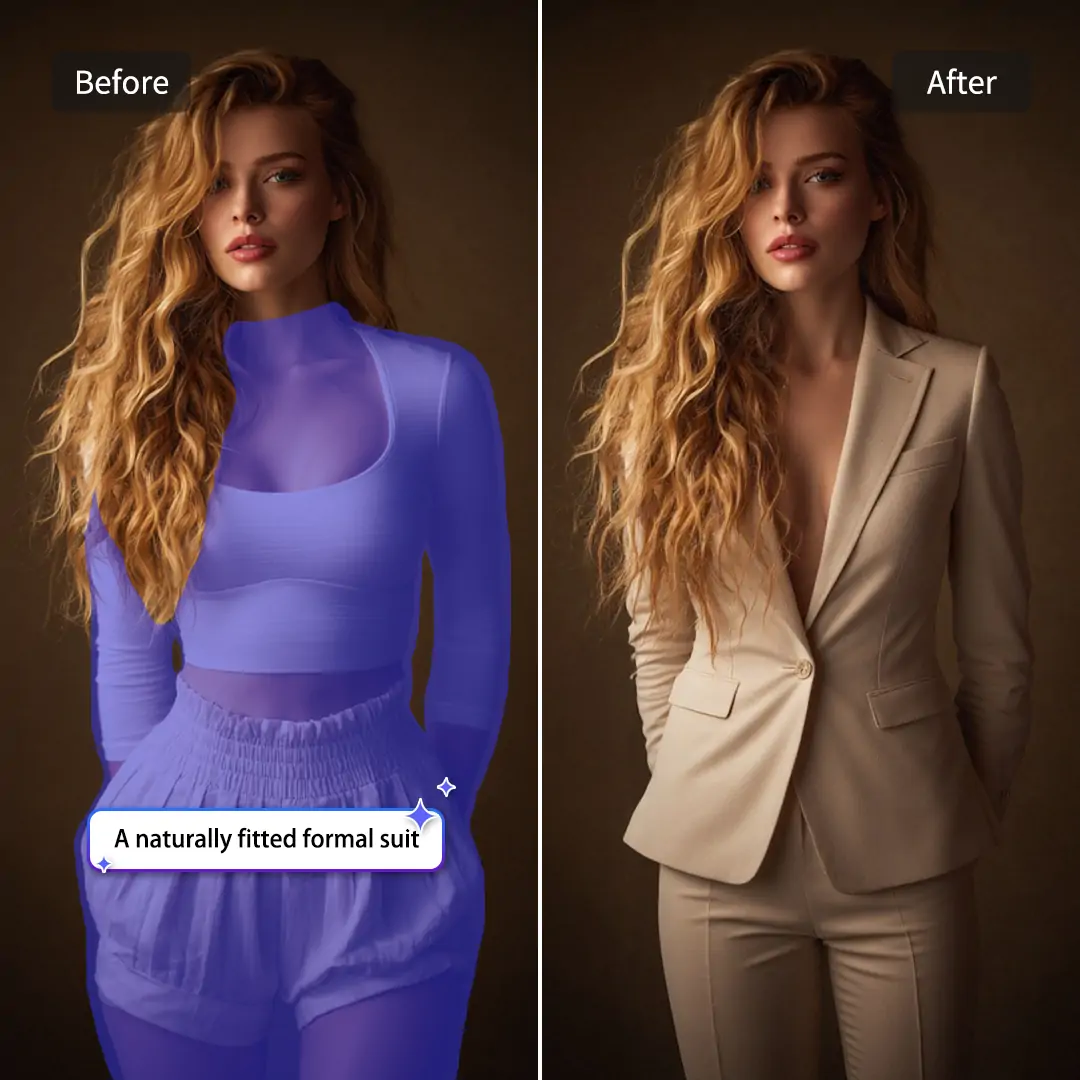
Turn casual selfies into professional headshots in one click. As a top photo editor formal attire, Pokecut seamlessly blends realistic suits. Experience the most realistic transformations today.



By uploading an image or URL you agree to our Terms of Use and Privacy Policy
How Can You Dress up with Pokecut Formal Attire Editor?

Apply Preset Styles
Just click on our ready-made suits and dresses. The photo editor formal attire tool will instantly fit the clothes to your body. It is fast, easy, and requires zero editing skills to look great.

Type Your Own Prompt
Want a specific look? Tell the AI exactly what you want to wear. Type "blue silk blouse" and let this formal attire for women editor generate a unique and stylish outfit just for your photo.

Upload Custom Suits
If you have a picture of your favorite suit, upload it directly. Our AI picture formal attire will smartly map your own clothing onto your selfie, keeping your personal style exactly how you like it.
Why Is Pokecut AI Formal Attire Editor So Powerful?

Diverse Formal Attire Templates for Women and Men
Pokecut offers an extensive wardrobe for everyone, breaking away from just standard men's black suits. You can easily explore elegant dresses, sophisticated silk shirts, and modern blazers. This formal attire women's editor is specifically designed to ensure every female professional looks her absolute best.
The AI perfectly maps to your body contours for a highly realistic, natural fit. It intelligently adjusts the garments to blend seamlessly with your shoulders and neckline. Use our platform to add a suit to your photo online for free and showcase your unique, stylish workplace charm.

Smart ID Picture Editor with Formal Attire
This tool does more than just change your clothes; it is a complete ID maker. It automatically removes your messy background and replaces it with a clean white or blue one. Using this AI pprogram makes the process foolproof.
You can instantly resize your updated photo to meet strict passport rules. With just one click, it crops your headshot to standard dimensions. Try this 2x2 formal attire editor to finish your visa application without ever visiting a photo studio.
Who Needs to Use This Formal Attire Editor?


Explore Similar Al Features Like Formal Attire Editor
How Does Our Formal Attire Editor Compare to Other Alternatives?
Unlike other platforms that force you to sign up or restrict your creative options, Pokecut provides a seamless, ready-to-use experience with zero registration required. We offer the highest flexibility in the market by allowing you to choose from preset templates, use one-click prompts, or even upload your own clothing for custom generation.
What Do Users Say About Pokecut Formal Attire Editor?
See how people save time and money by instantly upgrading their casual selfies into stunning, studio-quality professional headshots.


Mike T.

"I had a job application due at midnight and only had a selfie. This tool gave me a neat suit in seconds. Absolute lifesaver!"
Sarah J.
"Finally, an AI that doesn't just put me in a huge men's jacket. The silk blouse option looked so natural and fit perfectly."
David L.
"Saved me $20 and a trip to the store. I changed my t-shirt to a blazer and cropped it to 2x2 for my passport easily."
James C.
"My LinkedIn photo was from college. I used this to add a sharp grey suit, and the neck blending is crazy realistic. Highly recommend!"
Emily R.
"I love that I can just type what I want. I asked for a navy blue dress, and the AI generated it flawlessly on my photo."
Amanda B.
"As an HR manager, getting matching photos from remote workers is hard. I used this to give everyone the same corporate look. Looks amazing."
Mike T.
"I had a job application due at midnight and only had a selfie. This tool gave me a neat suit in seconds. Absolute lifesaver!"
Sarah J.
"Finally, an AI that doesn't just put me in a huge men's jacket. The silk blouse option looked so natural and fit perfectly."
David L.
"Saved me $20 and a trip to the store. I changed my t-shirt to a blazer and cropped it to 2x2 for my passport easily."
James C.
"My LinkedIn photo was from college. I used this to add a sharp grey suit, and the neck blending is crazy realistic. Highly recommend!"
Emily R.
"I love that I can just type what I want. I asked for a navy blue dress, and the AI generated it flawlessly on my photo."
Amanda B.
"As an HR manager, getting matching photos from remote workers is hard. I used this to give everyone the same corporate look. Looks amazing."
Mike T.
"I had a job application due at midnight and only had a selfie. This tool gave me a neat suit in seconds. Absolute lifesaver!"
Sarah J.
"Finally, an AI that doesn't just put me in a huge men's jacket. The silk blouse option looked so natural and fit perfectly."
David L.
"Saved me $20 and a trip to the store. I changed my t-shirt to a blazer and cropped it to 2x2 for my passport easily."
James C.
"My LinkedIn photo was from college. I used this to add a sharp grey suit, and the neck blending is crazy realistic. Highly recommend!"
Emily R.
"I love that I can just type what I want. I asked for a navy blue dress, and the AI generated it flawlessly on my photo."
Amanda B.
"As an HR manager, getting matching photos from remote workers is hard. I used this to give everyone the same corporate look. Looks amazing."
Mike T.
"I had a job application due at midnight and only had a selfie. This tool gave me a neat suit in seconds. Absolute lifesaver!"
Sarah J.
"Finally, an AI that doesn't just put me in a huge men's jacket. The silk blouse option looked so natural and fit perfectly."
David L.
"Saved me $20 and a trip to the store. I changed my t-shirt to a blazer and cropped it to 2x2 for my passport easily."
James C.
"My LinkedIn photo was from college. I used this to add a sharp grey suit, and the neck blending is crazy realistic. Highly recommend!"
Emily R.
"I love that I can just type what I want. I asked for a navy blue dress, and the AI generated it flawlessly on my photo."
Amanda B.
"As an HR manager, getting matching photos from remote workers is hard. I used this to give everyone the same corporate look. Looks amazing."
Mike T.
"I had a job application due at midnight and only had a selfie. This tool gave me a neat suit in seconds. Absolute lifesaver!"
Sarah J.
"Finally, an AI that doesn't just put me in a huge men's jacket. The silk blouse option looked so natural and fit perfectly."
David L.
"Saved me $20 and a trip to the store. I changed my t-shirt to a blazer and cropped it to 2x2 for my passport easily."
James C.
"My LinkedIn photo was from college. I used this to add a sharp grey suit, and the neck blending is crazy realistic. Highly recommend!"
Emily R.
"I love that I can just type what I want. I asked for a navy blue dress, and the AI generated it flawlessly on my photo."
Amanda B.
"As an HR manager, getting matching photos from remote workers is hard. I used this to give everyone the same corporate look. Looks amazing."
James C.
"My LinkedIn photo was from college. I used this to add a sharp grey suit, and the neck blending is crazy realistic. Highly recommend!"
Emily R.
"I love that I can just type what I want. I asked for a navy blue dress, and the AI generated it flawlessly on my photo."
Amanda B.
"As an HR manager, getting matching photos from remote workers is hard. I used this to give everyone the same corporate look. Looks amazing."
Mike T.
"I had a job application due at midnight and only had a selfie. This tool gave me a neat suit in seconds. Absolute lifesaver!"
Sarah J.
"Finally, an AI that doesn't just put me in a huge men's jacket. The silk blouse option looked so natural and fit perfectly."
David L.
"Saved me $20 and a trip to the store. I changed my t-shirt to a blazer and cropped it to 2x2 for my passport easily."
James C.
"My LinkedIn photo was from college. I used this to add a sharp grey suit, and the neck blending is crazy realistic. Highly recommend!"
Emily R.
"I love that I can just type what I want. I asked for a navy blue dress, and the AI generated it flawlessly on my photo."
Amanda B.
"As an HR manager, getting matching photos from remote workers is hard. I used this to give everyone the same corporate look. Looks amazing."
Mike T.
"I had a job application due at midnight and only had a selfie. This tool gave me a neat suit in seconds. Absolute lifesaver!"
Sarah J.
"Finally, an AI that doesn't just put me in a huge men's jacket. The silk blouse option looked so natural and fit perfectly."
David L.
"Saved me $20 and a trip to the store. I changed my t-shirt to a blazer and cropped it to 2x2 for my passport easily."
James C.
"My LinkedIn photo was from college. I used this to add a sharp grey suit, and the neck blending is crazy realistic. Highly recommend!"
Emily R.
"I love that I can just type what I want. I asked for a navy blue dress, and the AI generated it flawlessly on my photo."
Amanda B.
"As an HR manager, getting matching photos from remote workers is hard. I used this to give everyone the same corporate look. Looks amazing."
Mike T.
"I had a job application due at midnight and only had a selfie. This tool gave me a neat suit in seconds. Absolute lifesaver!"
Sarah J.
"Finally, an AI that doesn't just put me in a huge men's jacket. The silk blouse option looked so natural and fit perfectly."
David L.
"Saved me $20 and a trip to the store. I changed my t-shirt to a blazer and cropped it to 2x2 for my passport easily."
James C.
"My LinkedIn photo was from college. I used this to add a sharp grey suit, and the neck blending is crazy realistic. Highly recommend!"
Emily R.
"I love that I can just type what I want. I asked for a navy blue dress, and the AI generated it flawlessly on my photo."
Amanda B.
"As an HR manager, getting matching photos from remote workers is hard. I used this to give everyone the same corporate look. Looks amazing."
Mike T.
"I had a job application due at midnight and only had a selfie. This tool gave me a neat suit in seconds. Absolute lifesaver!"
Sarah J.
"Finally, an AI that doesn't just put me in a huge men's jacket. The silk blouse option looked so natural and fit perfectly."
David L.
"Saved me $20 and a trip to the store. I changed my t-shirt to a blazer and cropped it to 2x2 for my passport easily."
James C.
"My LinkedIn photo was from college. I used this to add a sharp grey suit, and the neck blending is crazy realistic. Highly recommend!"
Emily R.
"I love that I can just type what I want. I asked for a navy blue dress, and the AI generated it flawlessly on my photo."
Amanda B.
"As an HR manager, getting matching photos from remote workers is hard. I used this to give everyone the same corporate look. Looks amazing."
Mike T.
"I had a job application due at midnight and only had a selfie. This tool gave me a neat suit in seconds. Absolute lifesaver!"
Sarah J.
"Finally, an AI that doesn't just put me in a huge men's jacket. The silk blouse option looked so natural and fit perfectly."
David L.
"Saved me $20 and a trip to the store. I changed my t-shirt to a blazer and cropped it to 2x2 for my passport easily."
Reviews from: Reddit, Product Hunt, G2, TrustRadius, Google Play, App Store, and more.
Pokecut Trusted by Millions of Leaders and Users

100+ Formal Attire Templates
Pokecut offers 100+ professional templates.

#2 on Product Hunt
Pokecut launched and won #2 product of the day

Professional Privacy Protection
Ensure 100% data privacy for every photo

Trusted by Well-known Brands
Apple、Google、Paypal、Stripe、Product hunt、G2、TrustRadius
FAQs About Pokecut's Formal Attire Photo Editor Online Free
Q1: Will the formal attire look fake or photoshopped around my neck?
No, it won't look fake. Our formal attire editor uses advanced AI to perfectly blend the collar of the suit or shirt with your natural neckline and skin tone. It eliminates the "floating head" effect, ensuring your final professional photo looks incredibly realistic and completely natural.
Q2: Are there specific formal outfits designed for women, or just standard men's suits?
We offer an extensive wardrobe specifically for women. You are not limited to generic men's suits! Our collection features elegant silk blouses, professional dresses, and tailored blazers. The AI smartly adjusts these female outfits to match your unique body shape and shoulder width for a perfect, flattering fit.
Q3: Can I also change the background to white/blue and resize it to 2x2 inches for my passport?
Absolutely! This tool is a complete ID picture maker. After applying your formal attire, you can instantly remove your original background and replace it with standard solid white or blue. Then, use our 1-click crop feature to resize your image perfectly to 2x2 inches for your visa or passport.
Q4: Is this tool genuinely free to use, and will my final photo have a watermark?
Yes, you can use our formal attire photo editor online for free to generate and preview your professional headshots. Free downloads don't have watermark.
Q5: What kind of original photo should I upload for the best results?
For the best results with our photo editor formal attire, upload a clear, well-lit, front-facing photo where your face, neck, and shoulders are visible. Casual selfies in t-shirts or simple tops work perfectly, as our AI will seamlessly replace your everyday clothing with a sharp suit.
Q6: Is my privacy protected when I upload my face to Pokecut?
We take your privacy very seriously. All photos uploaded to the Pokecut formal attire photo editor online free are processed securely using encrypted connections. We do not use your personal facial data to train our AI models, and your uploaded files are auto-deleted from our servers.





