





Free Online AI Uncrop Image Tool - No Sign Up Required
Extend your canvas in any direction with our free online uncrop AI. Fix awkward framing and fit any social media platform perfectly. No watermark and zero quality loss.




By uploading an image or URL you agree to our Terms of Use and Privacy Policy
How to Uncrop a Photo Using Pokecut
Step1
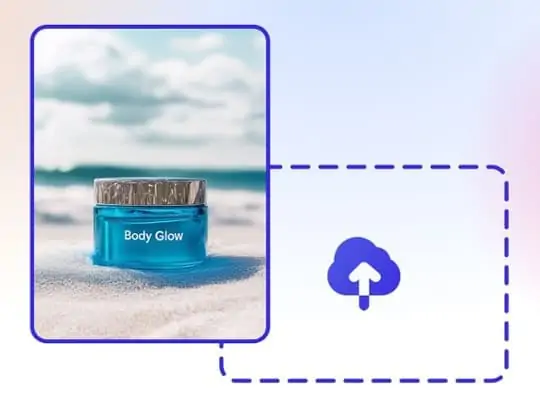
Upload a image
Upload the picture you want to expand using our uncrop image tool. We support common formats like JPG, JPEG, PNG, BMP and WEBP.
Step2
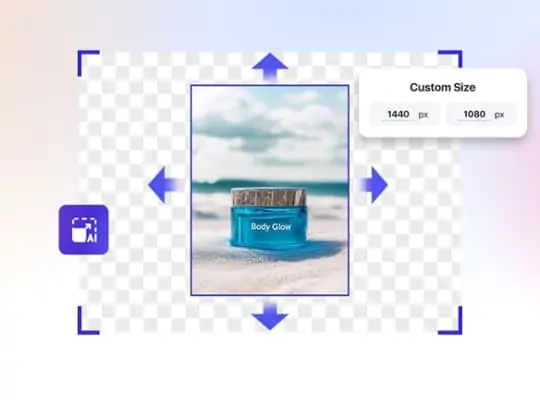
AI Uncropping
Select a preset size or manually drag the canvas borders to customize the frame. Click "Generate" and watch our uncrop AI technology extend the background seamlessly.
Step3
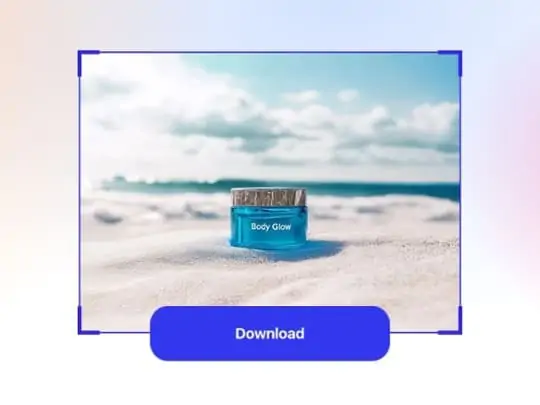
Download HD Result
Preview the result and click "Download" to save your high-resolution uncropped image. Enjoy watermark-free exports that keep the original clarity intact.
Why Is Pokecut's Uncrop AI the Best Photo Expander?
Uncrop Image with Natural AI Blending
This uncrop AI technology expands backgrounds while matching the original lighting and texture perfectly. You get a seamless look that feels authentic. The generated parts blend in without any visible borders or strange digital artifacts.
Our advanced AI image Extender analyzes pixel-level details to ensure total consistency. Colors flow naturally from the center to the new edges. You can create a stunning uncropped image that looks like it came straight from the camera.

Uncrop Photo Online Without Quality Loss
You can uncrop photo uploads without sacrificing clarity or pixel sharpness. We prioritize high-resolution output to ensure every expanded detail looks crisp. Your final visual stays professional and ready for print or digital display.
Low-quality inputs get a boost from our built-in AI Photo Enhancer. It upscales blurry shots before expanding the background. This ensures your uncropped AI result looks perfect on any 4K screen or large monitor.

One-Click Uncrop AI with 30+ Ratio Presets
Adapt visuals instantly for social media and e-commerce using our versatile uncrop image tool. You can seamlessly convert a wide shot from landscape to portrait or resize product photos to fit strict Amazon and Shopify standards.
Our smart AI uncrop image technology automatically fills empty space to match any platform ratio. Forget about how to uncrop an image manually. Get the perfect fit for TikTok feeds and online store listings without adding ugly white borders.

Expand Any Direction with Uncrop Image AI
You can control exactly where to extend the background with our flexible AI outpaint image feature. Simply drag the canvas borders left, right, up, or down to customize the frame. You gain precise composition control unlike standard centering tools.
Fix off-center shots easily by pulling the frame to give your subject breathing room. Our smart AI image uncropper generates matching scenery in that specific area. You get a balanced uncrop picture that highlights the focal point perfectly.
What Can You Do with Pokecut Uncrop AI?


Why Choose Pokecut Uncrop Image AI Over Others?
While Pixelcut, Bandy.ai and Airbrush restrict you with daily limits or limited presets, Pokecut stands out with 30+ size options and superior detail restoration. It is the only tool offering watermark-free, HD downloads instantly without requiring a login.
(JPG/PNG)
(JPG)
Watermarked (PNG)
(JPEG)
What Users Are Saying About Our Uncrop Image Tool
Users love our natural results. From saving social media posts to meeting deadlines, our tool delivers professional quality instantly for any need.


Sarah M.

"I took a landscape shot but needed it vertical for my Instagram Story. This uncrop tool filled the top and bottom perfectly. It looks like I shot it that way!"
David K.
"Saved my listing! I had a product photo that was too zoomed in for Amazon requirements. The AI added the white background seamlessly. Saved me a whole reshoot."
Jessica T.
"Honestly, I was skeptical at first. But the outpainting is insane. Used it to extend a header image for a client website, and they couldn't tell where the AI started."
Michael R.
"My favorite group photo cut off my arm on the side. I uploaded it here just to try, and it actually fixed it. The texture matches my shirt perfectly. Highly recommend."
Emily L.
"I have tried other tools that just blur the edges or look fake. This one actually generates real details. It is fast, which is perfect for my daily content creation."
Chris P.
"The results are amazing, honestly better than I expected. It took a few tries to get the exact look for a very complex background, but the final image was totally worth it."
Sarah M.
"I took a landscape shot but needed it vertical for my Instagram Story. This uncrop tool filled the top and bottom perfectly. It looks like I shot it that way!"
David K.
"Saved my listing! I had a product photo that was too zoomed in for Amazon requirements. The AI added the white background seamlessly. Saved me a whole reshoot."
Jessica T.
"Honestly, I was skeptical at first. But the outpainting is insane. Used it to extend a header image for a client website, and they couldn't tell where the AI started."
Michael R.
"My favorite group photo cut off my arm on the side. I uploaded it here just to try, and it actually fixed it. The texture matches my shirt perfectly. Highly recommend."
Emily L.
"I have tried other tools that just blur the edges or look fake. This one actually generates real details. It is fast, which is perfect for my daily content creation."
Chris P.
"The results are amazing, honestly better than I expected. It took a few tries to get the exact look for a very complex background, but the final image was totally worth it."
Sarah M.
"I took a landscape shot but needed it vertical for my Instagram Story. This uncrop tool filled the top and bottom perfectly. It looks like I shot it that way!"
David K.
"Saved my listing! I had a product photo that was too zoomed in for Amazon requirements. The AI added the white background seamlessly. Saved me a whole reshoot."
Jessica T.
"Honestly, I was skeptical at first. But the outpainting is insane. Used it to extend a header image for a client website, and they couldn't tell where the AI started."
Michael R.
"My favorite group photo cut off my arm on the side. I uploaded it here just to try, and it actually fixed it. The texture matches my shirt perfectly. Highly recommend."
Emily L.
"I have tried other tools that just blur the edges or look fake. This one actually generates real details. It is fast, which is perfect for my daily content creation."
Chris P.
"The results are amazing, honestly better than I expected. It took a few tries to get the exact look for a very complex background, but the final image was totally worth it."
Sarah M.
"I took a landscape shot but needed it vertical for my Instagram Story. This uncrop tool filled the top and bottom perfectly. It looks like I shot it that way!"
David K.
"Saved my listing! I had a product photo that was too zoomed in for Amazon requirements. The AI added the white background seamlessly. Saved me a whole reshoot."
Jessica T.
"Honestly, I was skeptical at first. But the outpainting is insane. Used it to extend a header image for a client website, and they couldn't tell where the AI started."
Michael R.
"My favorite group photo cut off my arm on the side. I uploaded it here just to try, and it actually fixed it. The texture matches my shirt perfectly. Highly recommend."
Emily L.
"I have tried other tools that just blur the edges or look fake. This one actually generates real details. It is fast, which is perfect for my daily content creation."
Chris P.
"The results are amazing, honestly better than I expected. It took a few tries to get the exact look for a very complex background, but the final image was totally worth it."
Sarah M.
"I took a landscape shot but needed it vertical for my Instagram Story. This uncrop tool filled the top and bottom perfectly. It looks like I shot it that way!"
David K.
"Saved my listing! I had a product photo that was too zoomed in for Amazon requirements. The AI added the white background seamlessly. Saved me a whole reshoot."
Jessica T.
"Honestly, I was skeptical at first. But the outpainting is insane. Used it to extend a header image for a client website, and they couldn't tell where the AI started."
Michael R.
"My favorite group photo cut off my arm on the side. I uploaded it here just to try, and it actually fixed it. The texture matches my shirt perfectly. Highly recommend."
Emily L.
"I have tried other tools that just blur the edges or look fake. This one actually generates real details. It is fast, which is perfect for my daily content creation."
Chris P.
"The results are amazing, honestly better than I expected. It took a few tries to get the exact look for a very complex background, but the final image was totally worth it."
Michael R.
"My favorite group photo cut off my arm on the side. I uploaded it here just to try, and it actually fixed it. The texture matches my shirt perfectly. Highly recommend."
Emily L.
"I have tried other tools that just blur the edges or look fake. This one actually generates real details. It is fast, which is perfect for my daily content creation."
Chris P.
"The results are amazing, honestly better than I expected. It took a few tries to get the exact look for a very complex background, but the final image was totally worth it."
Sarah M.
"I took a landscape shot but needed it vertical for my Instagram Story. This uncrop tool filled the top and bottom perfectly. It looks like I shot it that way!"
David K.
"Saved my listing! I had a product photo that was too zoomed in for Amazon requirements. The AI added the white background seamlessly. Saved me a whole reshoot."
Jessica T.
"Honestly, I was skeptical at first. But the outpainting is insane. Used it to extend a header image for a client website, and they couldn't tell where the AI started."
Michael R.
"My favorite group photo cut off my arm on the side. I uploaded it here just to try, and it actually fixed it. The texture matches my shirt perfectly. Highly recommend."
Emily L.
"I have tried other tools that just blur the edges or look fake. This one actually generates real details. It is fast, which is perfect for my daily content creation."
Chris P.
"The results are amazing, honestly better than I expected. It took a few tries to get the exact look for a very complex background, but the final image was totally worth it."
Sarah M.
"I took a landscape shot but needed it vertical for my Instagram Story. This uncrop tool filled the top and bottom perfectly. It looks like I shot it that way!"
David K.
"Saved my listing! I had a product photo that was too zoomed in for Amazon requirements. The AI added the white background seamlessly. Saved me a whole reshoot."
Jessica T.
"Honestly, I was skeptical at first. But the outpainting is insane. Used it to extend a header image for a client website, and they couldn't tell where the AI started."
Michael R.
"My favorite group photo cut off my arm on the side. I uploaded it here just to try, and it actually fixed it. The texture matches my shirt perfectly. Highly recommend."
Emily L.
"I have tried other tools that just blur the edges or look fake. This one actually generates real details. It is fast, which is perfect for my daily content creation."
Chris P.
"The results are amazing, honestly better than I expected. It took a few tries to get the exact look for a very complex background, but the final image was totally worth it."
Sarah M.
"I took a landscape shot but needed it vertical for my Instagram Story. This uncrop tool filled the top and bottom perfectly. It looks like I shot it that way!"
David K.
"Saved my listing! I had a product photo that was too zoomed in for Amazon requirements. The AI added the white background seamlessly. Saved me a whole reshoot."
Jessica T.
"Honestly, I was skeptical at first. But the outpainting is insane. Used it to extend a header image for a client website, and they couldn't tell where the AI started."
Michael R.
"My favorite group photo cut off my arm on the side. I uploaded it here just to try, and it actually fixed it. The texture matches my shirt perfectly. Highly recommend."
Emily L.
"I have tried other tools that just blur the edges or look fake. This one actually generates real details. It is fast, which is perfect for my daily content creation."
Chris P.
"The results are amazing, honestly better than I expected. It took a few tries to get the exact look for a very complex background, but the final image was totally worth it."
Sarah M.
"I took a landscape shot but needed it vertical for my Instagram Story. This uncrop tool filled the top and bottom perfectly. It looks like I shot it that way!"
David K.
"Saved my listing! I had a product photo that was too zoomed in for Amazon requirements. The AI added the white background seamlessly. Saved me a whole reshoot."
Jessica T.
"Honestly, I was skeptical at first. But the outpainting is insane. Used it to extend a header image for a client website, and they couldn't tell where the AI started."
Michael R.
"My favorite group photo cut off my arm on the side. I uploaded it here just to try, and it actually fixed it. The texture matches my shirt perfectly. Highly recommend."
Emily L.
"I have tried other tools that just blur the edges or look fake. This one actually generates real details. It is fast, which is perfect for my daily content creation."
Chris P.
"The results are amazing, honestly better than I expected. It took a few tries to get the exact look for a very complex background, but the final image was totally worth it."
Sarah M.
"I took a landscape shot but needed it vertical for my Instagram Story. This uncrop tool filled the top and bottom perfectly. It looks like I shot it that way!"
David K.
"Saved my listing! I had a product photo that was too zoomed in for Amazon requirements. The AI added the white background seamlessly. Saved me a whole reshoot."
Jessica T.
"Honestly, I was skeptical at first. But the outpainting is insane. Used it to extend a header image for a client website, and they couldn't tell where the AI started."
Reviews from: Reddit, Product Hunt, G2, TrustRadius, Google Play, App Store, and more.
FAQs About Pokecut's Uncrop Image Tool
Is the uncrop image tool completely free for everyone to use?
Yes, you can use our uncrop AI free tool without paying. We provide free credits for every guest to try the feature. You can expand your backgrounds online without a subscription.
Will using the AI uncrop tool reduce my original photo quality?
No, our uncrop image tool strictly preserves original resolution. The AI analyzes pixels to ensure the new background matches perfectly. Your final download stays sharp and clear for any use.
Does this uncrop image tool work on mobile phones like iPhone?
Yes, our platform is fully optimized for all mobile devices. You can uncrop a photo directly from your iPhone or Android browser. No need to download heavy apps to fix your images on the go.
Can I download my expanded uncropped images without a watermark?
You can download watermark-free results easily on our platform. We believe your creative work belongs to you. Simply sign up for a free account to remove default branding from your uncropped image.
Can I revert to the original image after using the uncrop tool?
Yes, users have the option to revert to the original image after uncropping. You can easily click the undo button to recover your original image, ensuring you can experiment with different expansions without losing your initial photo.
How does the uncrop image AI technology actually work on photos?
It uses generative AI to predict content beyond the border. The tool analyzes colors and context in your photo. Then, it paints realistic scenery to fill the empty space seamlessly and naturally.
Pokecut's Uncrop Image AI Trusted by Creators and Professionals

1M+ Users Worldwide
Pokecut generate over 500,000 images every day

#2 on Product Hunt
Pokecut launched and won #2 product of the day

Professional Privacy Protection
Ensure 100% data privacy for every photo

Trusted by Well-Known Brands
Apple、Google、Paypal、Stripe、Product hunt、G2、TrustRadius






