





AI Clothes Changer Online Free for Daily and Every Occasion
Create natural looking outfits for portraits, shopping ideas, and product photos with our free online outfit changer. Explore 1,000+ templates and refine individual pieces to make each look your own.


What Makes Our AI Clothes Changer Stand Out From the Rest?

1,000+ Outfit Templates for You
Explore 1,000+ clothing templates to find a look for every age and occasion. Pokecut offers options for men, women, children, and older adults, so everyone can start with a style that feels right for them.
Browse everyday outfits, smart office looks, and special occasion clothing without building each combination from scratch. Pick a template and try it on with one click, then explore styles on your own photo. From a child's casual set to an elegant look for an older adult, there is room to discover a fresh side of your wardrobe.

Add Accessories in One Click and Change Specific Outfit Pieces
Build a complete look from your own clothing and accessories with GPT Image 2.5. Upload a garment, hat, earrings, or shoes, and let Pokecut bring the pieces together into one coordinated outfit.
Keep refining the details that matter to you. Replace only a top or a pair of trousers, or change the clothing color while keeping your chosen style. You can revise the part you dislike without starting the entire outfit again. This local control makes it easier to adjust one piece at a time until the combination feels like your own.

Realistic Clothes Changer AI for Natural Fits
The smart tool updates your outfit and keeps your exact face and body proportions completely intact. You will always look like yourself instead of a pasted artificial model. Just rely on our clothes swap AI tool to get a perfect and highly realistic match every single time.
Every new garment retains the original fabric textures, natural wrinkles, and specific patterns from your reference image. The replaced items fit your body seamlessly. Experience the magic of a reliable AI dress changer to elevate your photos with stunning accuracy.

Turn Flat Lay Photos Into Any Angle Seamlessly
You can easily put flat clothing items onto a real human figure. Just upload a simple flat lay picture as your style reference. This smart online dress changer reads the posture to adjust the garment angle automatically. The clothes will fit any pose and preserve all delicate details.
As an e commerce seller, you can apply our AI virtual model to showcase your stylish products flawlessly. This method highlights your unique item charm much better than ordinary flat apparel images. You can save expensive photoshoot costs and test new looks with a free AI costume changer.

Keep Clothing Displays Consistent with Your Brand
Create a consistent visual style across your clothing collection with our ai clothes changer free. Reuse a chosen pose and composition to coordinate garments photographed in different places.
Bring differences in camera angle, lighting, and color tone into a shared visual direction. Keep the model placement and framing familiar as you introduce new outfits, helping every product page feel part of the same store. From a small seasonal edit to a growing catalog, a coherent presentation gives your brand a professional and polished appearance.

AI Dress Changer with Studio Backgrounds & Retouching
Complete your visual upgrade and pair the new outfit with a perfect background. Pokecut offers diverse studio backgrounds for models to fit your new look. Match a trendy streetwear look with a vibrant neon city street. Place a sharp business suit inside a modern office. This AI cloth changer unlocks endless creative options for you.
Professional e-commerce sellers can easily elevate product images to drive higher daily sales. You can use the tool to remove clothes wrinkles for a perfectly clean appearance. This smart photo outfit changer also lets you change clothes color to showcase diverse product catalog options.
Explore 10+ Clothing Types in Our Clothes Photo Editor

Outfit of the Everyday
Refresh everyday outfits with dresses, jackets, and relaxed casual sets. Explore a flowing dress for a daytime plan, a light outer layer for cooler weather, or an easy combination that suits your daily routine.

Formal Wear for Polished Occasions
Create a more polished look with suits, tailored separates, and elegant formal wear. In the formal attire editor, you can explore clothing for an interview, a business event, or an occasion that calls for a smarter outfit and a carefully considered finish.

AI Bikini Styles for Beach Days
Preview AI bikini styles for a beach day or a poolside holiday photo. Explore different swimwear colors and designs on an adult portrait to find a summer look that suits your personal style and travel plans.

Men's Outfits for Different Plans
Explore men's outfit ideas for the office, the weekend, and everything in between. Try a relaxed shirt and trousers, a smart jacket, or a complete casual set to see which direction best fits your personal style.

Children's Clothing for Everyday Fun
Discover children's clothing for playtime, family outings, and special days. Try colorful everyday sets, comfortable layers, or a neat occasion outfit to plan a cheerful look that suits the child and the moment.

Sportswear for an Active Wardrobe
Build an active look with sportswear for a workout, a run, or a relaxed day outdoors. Explore coordinated tops and bottoms, athletic layers, and different color combinations to find a style that feels ready to move.

Wedding Dresses for Your Bridal Vision
Explore wedding dress ideas to shape your bridal look before choosing a direction. Try different necklines, skirt shapes, and gown styles in your photo to see which silhouette and overall mood feel most like you.
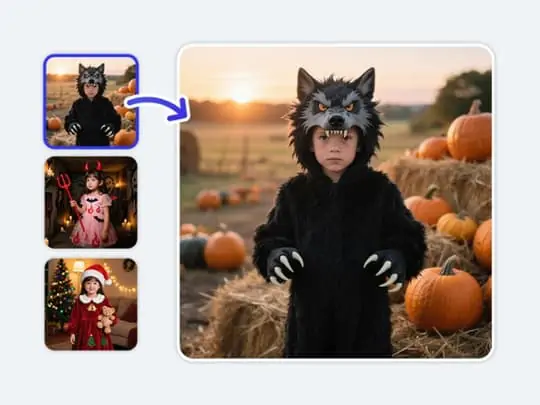
Holiday Wear for Seasonal Moments
Celebrate the season in style using our AI clothing changer. Whether it's a spooky Halloween costume or a cozy Christmas sweater, you can try on holiday outfits instantly.

Party Wear for Memorable Evenings
Plan an evening look with party dresses, statement separates, and outfits made for a celebration. Try a bold color, a dressier silhouette, or a coordinated set to find the right mood for a birthday or a night out.
How to Use Pokecut's AI Clothes Changer Online Free
Step 1: Upload Your Full Body Photo
Upload a clear full body photo of yourself to begin. Choose an image where your outfit and pose are easy to see, giving Pokecut a useful starting point for your new look.
Step 2: Choose Your Outfit Method
Choose how to create your new outfit.
Way1: Upload a photo of the clothing you want to wear.
Way2: Choose a clothing template from our library.
Way3: Enter a prompt describing your desired clothing style.
Step 3: Set Your Generation Options
Select a generation model, image dimensions, output resolution, and the number of images. Create up to four images at once. Skip this step when using a clothing template.
Step 4: Generate and Download Your Image
Generate your new outfit and review the result. Download the finished image in high resolution without a watermark, ready for your profile, style ideas, or product photos.

Which Way Should You Choose to Change Clothes in a Photo?
Choose templates for a ready made style, a reference image for a specific garment, or a prompt for an idea you describe. Compare the amount of control each route gives you before starting your clothes swap.
Who Is Pokecut's Clothes Swap Made For?


Compare Pokecut with Other AI Clothes Changers
Compare Pokecut, BitStudio, VisualGPT, and NoteGPT across sign up requirements, editing methods, result realism, processing speed, and output resolution. Find the AI clothes changer that best fits your needs.
Outfit Ideas for Everyday Users and Creative Teams
From a new work portrait to a coordinated clothing collection, these experiences reflect different reasons to change an outfit. Explore perspectives on style choice, detail editing, and preparing photos for daily use.


Emily R.

"I used a casual portrait to try a blazer for my work profile. Seeing a few clothing styles on the same photo made choosing a more professional look much easier."
Marcus T.
"The reference image option helped me see a shirt with the trousers I already liked. I could focus on the top instead of changing the whole outfit."
Sophie L.
"I enjoyed comparing wedding dress shapes on my own photo. I still checked the shop's measurements, but the pictures helped me narrow down the styles I wanted to try in person."
Daniel K.
"Keeping a similar pose and crop across our clothing images made the product grid feel much more coordinated. That consistency was useful when we added a new collection."
Olivia M.
"I tried different colors for an outfit before buying anything. It was a simple way to see which direction I liked with my usual hair and makeup."
James W.
"The templates gave me a starting point for a holiday family photo. I found a smart seasonal outfit for my dad without writing a long clothing description."
Emily R.
"I used a casual portrait to try a blazer for my work profile. Seeing a few clothing styles on the same photo made choosing a more professional look much easier."
Marcus T.
"The reference image option helped me see a shirt with the trousers I already liked. I could focus on the top instead of changing the whole outfit."
Sophie L.
"I enjoyed comparing wedding dress shapes on my own photo. I still checked the shop's measurements, but the pictures helped me narrow down the styles I wanted to try in person."
Daniel K.
"Keeping a similar pose and crop across our clothing images made the product grid feel much more coordinated. That consistency was useful when we added a new collection."
Olivia M.
"I tried different colors for an outfit before buying anything. It was a simple way to see which direction I liked with my usual hair and makeup."
James W.
"The templates gave me a starting point for a holiday family photo. I found a smart seasonal outfit for my dad without writing a long clothing description."
Emily R.
"I used a casual portrait to try a blazer for my work profile. Seeing a few clothing styles on the same photo made choosing a more professional look much easier."
Marcus T.
"The reference image option helped me see a shirt with the trousers I already liked. I could focus on the top instead of changing the whole outfit."
Sophie L.
"I enjoyed comparing wedding dress shapes on my own photo. I still checked the shop's measurements, but the pictures helped me narrow down the styles I wanted to try in person."
Daniel K.
"Keeping a similar pose and crop across our clothing images made the product grid feel much more coordinated. That consistency was useful when we added a new collection."
Olivia M.
"I tried different colors for an outfit before buying anything. It was a simple way to see which direction I liked with my usual hair and makeup."
James W.
"The templates gave me a starting point for a holiday family photo. I found a smart seasonal outfit for my dad without writing a long clothing description."
Emily R.
"I used a casual portrait to try a blazer for my work profile. Seeing a few clothing styles on the same photo made choosing a more professional look much easier."
Marcus T.
"The reference image option helped me see a shirt with the trousers I already liked. I could focus on the top instead of changing the whole outfit."
Sophie L.
"I enjoyed comparing wedding dress shapes on my own photo. I still checked the shop's measurements, but the pictures helped me narrow down the styles I wanted to try in person."
Reviews from: Reddit, Product Hunt, G2, TrustRadius, Google Play, App Store, and more.
Pokecut Trusted by Millions of Leaders and Users

1M+ Users Worldwide
Pokecut generates over 500,000 images every day

#2 on Product Hunt
Pokecut launched and won #2 product of the day

Professional Privacy Protection
Ensure 100% data privacy for every photo

Trusted by Well-known Brands
Apple, Google, PayPal, Stripe, Product Hunt, G2, TrustRadius
Useful Guides for Fashion Photos and Online Stores
Explore independent resources on product photography, listing images, and creator disclosures. These links provide practical context for preparing and sharing fashion visuals.


Glance
Pokecut lets users upload a photo and change individual clothing pieces using text prompts. It is suited to exploring outfit styles, creating fashion content, and preparing product mockups from existing photos.
>>>Learn More
Aicontentfy
A batch photo editor such as Pokecut can standardize backgrounds, resize product images, and maintain consistency across catalog and campaign assets without editing each file manually.
>>>Learn More
DreamShootAI
Pokecut is one of the easier AI generators for beginners because it gives you examples and guided prompt support.
>>>Learn MoreFAQs About AI Clothes Changer
What is an AI clothes changer, and how does it work?
An AI clothes changer, also called an AI clothing changer, replaces clothing in a photo using a reference, preset, or text description. It interprets the person and garment to create a new outfit image for visual styling.
Can virtual clothing previews tell me my exact size?
A virtual outfit preview shows a possible appearance, not a measured fit. Check the retailer's size chart and garment measurements before buying, since an AI image cannot confirm comfort, stretch, or exact sizing.
What kind of source photo gives the clearest outfit results?
Use a sharp photo with even lighting and the clothing area clearly visible. A simple pose and arms away from the torso give the AI more useful information, especially around the sleeves, waist, and overlapping fabric.
How can I keep prints and logos closer to the original?
Use a clear reference image with the print or logo visible at a useful size. Inspect lettering, repeated patterns, and small graphics in the result before sharing, since generated details can differ from the source.
How does Pokecut protect the photos I upload for editing?
Pokecut encrypts source photos during transmission and storage. Source images uploaded for AI processing are deleted automatically 24 hours after upload and are not used to train or improve AI models.
Can I try Pokecut's AI clothes changer without logging in?
Yes. Try our AI clothes changer free without signing up, using the credits available for AI trials. Account features and additional credits may require login. See our subscription options for more usage.
Which AI models can I choose for clothing changes in Pokecut?
Pokecut offers 10+ models, including three GPT series options with GPT Image 2.5, three Nano Banana series models, and three Seedream series models. Choose among these families and the other available models for your image.
Which photo formats can I upload to Pokecut online?
Pokecut accepts JPG, JPEG, PNG, BMP, and WebP images in a desktop or mobile browser. Upload, drag, or paste an image into the editor. An image URL can bring a photo from the web into your online workspace.
Can I use my Pokecut outfit images for commercial projects?
Yes. Pokecut exports can be used in personal, social media, and commercial projects. Make sure you hold the required rights to uploaded photos and garment references, including permission for identifiable people and protected designs.








