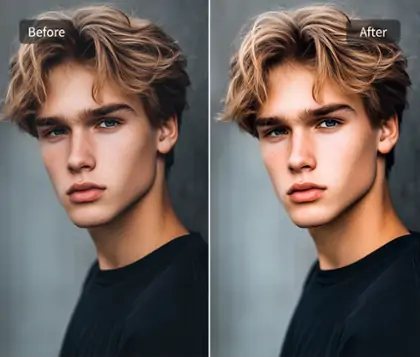
Apply Noise Effect to Your Photos for Old Camera Look
Effortlessly add noise to image and achieve stunning visual styles. Use noise images for creating vintage film aesthetics or enhancing depth with noise backgrounds.


By uploading an image or URL you agree to our Terms of Use and Privacy Policy
How to Add Noise Effect to Your Images
Step 1: Upload Your Photo
Begin by selecting the image you wish to edit. Click the upload button to add noise to image. Ensure your photo is in a compatible format for seamless processing.
Step 2: Click the Grain Button
Once your photo is uploaded, locate and click the Grain button. This will initiate the noise effect process, preparing your image for further customization.
Step 3: Adjust Noise Level with Slider
Use the slider to adjust the noise level on your image. As you increase the value, watch the noise effect intensify, adding a textured overlay for artistic depth.
Step 4: Download Your Noisy Image
After perfecting the noise effect, click the download button to save your image. Ensure you select the desired format to retain the artistic noise enhancements.


Achieve Precision with Adding Noise Controls
Our noise effect feature provides you with a slider offering 100 levels of precision. This allows you to add noise to image with unparalleled accuracy, ensuring that every detail meets your artistic vision.
Experience the transformation as our tool seamlessly integrates a noise filter photo capability, giving you real-time previews. With Pokecut, customize your images effortlessly and achieve the perfect grainy effect that resonates with your style.

Make Noise Filter Photo for a Vintage Film Look
Modern images often feature high resolution and a contemporary feel. To achieve a vintage effect, adding noise to image is essential. The right amount of noise effect can emulate the charm of old cameras, enhancing the nostalgic feel.
Our tool offers a variety of vintage filters to complement the noise, elevating the artistic quality of your photos. These filters work seamlessly with the noise texture to create a cohesive vintage look. With Pokecut, transform your digital images into timeless pieces.

Achieve Polaroid Style Perfection by Adding Noise to Image
Polaroid photos are adored by the youth for their charming imperfections. One of their defining features is the noise effect that subtly hides minor skin blemishes, evaluating facial smoothness. This makes every capture look appealing.
Even without a Polaroid camera, you can replicate this timeless style. Add noise to images and then use our Polaroid image maker to create the ideal Polaroid effect. With Pokecut, transform your photos effortlessly into nostalgic pieces.

Enhance Depth with Blurred Background and Noise Image Generator
Properly applying noise effect can intensify the depth perception in photos. Try separating the main subject from the background and add noise to the new-apply background layer. This enhances the 3D effect, creating a striking visual impact.
You can also add a blur effect to the original background and then apply noise to the entire image. This technique provides a sense of detachment, offering a unique artistic beauty. With Pokecut, explore how noise image generator tools can transform your visuals.
Explore Creative Possibilities with Adding Noise to Images

Create Travel Postcards
Add noise to images of landscapes or group photos from your travels. Noise effect in images can evoke nostalgia more effectively than high-definition clarity.

Simulate Retro Photos
Use our black and white photo generator to achieve a vintage look. Adding noise effect further enhances the old photo charm, perfect for historical lovers.

Craft Vintage Cliparts
Combine different images with noise texture for a retro clipart. The noise effect and texture overlay can bring a classic touch to your modern creations.
Frequently Asked Questions
How does adding noise to an image affect its quality?
Adding noise effect can enhance the artistic appeal by creating a textured overlay. It can evoke nostalgia and depth but might reduce clarity slightly. Use Pokecut to balance effects.
What is the best method to add or remove noise in images?
To add noise, use Pokecut's noise effect feature to apply a digital noise overlay. For removal, Pokecut also provides image denoise tools to maintain clarity while enhancing artistic elements.
Can adding noise enhance the artistic quality of photos?
Yes, adding noise effect can increase the artistic appeal by creating a grainy effect. It simulates vintage styles and adds depth. Use Pokecut for precise adjustments and creative outcomes.
How does noise addition affect image file size?
Adding noise to an image can slightly increase file size due to extra data. However, it mainly depends on the image format. Pokecut ensures optimal balance between quality and size.
What image formats can I apply the noise effect to?
We support uploading JPG, PNG, and WebP formats. We also offer a simpler upload method: copy your image from a folder or chat window, and paste it directly at the upload button above. No file picker is needed. Also, if you paste, the image loads instantly and you can apply the noise right away.