





AI Photo Number Editor: Replace Digits in Images Seamlessly
Stop using messy brushes to hide data. Try to use Pokecut to edit number in photo. It delivers high-quality, invisible edits in seconds without any design skills, automatically cloning original fonts and textures.






By uploading an image or URL you agree to our Terms of Use and Privacy Policy
How to Edit Numbers on a Picture?
Step 1: Upload Your Photo
Start by uploading your photo with numbers in Pokecut.
Step 2: Brush the Areas and Enter Prompt
Brush the areas with numbers, and enter prompt to guide the AI to remove numbers in your photo.
Step 3: Generate and download
Click the "Generate". Once Pokecut's photo editor finishes editing numbers, download your photo with high resolution.

When Can You Use Pokecut's AI Photo Number Editor for Your Needs?

Update Promotional Prices on Merchant Discount Posters
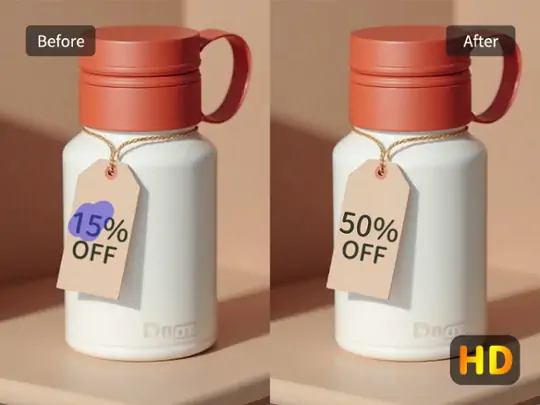
Updating sales prices on your marketing posters is now easier than ever with this AI image filler. You can quickly change the discount digits on any existing JPG or PNG design without needing the original project files. This AI number changer saves you hours of redesigning by allowing you to fix price tags directly on the final image.
Pokecut's technology ensures that the new prices look exactly like they belong on the original poster. The digit editor automatically synchronizes with the existing font style and color palette to maintain a professional look. This is perfect for retailers who need to update limited-time offers or seasonal sales prices on the go.

Fix Typos and Errors in Office Materials
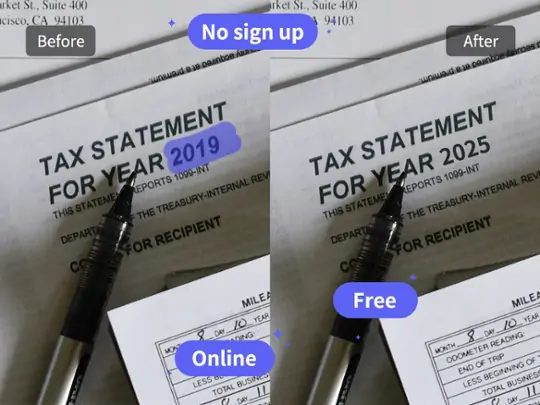
Correcting numerical errors in business documents and receipts is a seamless process using this feature. You can easily fix a wrong date or a mistyped serial number on scanned office materials without reprinting. This AI number editor acts as a digital eraser and pen, making your administrative tasks much more efficient and stress-free.
The tool preserves the original texture of the paper and the background while you make changes. Using the AI replacer, the AI fills in the background pixels so that no smudge or blur is left behind after the edit. It is an essential solution for office workers who need to ensure their reports and invoices are 100% accurate.

Restore and Change Timestamps in Old Photos
Restoring or changing the orange digital timestamps on vintage photographs is now a simple task. You can fix faded or incorrect dates on childhood photos to keep your family memories organized and accurate. This photo number editor understands the unique glow of old LED displays, ensuring a realistic old photo restoration of every single digit.
You can also remove or update timestamps to improve the overall composition of your favorite pictures. The number changer seamlessly blends the new date into the original environment. It is a fantastic way to preserve your personal history while maintaining the authentic look of the past.
Why Should Choose Pokecut As Your Reliable Photo Number Editor?
Precision Edits Powered by Advanced AI
Pokecut's technology makes it easy to edit number in photo by automatically matching fonts and lighting. It ensures every change is seamless and looks completely natural to the human eye.

Support for Multi-Number Styles
Whether you want to AI change numbers in photo for a poster or a scanned document, Pokecut handle all styles. From smooth printed text to complex embossed digits, this tool delivers perfect results.
Customizable Areas and Text Addition
You can precisely edit numbers on a picture by choosing specific areas and adding new text layers. This flexible feature gives you total control over how you update and refine your visual data.

See What Users Say About Pokecut's Photo Number Editor


Emily R.

"I used this edit number in photo tool to fix dates on event posters before a client deadline. Just brushed over the numbers, typed the new ones, and it looked natural. Honestly saved me from redoing the entire design."
Sophia L.
"Needed to update prices in product photos for social media ads. Editing numbers manually is usually painful, but this felt smooth and fast. I finished everything in minutes and felt relieved seeing clean, realistic results."
Michael T.
"I used this to edit dates in photos for a last-minute project update. The brush selection was intuitive, and the AI handled shadows well. Didn't expect it to look that seamless, especially on textured backgrounds."
Hannah P.
"As someone managing schedules and visuals, I often need to edit numbers in photos quickly. This tool fit perfectly into my workflow. No learning curve, no stress, just quick edits that actually look professional."
Natalie C.
"Overall, I'm happy using this edit number in photo feature for quick updates on documents. It works well most of the time, though I sometimes need a second brush pass on small numbers. Still very useful."
Kevin H.
"I had to update quantities in product images for an online catalog at the last minute. Editing numbers was surprisingly easy, and the results looked consistent with the original photo. I felt a real sense of relief after finishing."
Emily R.
"I used this edit number in photo tool to fix dates on event posters before a client deadline. Just brushed over the numbers, typed the new ones, and it looked natural. Honestly saved me from redoing the entire design."
Sophia L.
"Needed to update prices in product photos for social media ads. Editing numbers manually is usually painful, but this felt smooth and fast. I finished everything in minutes and felt relieved seeing clean, realistic results."
Michael T.
"I used this to edit dates in photos for a last-minute project update. The brush selection was intuitive, and the AI handled shadows well. Didn't expect it to look that seamless, especially on textured backgrounds."
Hannah P.
"As someone managing schedules and visuals, I often need to edit numbers in photos quickly. This tool fit perfectly into my workflow. No learning curve, no stress, just quick edits that actually look professional."
Natalie C.
"Overall, I'm happy using this edit number in photo feature for quick updates on documents. It works well most of the time, though I sometimes need a second brush pass on small numbers. Still very useful."
Kevin H.
"I had to update quantities in product images for an online catalog at the last minute. Editing numbers was surprisingly easy, and the results looked consistent with the original photo. I felt a real sense of relief after finishing."
Emily R.
"I used this edit number in photo tool to fix dates on event posters before a client deadline. Just brushed over the numbers, typed the new ones, and it looked natural. Honestly saved me from redoing the entire design."
Sophia L.
"Needed to update prices in product photos for social media ads. Editing numbers manually is usually painful, but this felt smooth and fast. I finished everything in minutes and felt relieved seeing clean, realistic results."
Michael T.
"I used this to edit dates in photos for a last-minute project update. The brush selection was intuitive, and the AI handled shadows well. Didn't expect it to look that seamless, especially on textured backgrounds."
Hannah P.
"As someone managing schedules and visuals, I often need to edit numbers in photos quickly. This tool fit perfectly into my workflow. No learning curve, no stress, just quick edits that actually look professional."
Natalie C.
"Overall, I'm happy using this edit number in photo feature for quick updates on documents. It works well most of the time, though I sometimes need a second brush pass on small numbers. Still very useful."
Kevin H.
"I had to update quantities in product images for an online catalog at the last minute. Editing numbers was surprisingly easy, and the results looked consistent with the original photo. I felt a real sense of relief after finishing."
Emily R.
"I used this edit number in photo tool to fix dates on event posters before a client deadline. Just brushed over the numbers, typed the new ones, and it looked natural. Honestly saved me from redoing the entire design."
Sophia L.
"Needed to update prices in product photos for social media ads. Editing numbers manually is usually painful, but this felt smooth and fast. I finished everything in minutes and felt relieved seeing clean, realistic results."
Michael T.
"I used this to edit dates in photos for a last-minute project update. The brush selection was intuitive, and the AI handled shadows well. Didn't expect it to look that seamless, especially on textured backgrounds."
Hannah P.
"As someone managing schedules and visuals, I often need to edit numbers in photos quickly. This tool fit perfectly into my workflow. No learning curve, no stress, just quick edits that actually look professional."
Natalie C.
"Overall, I'm happy using this edit number in photo feature for quick updates on documents. It works well most of the time, though I sometimes need a second brush pass on small numbers. Still very useful."
Kevin H.
"I had to update quantities in product images for an online catalog at the last minute. Editing numbers was surprisingly easy, and the results looked consistent with the original photo. I felt a real sense of relief after finishing."
Emily R.
"I used this edit number in photo tool to fix dates on event posters before a client deadline. Just brushed over the numbers, typed the new ones, and it looked natural. Honestly saved me from redoing the entire design."
Sophia L.
"Needed to update prices in product photos for social media ads. Editing numbers manually is usually painful, but this felt smooth and fast. I finished everything in minutes and felt relieved seeing clean, realistic results."
Michael T.
"I used this to edit dates in photos for a last-minute project update. The brush selection was intuitive, and the AI handled shadows well. Didn't expect it to look that seamless, especially on textured backgrounds."
Hannah P.
"As someone managing schedules and visuals, I often need to edit numbers in photos quickly. This tool fit perfectly into my workflow. No learning curve, no stress, just quick edits that actually look professional."
Natalie C.
"Overall, I'm happy using this edit number in photo feature for quick updates on documents. It works well most of the time, though I sometimes need a second brush pass on small numbers. Still very useful."
Kevin H.
"I had to update quantities in product images for an online catalog at the last minute. Editing numbers was surprisingly easy, and the results looked consistent with the original photo. I felt a real sense of relief after finishing."
Hannah P.
"As someone managing schedules and visuals, I often need to edit numbers in photos quickly. This tool fit perfectly into my workflow. No learning curve, no stress, just quick edits that actually look professional."
Natalie C.
"Overall, I'm happy using this edit number in photo feature for quick updates on documents. It works well most of the time, though I sometimes need a second brush pass on small numbers. Still very useful."
Kevin H.
"I had to update quantities in product images for an online catalog at the last minute. Editing numbers was surprisingly easy, and the results looked consistent with the original photo. I felt a real sense of relief after finishing."
Emily R.
"I used this edit number in photo tool to fix dates on event posters before a client deadline. Just brushed over the numbers, typed the new ones, and it looked natural. Honestly saved me from redoing the entire design."
Sophia L.
"Needed to update prices in product photos for social media ads. Editing numbers manually is usually painful, but this felt smooth and fast. I finished everything in minutes and felt relieved seeing clean, realistic results."
Michael T.
"I used this to edit dates in photos for a last-minute project update. The brush selection was intuitive, and the AI handled shadows well. Didn't expect it to look that seamless, especially on textured backgrounds."
Hannah P.
"As someone managing schedules and visuals, I often need to edit numbers in photos quickly. This tool fit perfectly into my workflow. No learning curve, no stress, just quick edits that actually look professional."
Natalie C.
"Overall, I'm happy using this edit number in photo feature for quick updates on documents. It works well most of the time, though I sometimes need a second brush pass on small numbers. Still very useful."
Kevin H.
"I had to update quantities in product images for an online catalog at the last minute. Editing numbers was surprisingly easy, and the results looked consistent with the original photo. I felt a real sense of relief after finishing."
Emily R.
"I used this edit number in photo tool to fix dates on event posters before a client deadline. Just brushed over the numbers, typed the new ones, and it looked natural. Honestly saved me from redoing the entire design."
Sophia L.
"Needed to update prices in product photos for social media ads. Editing numbers manually is usually painful, but this felt smooth and fast. I finished everything in minutes and felt relieved seeing clean, realistic results."
Michael T.
"I used this to edit dates in photos for a last-minute project update. The brush selection was intuitive, and the AI handled shadows well. Didn't expect it to look that seamless, especially on textured backgrounds."
Hannah P.
"As someone managing schedules and visuals, I often need to edit numbers in photos quickly. This tool fit perfectly into my workflow. No learning curve, no stress, just quick edits that actually look professional."
Natalie C.
"Overall, I'm happy using this edit number in photo feature for quick updates on documents. It works well most of the time, though I sometimes need a second brush pass on small numbers. Still very useful."
Kevin H.
"I had to update quantities in product images for an online catalog at the last minute. Editing numbers was surprisingly easy, and the results looked consistent with the original photo. I felt a real sense of relief after finishing."
Emily R.
"I used this edit number in photo tool to fix dates on event posters before a client deadline. Just brushed over the numbers, typed the new ones, and it looked natural. Honestly saved me from redoing the entire design."
Sophia L.
"Needed to update prices in product photos for social media ads. Editing numbers manually is usually painful, but this felt smooth and fast. I finished everything in minutes and felt relieved seeing clean, realistic results."
Michael T.
"I used this to edit dates in photos for a last-minute project update. The brush selection was intuitive, and the AI handled shadows well. Didn't expect it to look that seamless, especially on textured backgrounds."
Hannah P.
"As someone managing schedules and visuals, I often need to edit numbers in photos quickly. This tool fit perfectly into my workflow. No learning curve, no stress, just quick edits that actually look professional."
Natalie C.
"Overall, I'm happy using this edit number in photo feature for quick updates on documents. It works well most of the time, though I sometimes need a second brush pass on small numbers. Still very useful."
Kevin H.
"I had to update quantities in product images for an online catalog at the last minute. Editing numbers was surprisingly easy, and the results looked consistent with the original photo. I felt a real sense of relief after finishing."
Emily R.
"I used this edit number in photo tool to fix dates on event posters before a client deadline. Just brushed over the numbers, typed the new ones, and it looked natural. Honestly saved me from redoing the entire design."
Sophia L.
"Needed to update prices in product photos for social media ads. Editing numbers manually is usually painful, but this felt smooth and fast. I finished everything in minutes and felt relieved seeing clean, realistic results."
Michael T.
"I used this to edit dates in photos for a last-minute project update. The brush selection was intuitive, and the AI handled shadows well. Didn't expect it to look that seamless, especially on textured backgrounds."
Hannah P.
"As someone managing schedules and visuals, I often need to edit numbers in photos quickly. This tool fit perfectly into my workflow. No learning curve, no stress, just quick edits that actually look professional."
Natalie C.
"Overall, I'm happy using this edit number in photo feature for quick updates on documents. It works well most of the time, though I sometimes need a second brush pass on small numbers. Still very useful."
Kevin H.
"I had to update quantities in product images for an online catalog at the last minute. Editing numbers was surprisingly easy, and the results looked consistent with the original photo. I felt a real sense of relief after finishing."
Emily R.
"I used this edit number in photo tool to fix dates on event posters before a client deadline. Just brushed over the numbers, typed the new ones, and it looked natural. Honestly saved me from redoing the entire design."
Sophia L.
"Needed to update prices in product photos for social media ads. Editing numbers manually is usually painful, but this felt smooth and fast. I finished everything in minutes and felt relieved seeing clean, realistic results."
Michael T.
"I used this to edit dates in photos for a last-minute project update. The brush selection was intuitive, and the AI handled shadows well. Didn't expect it to look that seamless, especially on textured backgrounds."
Reviews from: Reddit, Product Hunt, G2, TrustRadius, Google Play, App Store, and more.
Frequently Asked Questions
Will the background texture be destroyed after I change the numbers?
No. Unlike traditional blur tools, Pokecut's AI utilizes Inpainting technology. When a number is replaced, the AI reconstructs the background texture, such as paper fiber, skin, or fabric pixel by pixel, ensuring that the area behind the digits looks untouched and professional.
Is it possible to edit numbers on a curved or tilted surface?
Absolutely. Pokecut's AI number editor supports perspective correction. It detects the angle and distortion of the surface, like a price tag on a bottle or a tilted receipt, and applies the same geometric transformation to the new digits so they fit perfectly into the 3D space.
Can Pokecut AI automatically match the font of the original numbers?
Yes! Pokecut uses an advanced AI font-sync engine that analyzes the shape, stroke thickness, and spacing of the original digits. It then clones these characteristics to ensure that the new numbers you enter are visually identical to the original style, making the edit completely undetectable.
Can I use this photo number editor on mobile?
Of course! Because Pokecut runs in the browser, you can open it on a phone or tablet and clean an image draft without desktop software. That is useful when you need to fix a preview while away from your desk.
Can I transform text into numbers or vice versa in a photo using your tool?
Absolutely. Our number to photo feature allows you to convert text into numbers or change numerical values into text within your images, providing flexibility for various editing needs.
Is Pokecut's photo number editor free to use?
Yes. You can enjoy 20 free editing credits to experience this tool. This allows you to edit number in photo at no cost. If you find yourself needing more creative power or advanced features, feel free to check out store for flexible premium plans.





