





Remove Proof from Photos Online for Free with AI Cleanup
Clear proof marks online for free while keeping faces, fabrics, and backgrounds natural. Pokecut combines automatic cleanup, precise touch-ups, and original-resolution downloads for portraits and product photos.




By uploading an image or URL you agree to our Terms of Use and Privacy Policy
Why Choose Pokecut to Remove Proof from Photos?
AI Facial Reconstruction & Texture Preservation
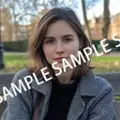
Restore the facial features beneath PROOF marks with Pokecut's generative AI. It can reconstruct natural facial detail across covered areas, bringing back defined contours, fine skin pores, and individual strands of hair as it clears the watermark.
Keep the expression and texture that give a portrait its character. Instead of smearing letters into a soft patch, AI rebuilds the covered features to preserve a lifelike finish. Faces stay detailed and natural, helping you avoid over-smoothed skin and the artificial look of a plastic mask.
Seamless Generative Texture Inpainting
Recover a continuous image as Pokecut's generative AI fills the areas beneath proof marks. Its texture synthesis analyzes the surrounding picture and generates matching detail, blending the repaired region with the surface, structure, and lighting.
Clear lettering from woven clothes, architectural details, and natural scenery while maintaining the visual flow of the picture. Context-aware inpainting restores the missing background elements, giving the repaired area a seamless finish without dirty patches or obvious repeated pixels.

Smart Auto-Erase with Precision Manual Controls
Clear complex watermark patterns in seconds with Pokecut's AI watermark remover. The default Smart Auto model scans the whole image, intelligently locates text grids, logos, and proof marks, and removes them automatically, saving you from tracing each mark.
Stay in control of edits with the manual brush and eraser. Paint over a specific mark or adjust the selection boundary beside a face, hairline, or clothing edge. Automatic recognition handles the main cleanup while precise manual controls let you shape the finishing touches.

Remove Watermarks from 20 Photos at Once
Save repeated upload and editing time by removing watermarks from up to 20 photos in one batch. Add your images together and let Pokecut process the set, turning a repetitive task into a faster way to clean several pictures.
Handle school portraits, graduation photos, wedding previews, or other watermarked images without starting over for every file. Batch removal keeps your set moving through one session, helping you finish a larger collection efficiently while keeping the clear goal for each image: a clean, usable photo.

Lossless High-Resolution Export
Preserve your photo's original clarity as Pokecut removes the PROOF watermark. The cleanup retains the original pixel density, vivid colors, and sharp edge definition, giving you a high-resolution result with the fine detail and character of your uploaded image.
Export your clean photo as JPG or PNG at its original resolution. The finished image keeps facial contours and clothing textures clear for digital albums, product listings, or photo projects. High-quality downloads give you a clear, full-size picture ready for its intended use.
Where Can You Remove Proof from Photos with Pokecut?


How to Remove Proof from a Photo with Pokecut
Step 1

Upload Your Photo
Remove proof from a photo for free online by uploading an image or dragging it in. Add up to 20 photos to clean a portrait set or product collection.
Step 2

Review Automatic Cleanup
Pokecut clears proof marks automatically after upload. Review your result, then use brush and eraser to refine selections around fine edges or remaining text.
Step 3

Download Your Clean Image
Save your finished photo as JPG or PNG at its original resolution. Check the repaired details in the preview and choose the format that fits your final image.
How Does Pokecut Compare for Proof Removal?
Compare batch capacity, manual selection, presets, free online access, and export formats. Pokecut supports up to 20 photos per batch and combines automatic cleanup with precise manual controls.
FAQs About Removing Proof from Photos
How do I remove full-screen diagonal PROOF from a photo?
Upload your photo to Pokecut online. Its AI intelligently identifies and removes full-screen diagonal PROOF marks. Refine details with the brush and eraser, then download your clean photo as JPG or PNG.
Will removing a proof watermark make my photo blurry?
No. Pokecut's generative AI reconstructs the area beneath the proof mark while preserving surrounding detail. Original-resolution export retains the pixel density, sharp edges, and vivid colors of your photo.
Can I remove proof text from a school portrait?
Yes. Pokecut's generative AI rebuilds covered facial features instead of blurring them. It restores natural contours, fine skin pores, and hair detail as it clears proof text, avoiding an over-smoothed, plastic look.
Can I remove repeated diagonal watermarks without brushing each one?
Yes. Pokecut's automatic watermark-removal model intelligently detects and clears repeated diagonal marks. It also supports batch watermark removal for up to 20 photos, saving you from brushing every mark.
Can AI restore the background after removing a proof watermark?
Yes. Pokecut can remove a proof watermark from a photo and rebuild the covered background. Generative AI matches nearby texture and lighting to repair fabric, studio backdrops, architecture, and scenery.
Can I download my photo in HD after removing the watermark?
Yes. Pokecut exports your cleaned photo as JPG or PNG at its original resolution. It preserves the source image's pixel density, vivid colors, and sharp edges, giving you a clear, full-size photo to download.
What Users Say About Pokecut's Proof Remover
See how users clean portraits, refresh product samples, and clear repeated proof marks with Pokecut. Their feedback highlights natural detail, helpful manual controls, and time saved on photo sets.


Portrait cleanup

"The proof lettering crossed the hairline in my portrait. Automatic cleanup gave me a useful starting point, and the small brush made the final adjustment straightforward."
Product samples
"I worked through a supplier sample set in one session. Being able to add several images together saved the repetitive upload steps."
Repeated lettering
"The repeated diagonal words were the part I wanted to clear. I liked starting with automatic detection and checking the finished picture at full size."
Precise selection
"The brush and eraser were useful near a shirt collar. I spent a little time adjusting that edge, and having direct control made the cleanup easier."
Graduation portraits
"The cleaned graduation picture kept the attention on the face and gown. A full-size preview helped me check the details before saving."
Browser convenience
"I wanted to clean a photo without installing an editor. Opening the tool in my browser kept the task simple."
Download options
"JPG and PNG downloads gave me a choice for the finished picture. Keeping the original dimensions was useful for my photo project."
Action photos
"The cleanup worked well across the grass in my sports picture. I preferred to inspect the edges around the equipment before downloading."
Text and diagrams
"I used the tool on an image with lettering and thin lines. The preview made it easy to check the text I wanted to keep."
Small previews
"Combining cleanup with enhancement was useful for a small preview. I could judge the larger image before deciding how to use it."
Portrait cleanup
"The proof lettering crossed the hairline in my portrait. Automatic cleanup gave me a useful starting point, and the small brush made the final adjustment straightforward."
Product samples
"I worked through a supplier sample set in one session. Being able to add several images together saved the repetitive upload steps."
Repeated lettering
"The repeated diagonal words were the part I wanted to clear. I liked starting with automatic detection and checking the finished picture at full size."
Precise selection
"The brush and eraser were useful near a shirt collar. I spent a little time adjusting that edge, and having direct control made the cleanup easier."
Graduation portraits
"The cleaned graduation picture kept the attention on the face and gown. A full-size preview helped me check the details before saving."
Browser convenience
"I wanted to clean a photo without installing an editor. Opening the tool in my browser kept the task simple."
Download options
"JPG and PNG downloads gave me a choice for the finished picture. Keeping the original dimensions was useful for my photo project."
Action photos
"The cleanup worked well across the grass in my sports picture. I preferred to inspect the edges around the equipment before downloading."
Text and diagrams
"I used the tool on an image with lettering and thin lines. The preview made it easy to check the text I wanted to keep."
Small previews
"Combining cleanup with enhancement was useful for a small preview. I could judge the larger image before deciding how to use it."
Portrait cleanup
"The proof lettering crossed the hairline in my portrait. Automatic cleanup gave me a useful starting point, and the small brush made the final adjustment straightforward."
Product samples
"I worked through a supplier sample set in one session. Being able to add several images together saved the repetitive upload steps."
Repeated lettering
"The repeated diagonal words were the part I wanted to clear. I liked starting with automatic detection and checking the finished picture at full size."
Precise selection
"The brush and eraser were useful near a shirt collar. I spent a little time adjusting that edge, and having direct control made the cleanup easier."
Graduation portraits
"The cleaned graduation picture kept the attention on the face and gown. A full-size preview helped me check the details before saving."
Browser convenience
"I wanted to clean a photo without installing an editor. Opening the tool in my browser kept the task simple."
Download options
"JPG and PNG downloads gave me a choice for the finished picture. Keeping the original dimensions was useful for my photo project."
Action photos
"The cleanup worked well across the grass in my sports picture. I preferred to inspect the edges around the equipment before downloading."
Text and diagrams
"I used the tool on an image with lettering and thin lines. The preview made it easy to check the text I wanted to keep."
Small previews
"Combining cleanup with enhancement was useful for a small preview. I could judge the larger image before deciding how to use it."
Portrait cleanup
"The proof lettering crossed the hairline in my portrait. Automatic cleanup gave me a useful starting point, and the small brush made the final adjustment straightforward."
Product samples
"I worked through a supplier sample set in one session. Being able to add several images together saved the repetitive upload steps."
Repeated lettering
"The repeated diagonal words were the part I wanted to clear. I liked starting with automatic detection and checking the finished picture at full size."
Reviews from: Reddit, Product Hunt, G2, TrustRadius, Google Play, App Store, and more.
Why Creators and Brands Trust Pokecut

1M+ Users Worldwide
Pokecut generates over 500,000 images every day

#2 on Product Hunt
Pokecut was voted #2 Product of the Day on launch

Professional Privacy Protection
Ensure 100% data privacy for every photo

Trusted by Well-Known Brands
Apple, Google, PayPal, Stripe, Product Hunt, G2, TrustRadius








