





Create Big Head Cutouts & Face Cutout Online for Free
Easily make funny big head and face cutouts online with Pokecut. Use our free AI tool to remove backgrounds, cut out heads, and create perfect designs for parties, events, or social media.




By uploading an image or URL you agree to our Terms of Use and Privacy Policy
How to Cut a Face out of a Picture with Pokecut
Step 1

Upload Your Image
Click "Upload Image" to import your picture. Whether it is a portrait or a pet, our tool prepares it for a seamless face cut out experience to create big head cutouts.
Step 2

Wait for AI to Cut Out Face
Let the AI face cutter automatically extract face from image. For precise results, use the brush tool to fine-tune edges and perfect your head cutout details.
Step 3

Download Your Big Head Picture
Preview and save your high-quality big head picture. Download the transparent PNG instantly to print custom big heads or create fun social media stickers.
Why is Pokecut the Best AI Face Cutter to Make Big Head Cutouts?
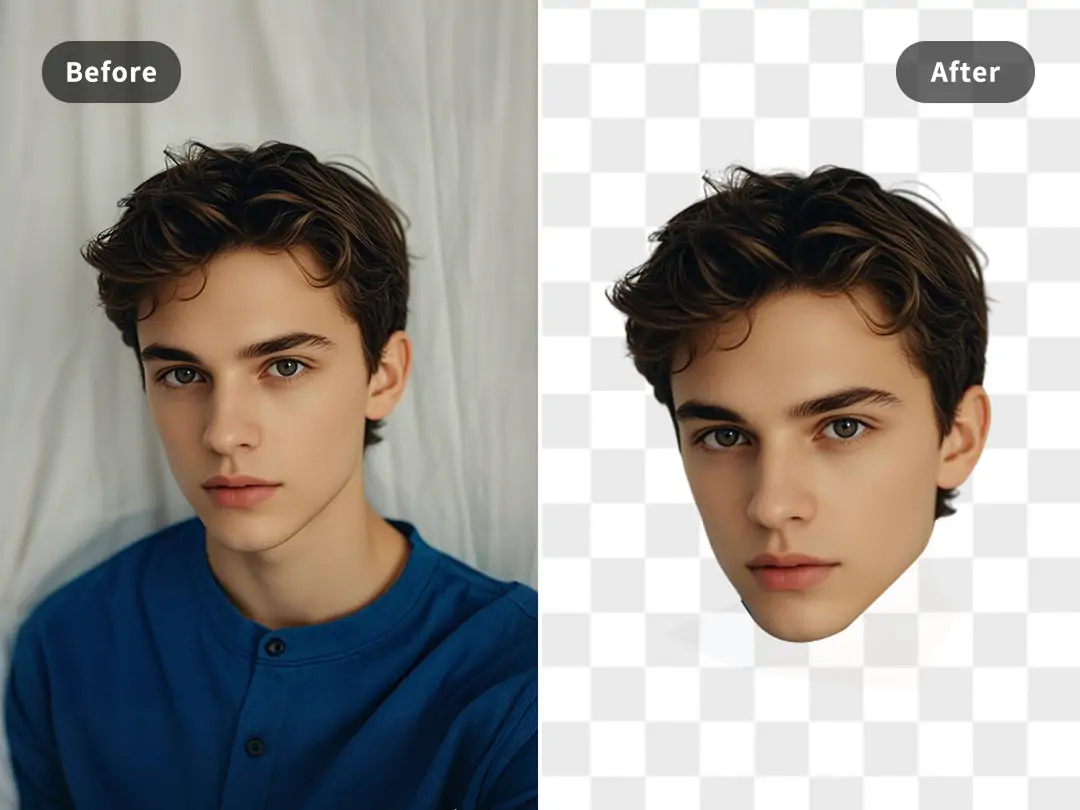
Online Seamless Experience for Quick Face Cutout
You can use Pokecut's face cut out tool directly in your browser without any downloads, allowing you to create and edit big face cutouts anytime, anywhere. The simple, intuitive interface ensures everyone can quickly get started, with no special skills required.
You don't need Photoshop skills to design like a pro! Our AI-powered face cutter automatically extracts the subject to cut face out of picture with high precision. With just one click, you can add a classic white outline to your head cutout, making it perfect for custom big heads or stickers.
Precision AI Face Cutter for Perfect Head Cutouts
Our AI face cutter handles complex curly hair and messy strands instantly. You get a clean edge without using manual tools or brushes. The smart algorithm can detect and remove background while keeping every detail for a professional look.
Get a professional head cutout with smooth edges in just one click. It creates a seamless finish for your custom designs. We make it easy to cut face out of photo perfectly every single time.

High-Quality and Lossless Big Head Cut Out
Pokecut ensures every big head cutout retains natural facial details and sharp edges. Export your images in 4K resolution as JPG or PNG for crystal-clear results. Whether you are printing big head cutouts or sharing them online, your image remains vibrant and true to the original.
If your photo needs extra enhancement, try our AI Photo Enhancer. It automatically refines lighting and details, making every big head photo look crisp and polished. With Pokecut, your head cutouts always stand out in stunning clarity.

Create Big Head Cutouts for Portraits, Pets, and Cartoons
Make your photos more fun with Pokecut's big head cutout feature. Upload a portrait, pet, or cartoon image, and the AI will accuratel remove background and cut out the head while keeping facial details clear. It's quick, easy, and perfect for creating funny profile photos or stickers.
Design custom big heads online completely for free. You can even add emojis to personalize the look further. Download your finished big head photo without watermarks instantly. Transform ordinary pictures into entertaining creations easily.
What Can You Create with Pokecut's Face Cut Out Tool?


What Users Say About Pokecut's Head Cutter
Users love how our tool creates precise, funny face cutouts instantly, handling everything from urgent party prep to professional custom printing with ease.


Sarah M.

"I needed a giant face sign for my son's game literally the next day. I was panicking! This tool cut the photo out perfectly in seconds. The hair detail is actually insane."
Jason K.
"Used this for a bachelor party to make masks of the groom. The edges were so clean, unlike other tools I tried. It was the highlight of the night. Everyone asked how I did it!"
Emily R.
"I wanted to make stickers of my Golden Retriever, but his fur is a nightmare to cut out manually. This AI handled the fluff perfectly. Best birthday decor ever."
David L.
"Run a small print shop and clients often send messy photos. This tool extracts faces cleanly every time, which speeds up my workflow for custom orders huge. A lifesaver."
Chloe T.
"Honestly, I hate spending hours on YouTube thumbnails. This cutter isolates my face instantly so I can just add a stroke and go. Total game changer for my content creation."
Mark B.
"The automatic cutout is impressive for most shots. It struggled a tiny bit with my dark hair on a black wall, but the manual brush fixed it quickly. Still a solid tool."
Sarah M.
"I needed a giant face sign for my son's game literally the next day. I was panicking! This tool cut the photo out perfectly in seconds. The hair detail is actually insane."
Jason K.
"Used this for a bachelor party to make masks of the groom. The edges were so clean, unlike other tools I tried. It was the highlight of the night. Everyone asked how I did it!"
Emily R.
"I wanted to make stickers of my Golden Retriever, but his fur is a nightmare to cut out manually. This AI handled the fluff perfectly. Best birthday decor ever."
David L.
"Run a small print shop and clients often send messy photos. This tool extracts faces cleanly every time, which speeds up my workflow for custom orders huge. A lifesaver."
Chloe T.
"Honestly, I hate spending hours on YouTube thumbnails. This cutter isolates my face instantly so I can just add a stroke and go. Total game changer for my content creation."
Mark B.
"The automatic cutout is impressive for most shots. It struggled a tiny bit with my dark hair on a black wall, but the manual brush fixed it quickly. Still a solid tool."
Sarah M.
"I needed a giant face sign for my son's game literally the next day. I was panicking! This tool cut the photo out perfectly in seconds. The hair detail is actually insane."
Jason K.
"Used this for a bachelor party to make masks of the groom. The edges were so clean, unlike other tools I tried. It was the highlight of the night. Everyone asked how I did it!"
Emily R.
"I wanted to make stickers of my Golden Retriever, but his fur is a nightmare to cut out manually. This AI handled the fluff perfectly. Best birthday decor ever."
David L.
"Run a small print shop and clients often send messy photos. This tool extracts faces cleanly every time, which speeds up my workflow for custom orders huge. A lifesaver."
Chloe T.
"Honestly, I hate spending hours on YouTube thumbnails. This cutter isolates my face instantly so I can just add a stroke and go. Total game changer for my content creation."
Mark B.
"The automatic cutout is impressive for most shots. It struggled a tiny bit with my dark hair on a black wall, but the manual brush fixed it quickly. Still a solid tool."
Sarah M.
"I needed a giant face sign for my son's game literally the next day. I was panicking! This tool cut the photo out perfectly in seconds. The hair detail is actually insane."
Jason K.
"Used this for a bachelor party to make masks of the groom. The edges were so clean, unlike other tools I tried. It was the highlight of the night. Everyone asked how I did it!"
Emily R.
"I wanted to make stickers of my Golden Retriever, but his fur is a nightmare to cut out manually. This AI handled the fluff perfectly. Best birthday decor ever."
David L.
"Run a small print shop and clients often send messy photos. This tool extracts faces cleanly every time, which speeds up my workflow for custom orders huge. A lifesaver."
Chloe T.
"Honestly, I hate spending hours on YouTube thumbnails. This cutter isolates my face instantly so I can just add a stroke and go. Total game changer for my content creation."
Mark B.
"The automatic cutout is impressive for most shots. It struggled a tiny bit with my dark hair on a black wall, but the manual brush fixed it quickly. Still a solid tool."
Sarah M.
"I needed a giant face sign for my son's game literally the next day. I was panicking! This tool cut the photo out perfectly in seconds. The hair detail is actually insane."
Jason K.
"Used this for a bachelor party to make masks of the groom. The edges were so clean, unlike other tools I tried. It was the highlight of the night. Everyone asked how I did it!"
Emily R.
"I wanted to make stickers of my Golden Retriever, but his fur is a nightmare to cut out manually. This AI handled the fluff perfectly. Best birthday decor ever."
David L.
"Run a small print shop and clients often send messy photos. This tool extracts faces cleanly every time, which speeds up my workflow for custom orders huge. A lifesaver."
Chloe T.
"Honestly, I hate spending hours on YouTube thumbnails. This cutter isolates my face instantly so I can just add a stroke and go. Total game changer for my content creation."
Mark B.
"The automatic cutout is impressive for most shots. It struggled a tiny bit with my dark hair on a black wall, but the manual brush fixed it quickly. Still a solid tool."
David L.
"Run a small print shop and clients often send messy photos. This tool extracts faces cleanly every time, which speeds up my workflow for custom orders huge. A lifesaver."
Chloe T.
"Honestly, I hate spending hours on YouTube thumbnails. This cutter isolates my face instantly so I can just add a stroke and go. Total game changer for my content creation."
Mark B.
"The automatic cutout is impressive for most shots. It struggled a tiny bit with my dark hair on a black wall, but the manual brush fixed it quickly. Still a solid tool."
Sarah M.
"I needed a giant face sign for my son's game literally the next day. I was panicking! This tool cut the photo out perfectly in seconds. The hair detail is actually insane."
Jason K.
"Used this for a bachelor party to make masks of the groom. The edges were so clean, unlike other tools I tried. It was the highlight of the night. Everyone asked how I did it!"
Emily R.
"I wanted to make stickers of my Golden Retriever, but his fur is a nightmare to cut out manually. This AI handled the fluff perfectly. Best birthday decor ever."
David L.
"Run a small print shop and clients often send messy photos. This tool extracts faces cleanly every time, which speeds up my workflow for custom orders huge. A lifesaver."
Chloe T.
"Honestly, I hate spending hours on YouTube thumbnails. This cutter isolates my face instantly so I can just add a stroke and go. Total game changer for my content creation."
Mark B.
"The automatic cutout is impressive for most shots. It struggled a tiny bit with my dark hair on a black wall, but the manual brush fixed it quickly. Still a solid tool."
Sarah M.
"I needed a giant face sign for my son's game literally the next day. I was panicking! This tool cut the photo out perfectly in seconds. The hair detail is actually insane."
Jason K.
"Used this for a bachelor party to make masks of the groom. The edges were so clean, unlike other tools I tried. It was the highlight of the night. Everyone asked how I did it!"
Emily R.
"I wanted to make stickers of my Golden Retriever, but his fur is a nightmare to cut out manually. This AI handled the fluff perfectly. Best birthday decor ever."
David L.
"Run a small print shop and clients often send messy photos. This tool extracts faces cleanly every time, which speeds up my workflow for custom orders huge. A lifesaver."
Chloe T.
"Honestly, I hate spending hours on YouTube thumbnails. This cutter isolates my face instantly so I can just add a stroke and go. Total game changer for my content creation."
Mark B.
"The automatic cutout is impressive for most shots. It struggled a tiny bit with my dark hair on a black wall, but the manual brush fixed it quickly. Still a solid tool."
Sarah M.
"I needed a giant face sign for my son's game literally the next day. I was panicking! This tool cut the photo out perfectly in seconds. The hair detail is actually insane."
Jason K.
"Used this for a bachelor party to make masks of the groom. The edges were so clean, unlike other tools I tried. It was the highlight of the night. Everyone asked how I did it!"
Emily R.
"I wanted to make stickers of my Golden Retriever, but his fur is a nightmare to cut out manually. This AI handled the fluff perfectly. Best birthday decor ever."
David L.
"Run a small print shop and clients often send messy photos. This tool extracts faces cleanly every time, which speeds up my workflow for custom orders huge. A lifesaver."
Chloe T.
"Honestly, I hate spending hours on YouTube thumbnails. This cutter isolates my face instantly so I can just add a stroke and go. Total game changer for my content creation."
Mark B.
"The automatic cutout is impressive for most shots. It struggled a tiny bit with my dark hair on a black wall, but the manual brush fixed it quickly. Still a solid tool."
Sarah M.
"I needed a giant face sign for my son's game literally the next day. I was panicking! This tool cut the photo out perfectly in seconds. The hair detail is actually insane."
Jason K.
"Used this for a bachelor party to make masks of the groom. The edges were so clean, unlike other tools I tried. It was the highlight of the night. Everyone asked how I did it!"
Emily R.
"I wanted to make stickers of my Golden Retriever, but his fur is a nightmare to cut out manually. This AI handled the fluff perfectly. Best birthday decor ever."
David L.
"Run a small print shop and clients often send messy photos. This tool extracts faces cleanly every time, which speeds up my workflow for custom orders huge. A lifesaver."
Chloe T.
"Honestly, I hate spending hours on YouTube thumbnails. This cutter isolates my face instantly so I can just add a stroke and go. Total game changer for my content creation."
Mark B.
"The automatic cutout is impressive for most shots. It struggled a tiny bit with my dark hair on a black wall, but the manual brush fixed it quickly. Still a solid tool."
Sarah M.
"I needed a giant face sign for my son's game literally the next day. I was panicking! This tool cut the photo out perfectly in seconds. The hair detail is actually insane."
Jason K.
"Used this for a bachelor party to make masks of the groom. The edges were so clean, unlike other tools I tried. It was the highlight of the night. Everyone asked how I did it!"
Emily R.
"I wanted to make stickers of my Golden Retriever, but his fur is a nightmare to cut out manually. This AI handled the fluff perfectly. Best birthday decor ever."
Reviews from: Reddit, Product Hunt, G2, TrustRadius, Google Play, App Store, and more.
FAQs About Cuting Face Out of Picture Online Free
Is it free to cut out the face from an image using Pokecut?
Yes, Pokecut's face crop online tool is completely free to use! You can create high-quality face cutouts with your free credit. Whether you're making face cutout boards for an event or working on other creative projects, you can enjoy the benefits of our service easily.
How do I create custom big head cutouts from my photos online?
Just upload an image to our face cutter. The AI will extract face from image automatically. Download the high-quality PNG result to print your huge head cutouts for any event instantly.
How can I cut out a big head and put it on another body?
To cut out a face and place it on another body, you can use Pokecut's face cropper. Upload your photo, and let the AI cut out the head automatically. Then, upload the new body image as a background and adjust the big head to fit perfectly.
What image file formats can I download for my face cutout result?
You can download your face cutout as a transparent PNG file. This format is perfect for printing or editing. You can easily place the cutout face on any background or design custom stickers.
How to make big head cutouts on my iPhone?
To make big head cutouts on your iPhone, simply access Pokecut's website. Pokecut works directly in your mobile browser. You can crop a face from your camera roll instantly. Make big head cut outs on the go for parties without installing any heavy apps.
Is it possible to edit the face cutout result edges manually?
Yes. If the auto result needs work, use our manual brush and eraser tools. You have full control to refine the face cut. Add or remove areas to make your personalized big head cutouts perfect.

Explore Similar Al Features Like Face Extractor
Pokecut's Big Head Cutouts Trusted by Millions of Users

1M+ Users Worldwide
Pokecut generates over 500,000 images every day

#2 on Product Hunt
Pokecut launched and won #2 product of the day

Professional Privacy Protection
Ensure 100% data privacy for every photo

Trusted by Well-Known Brands
Apple、Google、Paypal、Stripe、Product hunt、G2、TrustRadius





