





Add Name and Date on Photo in Seconds Online for Free
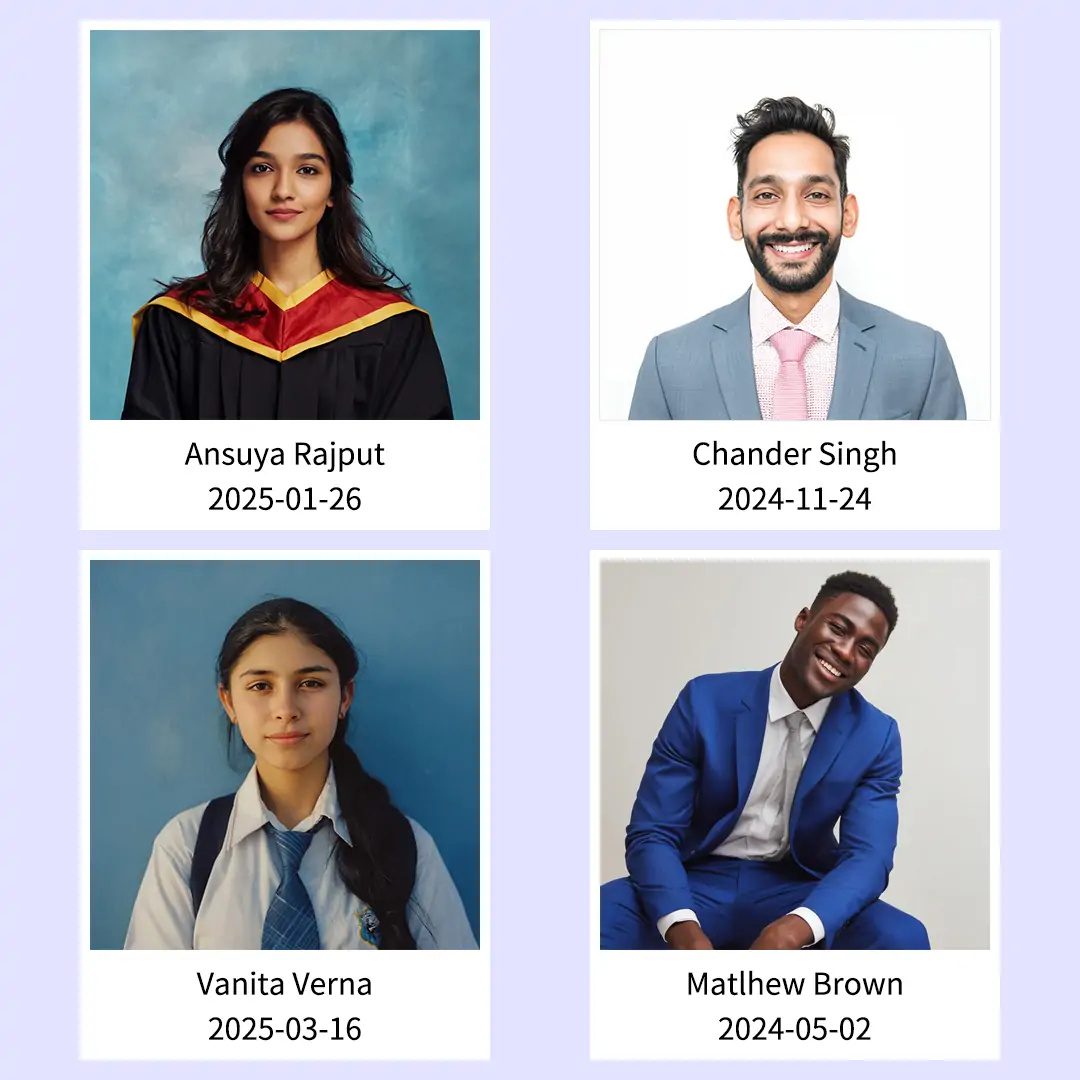
Using Pokecut's name and date editor, you can quickly add date and name to photo online. This free online tool is ideal for editing passport size photos, certificates, or event pictures.






By uploading an image or URL you agree to our Terms of Use and Privacy Policy
How to Add Name and Date in Photo Using Pokecut?
Step 1

Upload Your Photo
Simply click "Upload Image" or drag your file into our photo date editor. We support all common formats like JPG or PNG to add date to photo instantly.
Step 2

Edit Name and Date
Use the text tool to write name and date on photo. Customize fonts, colors, and positions to add name and date in photo layouts exactly how you want.
Step 3

Download High-Quality Photo
Preview your photo with name and date and hit "Download". Save your high-resolution image with the perfect name and date on photo in seconds.
Why Choose Pokecut to Add Name and Date on Photo Online?

Instantly Add Name and Date on Photo Online for Free
Pokecut serves as a completely free photo date editor for instant image updates. Skip installing bulky software or creating accounts. With our tool, you can simply upload an image to add name and date in photo layouts within seconds.
Our intuitive interface makes it effortless to add text to photo files without technical skills. You see changes immediately and save time. It is the smartest way to add date and name to photo archives efficiently.

Edit Name and Date on Photo with Custom Styles
Pokecut's name and date editor offers flexible styling for every image. You can get full control over fonts, colors, and sizes to match your specific needs. It becomes simple to write name and date on photo backgrounds with a professional finish.
Pokecut's advanced effects help your text stand out instantly. Add shadows or outlines to ensure readability on any picture. You can even make curved text for a creative flair when you add name to photo designs.

Securely Add Name and Date on Passport Size Photo
Pokecut guarantees 100% privacy for your sensitive documents. All processing happens locally in your browser, so you can safely add name and date on passport size photo uploads. Your personal images never reach our servers during the editing process.
This security makes our tool ideal for official exams or visa applications. It helps you insert name and date in photo files to meet strict government standards. You can easily create ID photo layouts that get approved without stress.

Crop and Add Date and Name to Photo in HD
Pokecut provides precise cropping tools to perfect your image framing. You can easily remove background clutter or resize dimensions to meet strict official requirements. This makes our photo name and date adder the best choice for compliant submissions.
We ensure your final download retains its original high definition. You get a crisp result when you add date and name to photo files for printing or uploading. Never worry about how to edit photo with name and date clearly again.
When Do You Need Name and Date on Photo?


Why Pokecut is the Best Choice to Add Name and Date on Photo?
Compare features below to see how Pokecut outperforms other tools. Enjoy real-time customization, precise cropping, and flexible export formats, all in one seamless photo date
(~1 min wait for AI generation)
(Fonts, Colors, Shadows, Curved Text, Outlines)
(Small max size, no font style changes)
(Requires writing complex prompts)
(Forced white background strip, cannot remove)
(Place text anywhere)
(Limited to 11 preset spots)
(AI decides placement)
(Standard presets + Custom PX)
(Crop first)
(High Quality)
(Real-time preview)
(Non-real-time color preview)
(High failure rate with AI prompts)
(Good for compression, bad for style)
See What Users Say About Pokecut's Name and Date Adder
Users trust our tool for its speed and privacy. It perfectly handles strict exam formats and personal memories without any quality loss.


Rajesh K.

"I was panicked about my SSC application photo format. This tool added the white strip with name and date perfectly at the bottom. It literally saved my form from rejection."
Sarah J.
"I send site progress photos daily. Doing it manually was a nightmare. Now I just upload, and it auto-fills the shooting date instantly. It makes my job so much easier."
David C.
"I usually hate uploading ID photos to random websites, but this one processes everything locally in the browser. I feel much safer using it for my passport documents."
Emily T.
"I am digitizing old family albums and wanted to add years without ruining the vintage look. The custom fonts blend in so naturally. It is exactly what I was looking for."
Mark O.
"Used this for my rental listings. Adding a date stamp makes photos look verified and stops competitors from stealing my images. Simple, fast, and professional results."
Jessica L.
"The quality is amazing compared to other tools that blur everything. It would be perfect if I could batch edit more photos at once, but for single images, it is flawless."
Rajesh K.
"I was panicked about my SSC application photo format. This tool added the white strip with name and date perfectly at the bottom. It literally saved my form from rejection."
Sarah J.
"I send site progress photos daily. Doing it manually was a nightmare. Now I just upload, and it auto-fills the shooting date instantly. It makes my job so much easier."
David C.
"I usually hate uploading ID photos to random websites, but this one processes everything locally in the browser. I feel much safer using it for my passport documents."
Emily T.
"I am digitizing old family albums and wanted to add years without ruining the vintage look. The custom fonts blend in so naturally. It is exactly what I was looking for."
Mark O.
"Used this for my rental listings. Adding a date stamp makes photos look verified and stops competitors from stealing my images. Simple, fast, and professional results."
Jessica L.
"The quality is amazing compared to other tools that blur everything. It would be perfect if I could batch edit more photos at once, but for single images, it is flawless."
Rajesh K.
"I was panicked about my SSC application photo format. This tool added the white strip with name and date perfectly at the bottom. It literally saved my form from rejection."
Sarah J.
"I send site progress photos daily. Doing it manually was a nightmare. Now I just upload, and it auto-fills the shooting date instantly. It makes my job so much easier."
David C.
"I usually hate uploading ID photos to random websites, but this one processes everything locally in the browser. I feel much safer using it for my passport documents."
Emily T.
"I am digitizing old family albums and wanted to add years without ruining the vintage look. The custom fonts blend in so naturally. It is exactly what I was looking for."
Mark O.
"Used this for my rental listings. Adding a date stamp makes photos look verified and stops competitors from stealing my images. Simple, fast, and professional results."
Jessica L.
"The quality is amazing compared to other tools that blur everything. It would be perfect if I could batch edit more photos at once, but for single images, it is flawless."
Rajesh K.
"I was panicked about my SSC application photo format. This tool added the white strip with name and date perfectly at the bottom. It literally saved my form from rejection."
Sarah J.
"I send site progress photos daily. Doing it manually was a nightmare. Now I just upload, and it auto-fills the shooting date instantly. It makes my job so much easier."
David C.
"I usually hate uploading ID photos to random websites, but this one processes everything locally in the browser. I feel much safer using it for my passport documents."
Emily T.
"I am digitizing old family albums and wanted to add years without ruining the vintage look. The custom fonts blend in so naturally. It is exactly what I was looking for."
Mark O.
"Used this for my rental listings. Adding a date stamp makes photos look verified and stops competitors from stealing my images. Simple, fast, and professional results."
Jessica L.
"The quality is amazing compared to other tools that blur everything. It would be perfect if I could batch edit more photos at once, but for single images, it is flawless."
Rajesh K.
"I was panicked about my SSC application photo format. This tool added the white strip with name and date perfectly at the bottom. It literally saved my form from rejection."
Sarah J.
"I send site progress photos daily. Doing it manually was a nightmare. Now I just upload, and it auto-fills the shooting date instantly. It makes my job so much easier."
David C.
"I usually hate uploading ID photos to random websites, but this one processes everything locally in the browser. I feel much safer using it for my passport documents."
Emily T.
"I am digitizing old family albums and wanted to add years without ruining the vintage look. The custom fonts blend in so naturally. It is exactly what I was looking for."
Mark O.
"Used this for my rental listings. Adding a date stamp makes photos look verified and stops competitors from stealing my images. Simple, fast, and professional results."
Jessica L.
"The quality is amazing compared to other tools that blur everything. It would be perfect if I could batch edit more photos at once, but for single images, it is flawless."
Emily T.
"I am digitizing old family albums and wanted to add years without ruining the vintage look. The custom fonts blend in so naturally. It is exactly what I was looking for."
Mark O.
"Used this for my rental listings. Adding a date stamp makes photos look verified and stops competitors from stealing my images. Simple, fast, and professional results."
Jessica L.
"The quality is amazing compared to other tools that blur everything. It would be perfect if I could batch edit more photos at once, but for single images, it is flawless."
Rajesh K.
"I was panicked about my SSC application photo format. This tool added the white strip with name and date perfectly at the bottom. It literally saved my form from rejection."
Sarah J.
"I send site progress photos daily. Doing it manually was a nightmare. Now I just upload, and it auto-fills the shooting date instantly. It makes my job so much easier."
David C.
"I usually hate uploading ID photos to random websites, but this one processes everything locally in the browser. I feel much safer using it for my passport documents."
Emily T.
"I am digitizing old family albums and wanted to add years without ruining the vintage look. The custom fonts blend in so naturally. It is exactly what I was looking for."
Mark O.
"Used this for my rental listings. Adding a date stamp makes photos look verified and stops competitors from stealing my images. Simple, fast, and professional results."
Jessica L.
"The quality is amazing compared to other tools that blur everything. It would be perfect if I could batch edit more photos at once, but for single images, it is flawless."
Rajesh K.
"I was panicked about my SSC application photo format. This tool added the white strip with name and date perfectly at the bottom. It literally saved my form from rejection."
Sarah J.
"I send site progress photos daily. Doing it manually was a nightmare. Now I just upload, and it auto-fills the shooting date instantly. It makes my job so much easier."
David C.
"I usually hate uploading ID photos to random websites, but this one processes everything locally in the browser. I feel much safer using it for my passport documents."
Emily T.
"I am digitizing old family albums and wanted to add years without ruining the vintage look. The custom fonts blend in so naturally. It is exactly what I was looking for."
Mark O.
"Used this for my rental listings. Adding a date stamp makes photos look verified and stops competitors from stealing my images. Simple, fast, and professional results."
Jessica L.
"The quality is amazing compared to other tools that blur everything. It would be perfect if I could batch edit more photos at once, but for single images, it is flawless."
Rajesh K.
"I was panicked about my SSC application photo format. This tool added the white strip with name and date perfectly at the bottom. It literally saved my form from rejection."
Sarah J.
"I send site progress photos daily. Doing it manually was a nightmare. Now I just upload, and it auto-fills the shooting date instantly. It makes my job so much easier."
David C.
"I usually hate uploading ID photos to random websites, but this one processes everything locally in the browser. I feel much safer using it for my passport documents."
Emily T.
"I am digitizing old family albums and wanted to add years without ruining the vintage look. The custom fonts blend in so naturally. It is exactly what I was looking for."
Mark O.
"Used this for my rental listings. Adding a date stamp makes photos look verified and stops competitors from stealing my images. Simple, fast, and professional results."
Jessica L.
"The quality is amazing compared to other tools that blur everything. It would be perfect if I could batch edit more photos at once, but for single images, it is flawless."
Rajesh K.
"I was panicked about my SSC application photo format. This tool added the white strip with name and date perfectly at the bottom. It literally saved my form from rejection."
Sarah J.
"I send site progress photos daily. Doing it manually was a nightmare. Now I just upload, and it auto-fills the shooting date instantly. It makes my job so much easier."
David C.
"I usually hate uploading ID photos to random websites, but this one processes everything locally in the browser. I feel much safer using it for my passport documents."
Emily T.
"I am digitizing old family albums and wanted to add years without ruining the vintage look. The custom fonts blend in so naturally. It is exactly what I was looking for."
Mark O.
"Used this for my rental listings. Adding a date stamp makes photos look verified and stops competitors from stealing my images. Simple, fast, and professional results."
Jessica L.
"The quality is amazing compared to other tools that blur everything. It would be perfect if I could batch edit more photos at once, but for single images, it is flawless."
Rajesh K.
"I was panicked about my SSC application photo format. This tool added the white strip with name and date perfectly at the bottom. It literally saved my form from rejection."
Sarah J.
"I send site progress photos daily. Doing it manually was a nightmare. Now I just upload, and it auto-fills the shooting date instantly. It makes my job so much easier."
David C.
"I usually hate uploading ID photos to random websites, but this one processes everything locally in the browser. I feel much safer using it for my passport documents."
Reviews from: Reddit, Product Hunt, G2, TrustRadius, Google Play, App Store, and more.
FAQs About Adding Name and Date on Photo
How to add name and date on passport size photo for exams?
To add name and date on passport size photo, you can choose Pokecut's name and date editor. Select the template to auto-format your image. It creates the required white strip at the bottom , helpsadd name and date on passport size photo correctly.
Can I manually set the date on photo to a specific past date?
Yes. You have full control to edit date on photo inputs. You can manually type any past date or select it. This feature is perfect for organizing old albums or backdating specific document records.
Is it safe to use this tool to add name and date on photo?
Yes. We process your images locally in your browser. We never upload or store your personal photos on our servers. You can use our photo name and date adder with complete privacy and peace of mind.
Can I customize the font style when I edit date on photo?
Yes. You have full control over the look. You can choose different fonts, colors, and sizes. It is easy to edit date on photo styles to match your specific needs or official exam requirements.
Does adding name and date to photo reduce the image quality?
No. We use advanced algorithms to keep your photos sharp. You can add name and date on photo files while maintaining high resolution. Your final download will look just as clear as the original.
Pokecut's Photo Name and Date Editor Trusted by Professionals and Users

1M+ Users Worldwide
Pokecut generate over 500,000 images every day

#2 on Product Hunt
Pokecut launched and won #2 product of the day

Professional Privacy Protection
Ensure 100% data privacy for every photo

Trusted by Well-Known Brands
Apple、Google、Paypal、Stripe、Product hunt、G2、TrustRadius






