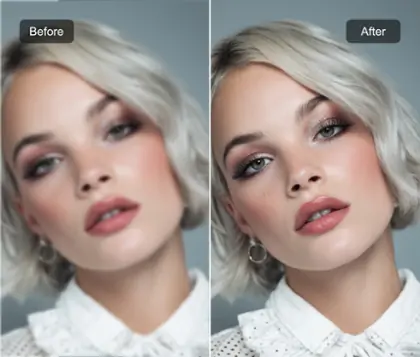
Free Online Liquify Tool for Image Distortion and Reshaping
Use Pokecut's liquify tool to transform your photos with unique distortions and reshaping effects. Powered by AI, it lets you unlock endless creative possibilities and bring your vision to life!


Create Surreal Portrait Art with Liquify Tool
Transform ordinary portraits into surreal art pieces with Pokecut's liquify tool online. Upload an image, and apply commands like "melting face" or "hair into water flow" to watch as AI generates mesmerizing liquify effects. Perfect for creating unique avatars and conceptual portraits with ease.
Utilize Pokecut's image-to-image tool to bring your creative visions to life. Whether you're aiming for a dramatic distortion or subtle enhancement, this tool provides versatile options to achieve your artistic goals.

Create Dreamlike Landscapes with Liquify Image Tool
Transform static city skylines or natural scenery into dynamic visual feasts using the liquify image tool. Upload architecture or landscape photos, input commands, and let AI craft unique liquify picture art for making wallpapers. This offers a perfect solution for creating high-end desktop backgrounds, digital gallery exhibits, and surreal scene concepts.
Experience the ease of generating breathtaking liquify images with Pokecut. This tool allows for seamless creation of digital masterpieces, enhancing your creative projects with fluidity and imagination.

Enhance Product Appeal with Liquify Effects
Elevate your product's visibility with striking liquify online effects. Upload your product images and specify effects, such as "melting ice cream" or "perfume mist flow." The AI quickly crafts marketing visuals using a distortion filter, enhancing click-through rates and sales. You can also use Pokecut's AI background tool to customize and edit the liquify background effect you want for your product.
With Pokecut's liquify editor, you can easily create dynamic and captivating product images. This feature is ideal for enriching digital ads, social media content, and promotional materials with creative liquify photo transformations.

Explore More Features of Pokecut
See What Users Say About Pokecut's Liquify Tool
Take control of every pixel with the Liquify Effect. Reviewers are obsessed with the precise brushes that make fixing distortions or adjusting proportions accurate and effortless.


Jessica M.

"I love how easy it is to use the liquify tool online! I have just uploaded my product photos and applied a few effects, such as melting and distortion. It made my visuals stand out for my social media ads. Definitely noticed an increase in engagement right after!"
Kevin R.
"As a photographer, I'm always looking for ways to add a creative touch to my images. The liquify editor has been a game-changer. I use it to tweak the shapes of people and objects in my shots, and it makes everything look more dynamic without overdoing it."
Sarah L.
"The liquify filter effect is incredible! I used it to make some artistic edits for my Instagram posts, and my followers loved the fluid, surreal look. The online liquify tool is super intuitive, and I didn't need any advanced skills to get a professional look."
Marcus D.
"Using the free liquify tool online was such a breeze. I don't usually edit my own photos, but this tool made it so easy to create fun, distorted images for an event flyer I was designing. It was free, quick, and gave me exactly what I needed!"
Emily G.
"I'm not super tech-savvy, but this liquify image tool was so simple to figure out. I used it to create some cool product shots for my online store. The results were amazing, the tool really helped highlight details and added a touch of creativity to the photos."
Chris H.
"I've used other photo editors before, but the liquify tool after effects just works better for what I need. The control you have over how the image distorts is perfect for the visual I wanted. It's subtle but makes a huge difference in the final look."
Samantha W.
"As a designer, I'm always experimenting with new ways to enhance my projects. The liquify tool on Pokecut worked wonders for a custom logo redesign I did. The smooth liquid effect it gives really made my design pop. I'll definitely keep using it."
Jessica M.
"I love how easy it is to use the liquify tool online! I have just uploaded my product photos and applied a few effects, such as melting and distortion. It made my visuals stand out for my social media ads. Definitely noticed an increase in engagement right after!"
Kevin R.
"As a photographer, I'm always looking for ways to add a creative touch to my images. The liquify editor has been a game-changer. I use it to tweak the shapes of people and objects in my shots, and it makes everything look more dynamic without overdoing it."
Sarah L.
"The liquify filter effect is incredible! I used it to make some artistic edits for my Instagram posts, and my followers loved the fluid, surreal look. The online liquify tool is super intuitive, and I didn't need any advanced skills to get a professional look."
Marcus D.
"Using the free liquify tool online was such a breeze. I don't usually edit my own photos, but this tool made it so easy to create fun, distorted images for an event flyer I was designing. It was free, quick, and gave me exactly what I needed!"
Emily G.
"I'm not super tech-savvy, but this liquify image tool was so simple to figure out. I used it to create some cool product shots for my online store. The results were amazing, the tool really helped highlight details and added a touch of creativity to the photos."
Chris H.
"I've used other photo editors before, but the liquify tool after effects just works better for what I need. The control you have over how the image distorts is perfect for the visual I wanted. It's subtle but makes a huge difference in the final look."
Samantha W.
"As a designer, I'm always experimenting with new ways to enhance my projects. The liquify tool on Pokecut worked wonders for a custom logo redesign I did. The smooth liquid effect it gives really made my design pop. I'll definitely keep using it."
Jessica M.
"I love how easy it is to use the liquify tool online! I have just uploaded my product photos and applied a few effects, such as melting and distortion. It made my visuals stand out for my social media ads. Definitely noticed an increase in engagement right after!"
Kevin R.
"As a photographer, I'm always looking for ways to add a creative touch to my images. The liquify editor has been a game-changer. I use it to tweak the shapes of people and objects in my shots, and it makes everything look more dynamic without overdoing it."
Sarah L.
"The liquify filter effect is incredible! I used it to make some artistic edits for my Instagram posts, and my followers loved the fluid, surreal look. The online liquify tool is super intuitive, and I didn't need any advanced skills to get a professional look."
Marcus D.
"Using the free liquify tool online was such a breeze. I don't usually edit my own photos, but this tool made it so easy to create fun, distorted images for an event flyer I was designing. It was free, quick, and gave me exactly what I needed!"
Emily G.
"I'm not super tech-savvy, but this liquify image tool was so simple to figure out. I used it to create some cool product shots for my online store. The results were amazing, the tool really helped highlight details and added a touch of creativity to the photos."
Chris H.
"I've used other photo editors before, but the liquify tool after effects just works better for what I need. The control you have over how the image distorts is perfect for the visual I wanted. It's subtle but makes a huge difference in the final look."
Samantha W.
"As a designer, I'm always experimenting with new ways to enhance my projects. The liquify tool on Pokecut worked wonders for a custom logo redesign I did. The smooth liquid effect it gives really made my design pop. I'll definitely keep using it."
Jessica M.
"I love how easy it is to use the liquify tool online! I have just uploaded my product photos and applied a few effects, such as melting and distortion. It made my visuals stand out for my social media ads. Definitely noticed an increase in engagement right after!"
Kevin R.
"As a photographer, I'm always looking for ways to add a creative touch to my images. The liquify editor has been a game-changer. I use it to tweak the shapes of people and objects in my shots, and it makes everything look more dynamic without overdoing it."
Sarah L.
"The liquify filter effect is incredible! I used it to make some artistic edits for my Instagram posts, and my followers loved the fluid, surreal look. The online liquify tool is super intuitive, and I didn't need any advanced skills to get a professional look."
Marcus D.
"Using the free liquify tool online was such a breeze. I don't usually edit my own photos, but this tool made it so easy to create fun, distorted images for an event flyer I was designing. It was free, quick, and gave me exactly what I needed!"
Emily G.
"I'm not super tech-savvy, but this liquify image tool was so simple to figure out. I used it to create some cool product shots for my online store. The results were amazing, the tool really helped highlight details and added a touch of creativity to the photos."
Chris H.
"I've used other photo editors before, but the liquify tool after effects just works better for what I need. The control you have over how the image distorts is perfect for the visual I wanted. It's subtle but makes a huge difference in the final look."
Samantha W.
"As a designer, I'm always experimenting with new ways to enhance my projects. The liquify tool on Pokecut worked wonders for a custom logo redesign I did. The smooth liquid effect it gives really made my design pop. I'll definitely keep using it."
Jessica M.
"I love how easy it is to use the liquify tool online! I have just uploaded my product photos and applied a few effects, such as melting and distortion. It made my visuals stand out for my social media ads. Definitely noticed an increase in engagement right after!"
Kevin R.
"As a photographer, I'm always looking for ways to add a creative touch to my images. The liquify editor has been a game-changer. I use it to tweak the shapes of people and objects in my shots, and it makes everything look more dynamic without overdoing it."
Sarah L.
"The liquify filter effect is incredible! I used it to make some artistic edits for my Instagram posts, and my followers loved the fluid, surreal look. The online liquify tool is super intuitive, and I didn't need any advanced skills to get a professional look."
Marcus D.
"Using the free liquify tool online was such a breeze. I don't usually edit my own photos, but this tool made it so easy to create fun, distorted images for an event flyer I was designing. It was free, quick, and gave me exactly what I needed!"
Emily G.
"I'm not super tech-savvy, but this liquify image tool was so simple to figure out. I used it to create some cool product shots for my online store. The results were amazing, the tool really helped highlight details and added a touch of creativity to the photos."
Chris H.
"I've used other photo editors before, but the liquify tool after effects just works better for what I need. The control you have over how the image distorts is perfect for the visual I wanted. It's subtle but makes a huge difference in the final look."
Samantha W.
"As a designer, I'm always experimenting with new ways to enhance my projects. The liquify tool on Pokecut worked wonders for a custom logo redesign I did. The smooth liquid effect it gives really made my design pop. I'll definitely keep using it."
Marcus D.
"Using the free liquify tool online was such a breeze. I don't usually edit my own photos, but this tool made it so easy to create fun, distorted images for an event flyer I was designing. It was free, quick, and gave me exactly what I needed!"
Emily G.
"I'm not super tech-savvy, but this liquify image tool was so simple to figure out. I used it to create some cool product shots for my online store. The results were amazing, the tool really helped highlight details and added a touch of creativity to the photos."
Chris H.
"I've used other photo editors before, but the liquify tool after effects just works better for what I need. The control you have over how the image distorts is perfect for the visual I wanted. It's subtle but makes a huge difference in the final look."
Samantha W.
"As a designer, I'm always experimenting with new ways to enhance my projects. The liquify tool on Pokecut worked wonders for a custom logo redesign I did. The smooth liquid effect it gives really made my design pop. I'll definitely keep using it."
Jessica M.
"I love how easy it is to use the liquify tool online! I have just uploaded my product photos and applied a few effects, such as melting and distortion. It made my visuals stand out for my social media ads. Definitely noticed an increase in engagement right after!"
Kevin R.
"As a photographer, I'm always looking for ways to add a creative touch to my images. The liquify editor has been a game-changer. I use it to tweak the shapes of people and objects in my shots, and it makes everything look more dynamic without overdoing it."
Sarah L.
"The liquify filter effect is incredible! I used it to make some artistic edits for my Instagram posts, and my followers loved the fluid, surreal look. The online liquify tool is super intuitive, and I didn't need any advanced skills to get a professional look."
Marcus D.
"Using the free liquify tool online was such a breeze. I don't usually edit my own photos, but this tool made it so easy to create fun, distorted images for an event flyer I was designing. It was free, quick, and gave me exactly what I needed!"
Emily G.
"I'm not super tech-savvy, but this liquify image tool was so simple to figure out. I used it to create some cool product shots for my online store. The results were amazing, the tool really helped highlight details and added a touch of creativity to the photos."
Chris H.
"I've used other photo editors before, but the liquify tool after effects just works better for what I need. The control you have over how the image distorts is perfect for the visual I wanted. It's subtle but makes a huge difference in the final look."
Samantha W.
"As a designer, I'm always experimenting with new ways to enhance my projects. The liquify tool on Pokecut worked wonders for a custom logo redesign I did. The smooth liquid effect it gives really made my design pop. I'll definitely keep using it."
Jessica M.
"I love how easy it is to use the liquify tool online! I have just uploaded my product photos and applied a few effects, such as melting and distortion. It made my visuals stand out for my social media ads. Definitely noticed an increase in engagement right after!"
Kevin R.
"As a photographer, I'm always looking for ways to add a creative touch to my images. The liquify editor has been a game-changer. I use it to tweak the shapes of people and objects in my shots, and it makes everything look more dynamic without overdoing it."
Sarah L.
"The liquify filter effect is incredible! I used it to make some artistic edits for my Instagram posts, and my followers loved the fluid, surreal look. The online liquify tool is super intuitive, and I didn't need any advanced skills to get a professional look."
Marcus D.
"Using the free liquify tool online was such a breeze. I don't usually edit my own photos, but this tool made it so easy to create fun, distorted images for an event flyer I was designing. It was free, quick, and gave me exactly what I needed!"
Emily G.
"I'm not super tech-savvy, but this liquify image tool was so simple to figure out. I used it to create some cool product shots for my online store. The results were amazing, the tool really helped highlight details and added a touch of creativity to the photos."
Chris H.
"I've used other photo editors before, but the liquify tool after effects just works better for what I need. The control you have over how the image distorts is perfect for the visual I wanted. It's subtle but makes a huge difference in the final look."
Samantha W.
"As a designer, I'm always experimenting with new ways to enhance my projects. The liquify tool on Pokecut worked wonders for a custom logo redesign I did. The smooth liquid effect it gives really made my design pop. I'll definitely keep using it."
Jessica M.
"I love how easy it is to use the liquify tool online! I have just uploaded my product photos and applied a few effects, such as melting and distortion. It made my visuals stand out for my social media ads. Definitely noticed an increase in engagement right after!"
Kevin R.
"As a photographer, I'm always looking for ways to add a creative touch to my images. The liquify editor has been a game-changer. I use it to tweak the shapes of people and objects in my shots, and it makes everything look more dynamic without overdoing it."
Sarah L.
"The liquify filter effect is incredible! I used it to make some artistic edits for my Instagram posts, and my followers loved the fluid, surreal look. The online liquify tool is super intuitive, and I didn't need any advanced skills to get a professional look."
Marcus D.
"Using the free liquify tool online was such a breeze. I don't usually edit my own photos, but this tool made it so easy to create fun, distorted images for an event flyer I was designing. It was free, quick, and gave me exactly what I needed!"
Emily G.
"I'm not super tech-savvy, but this liquify image tool was so simple to figure out. I used it to create some cool product shots for my online store. The results were amazing, the tool really helped highlight details and added a touch of creativity to the photos."
Chris H.
"I've used other photo editors before, but the liquify tool after effects just works better for what I need. The control you have over how the image distorts is perfect for the visual I wanted. It's subtle but makes a huge difference in the final look."
Samantha W.
"As a designer, I'm always experimenting with new ways to enhance my projects. The liquify tool on Pokecut worked wonders for a custom logo redesign I did. The smooth liquid effect it gives really made my design pop. I'll definitely keep using it."
Jessica M.
"I love how easy it is to use the liquify tool online! I have just uploaded my product photos and applied a few effects, such as melting and distortion. It made my visuals stand out for my social media ads. Definitely noticed an increase in engagement right after!"
Kevin R.
"As a photographer, I'm always looking for ways to add a creative touch to my images. The liquify editor has been a game-changer. I use it to tweak the shapes of people and objects in my shots, and it makes everything look more dynamic without overdoing it."
Sarah L.
"The liquify filter effect is incredible! I used it to make some artistic edits for my Instagram posts, and my followers loved the fluid, surreal look. The online liquify tool is super intuitive, and I didn't need any advanced skills to get a professional look."
Marcus D.
"Using the free liquify tool online was such a breeze. I don't usually edit my own photos, but this tool made it so easy to create fun, distorted images for an event flyer I was designing. It was free, quick, and gave me exactly what I needed!"
Emily G.
"I'm not super tech-savvy, but this liquify image tool was so simple to figure out. I used it to create some cool product shots for my online store. The results were amazing, the tool really helped highlight details and added a touch of creativity to the photos."
Chris H.
"I've used other photo editors before, but the liquify tool after effects just works better for what I need. The control you have over how the image distorts is perfect for the visual I wanted. It's subtle but makes a huge difference in the final look."
Samantha W.
"As a designer, I'm always experimenting with new ways to enhance my projects. The liquify tool on Pokecut worked wonders for a custom logo redesign I did. The smooth liquid effect it gives really made my design pop. I'll definitely keep using it."
Jessica M.
"I love how easy it is to use the liquify tool online! I have just uploaded my product photos and applied a few effects, such as melting and distortion. It made my visuals stand out for my social media ads. Definitely noticed an increase in engagement right after!"
Kevin R.
"As a photographer, I'm always looking for ways to add a creative touch to my images. The liquify editor has been a game-changer. I use it to tweak the shapes of people and objects in my shots, and it makes everything look more dynamic without overdoing it."
Sarah L.
"The liquify filter effect is incredible! I used it to make some artistic edits for my Instagram posts, and my followers loved the fluid, surreal look. The online liquify tool is super intuitive, and I didn't need any advanced skills to get a professional look."
Reviews from: Reddit, Product Hunt, G2, TrustRadius, Google Play, App Store, and more.
FAQs
What is a liquify image?
A liquify image is a photo manipulation technique where you can distort, reshape, or melt parts of an image. Using liquify tool, you can make subtle changes to the shapes, curves, or even smooth out areas to create unique and dynamic visual effects.
How can I control the intensity of the liquify distortion?
The distortion intensity is primarily guided by your text prompt. Using stronger verbs like "violently melt" vs. "gently warp" will influence the outcome. For finer control, you can run the tool multiple times with adjusted prompts or combine outputs.
What kind of prompts work best for creating liquify effects?
Use descriptive action words related to liquid and motion. Prompts like "swirling vortex in the center," "make the fabric look like melting butter," "ripple effect on water," or "subtle warp for a dreamy look" yield excellent results. The more specific you are, the better the AI performs.
Can I use this tool to liquify images for commercial projects?
Absolutely. Images edited by this liquify tool are yours to use for personal and commercial projects. Pokecut recommends checking that your original uploaded image has appropriate usage rights.
Do I need to sign up to use Pokecut's liquify tool?
No sign-up is required! You can instantly start editing and reshaping your photos with the free liquify tool online.