Retouch Photos Online with AI for Natural-Looking Results
AI photo retouching for portraits, vacation shots, and product photos. Remove blemishes and distractions while preserving natural skin texture and fine details.


Photo Retouching That Keeps Your Natural Details
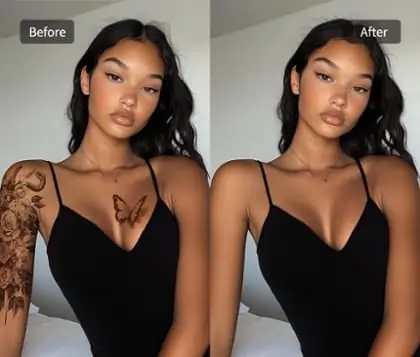
Pokecut removes temporary blemishes from selfies and headshots while preserving freckles, pores, and facial contours. AI identifies the affected area and blends the repair with the surrounding skin tone and texture.
The photo blemish remover targets individual spots, giving you clearer skin without a smoothing effect across the whole face.
Touch Up Eyes, Teeth, and Small Facial Details
Dark circles and fine lines can make a good portrait look tired. This AI beauty retoucher detects facial areas and applies targeted corrections to soften under-eye shadows and wrinkles while preserving eye shape and skin texture.
Separate controls brighten teeth and tidy isolated flyaway hairs, creating a refreshed look for social profiles and work headshots without changing your facial features.
Retouch Photos to Remove Unwanted Distractions
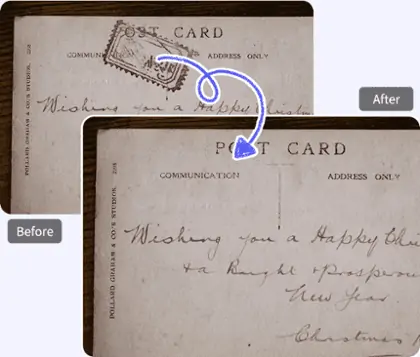
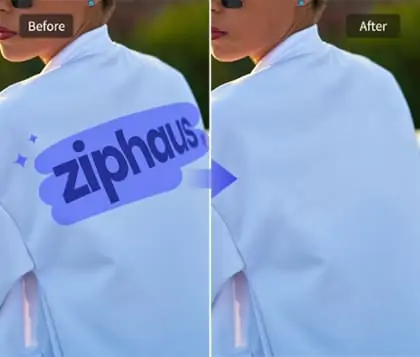
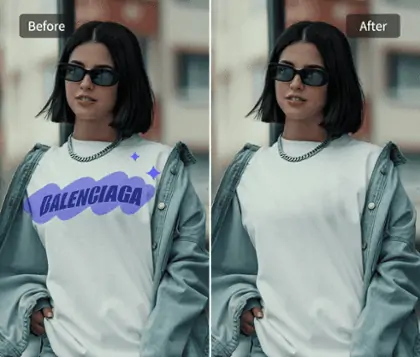
Pokecut removes photobombers from vacation shots and clears distracting objects from the background. AI detects unwanted people, or uses a brushed selection, then reconstructs the area with colors and textures from the surrounding scene.
The result keeps attention on your subject, with background details filled in to match the original setting. The same local cleanup removes loose dust and lint from product photos.

AI Retouch with Precise Control
Automatic detection handles common touch-ups, while a manual brush gives you control over small or hard-to-isolate areas. This AI photo retoucher limits each correction to the selected region, keeping nearby details intact.
In a group photo, one person can be retouched while everyone else stays unchanged. Adjustable strength and local restore controls refine the result while preserving freckles, natural expressions, and the shape of a smile.
Retouch Photo for Everyday and Professional Photos


How to Retouch a Photo Online
Step 1: Upload Your Photo
Choose a clear JPG, PNG, WebP, or BMP from your device. Use the original file when possible so small details are easier to inspect.
Step 2: Use AI or a Manual Brush
Use AI detection to remove acne, wrinkles, dark circles, or passersby. For precise removal, brush over the area and apply the edit.
Step 3: Review and Download
Compare before and after, then check skin, edges, and backgrounds at full size. Review the available export options and download your chosen result.

What Users Say About Pokecut
Feedback on Pokecut's broader editing tools, from background cleanup to browser-based creative work.


Zepeng She

"I'm really impressed with how user-friendly it is for both casual users and pros alike! The AI Background remover and the Magic Eraser are absolute game-changers!"
Jessica Miller
"Pokecut creates natural-looking hair without any rough edges, making it a great tool for content creators!"
Rachit Magon
"The range of specialized AI models (portraits, products, anime) is impressive! Love that it's browser-based with no downloads."
Emily R.
"I wanted to fix one breakout in my headshot. The spot was gone, and the freckles around it were still there."
Sophie M.
"The dark circles were what bothered me in this selfie. The lighter edit looked more like me than the smoothing filters I usually try."
Daniel K.
"I removed a stranger behind us in a vacation photo. I was glad I could keep the shot instead of cropping part of the scene out."
Oliver B.
"Automatic detection gave me a starting point. The brush helped with a small area beside my hair that needed a more careful selection."
Chloe T.
"I cleaned a blemish on my face in our graduation photo. My friends' faces and expressions stayed the same."
Megan L.
"There was loose lint on the sweater I photographed for my shop. The cleanup kept the knit pattern and label readable."
Alex P.
"I only wanted a slight change to my smile. Being able to lower the strength helped the teeth fit the rest of the photo."
Zepeng She
"I'm really impressed with how user-friendly it is for both casual users and pros alike! The AI Background remover and the Magic Eraser are absolute game-changers!"
Jessica Miller
"Pokecut creates natural-looking hair without any rough edges, making it a great tool for content creators!"
Rachit Magon
"The range of specialized AI models (portraits, products, anime) is impressive! Love that it's browser-based with no downloads."
Emily R.
"I wanted to fix one breakout in my headshot. The spot was gone, and the freckles around it were still there."
Sophie M.
"The dark circles were what bothered me in this selfie. The lighter edit looked more like me than the smoothing filters I usually try."
Daniel K.
"I removed a stranger behind us in a vacation photo. I was glad I could keep the shot instead of cropping part of the scene out."
Oliver B.
"Automatic detection gave me a starting point. The brush helped with a small area beside my hair that needed a more careful selection."
Chloe T.
"I cleaned a blemish on my face in our graduation photo. My friends' faces and expressions stayed the same."
Megan L.
"There was loose lint on the sweater I photographed for my shop. The cleanup kept the knit pattern and label readable."
Alex P.
"I only wanted a slight change to my smile. Being able to lower the strength helped the teeth fit the rest of the photo."
Zepeng She
"I'm really impressed with how user-friendly it is for both casual users and pros alike! The AI Background remover and the Magic Eraser are absolute game-changers!"
Jessica Miller
"Pokecut creates natural-looking hair without any rough edges, making it a great tool for content creators!"
Rachit Magon
"The range of specialized AI models (portraits, products, anime) is impressive! Love that it's browser-based with no downloads."
Emily R.
"I wanted to fix one breakout in my headshot. The spot was gone, and the freckles around it were still there."
Sophie M.
"The dark circles were what bothered me in this selfie. The lighter edit looked more like me than the smoothing filters I usually try."
Daniel K.
"I removed a stranger behind us in a vacation photo. I was glad I could keep the shot instead of cropping part of the scene out."
Oliver B.
"Automatic detection gave me a starting point. The brush helped with a small area beside my hair that needed a more careful selection."
Chloe T.
"I cleaned a blemish on my face in our graduation photo. My friends' faces and expressions stayed the same."
Megan L.
"There was loose lint on the sweater I photographed for my shop. The cleanup kept the knit pattern and label readable."
Alex P.
"I only wanted a slight change to my smile. Being able to lower the strength helped the teeth fit the rest of the photo."
Zepeng She
"I'm really impressed with how user-friendly it is for both casual users and pros alike! The AI Background remover and the Magic Eraser are absolute game-changers!"
Jessica Miller
"Pokecut creates natural-looking hair without any rough edges, making it a great tool for content creators!"
Rachit Magon
"The range of specialized AI models (portraits, products, anime) is impressive! Love that it's browser-based with no downloads."
Emily R.
"I wanted to fix one breakout in my headshot. The spot was gone, and the freckles around it were still there."
Sophie M.
"The dark circles were what bothered me in this selfie. The lighter edit looked more like me than the smoothing filters I usually try."
Daniel K.
"I removed a stranger behind us in a vacation photo. I was glad I could keep the shot instead of cropping part of the scene out."
Oliver B.
"Automatic detection gave me a starting point. The brush helped with a small area beside my hair that needed a more careful selection."
Chloe T.
"I cleaned a blemish on my face in our graduation photo. My friends' faces and expressions stayed the same."
Megan L.
"There was loose lint on the sweater I photographed for my shop. The cleanup kept the knit pattern and label readable."
Alex P.
"I only wanted a slight change to my smile. Being able to lower the strength helped the teeth fit the rest of the photo."
Zepeng She
"I'm really impressed with how user-friendly it is for both casual users and pros alike! The AI Background remover and the Magic Eraser are absolute game-changers!"
Jessica Miller
"Pokecut creates natural-looking hair without any rough edges, making it a great tool for content creators!"
Rachit Magon
"The range of specialized AI models (portraits, products, anime) is impressive! Love that it's browser-based with no downloads."
Emily R.
"I wanted to fix one breakout in my headshot. The spot was gone, and the freckles around it were still there."
Sophie M.
"The dark circles were what bothered me in this selfie. The lighter edit looked more like me than the smoothing filters I usually try."
Daniel K.
"I removed a stranger behind us in a vacation photo. I was glad I could keep the shot instead of cropping part of the scene out."
Oliver B.
"Automatic detection gave me a starting point. The brush helped with a small area beside my hair that needed a more careful selection."
Chloe T.
"I cleaned a blemish on my face in our graduation photo. My friends' faces and expressions stayed the same."
Megan L.
"There was loose lint on the sweater I photographed for my shop. The cleanup kept the knit pattern and label readable."
Alex P.
"I only wanted a slight change to my smile. Being able to lower the strength helped the teeth fit the rest of the photo."
Emily R.
"I wanted to fix one breakout in my headshot. The spot was gone, and the freckles around it were still there."
Sophie M.
"The dark circles were what bothered me in this selfie. The lighter edit looked more like me than the smoothing filters I usually try."
Daniel K.
"I removed a stranger behind us in a vacation photo. I was glad I could keep the shot instead of cropping part of the scene out."
Oliver B.
"Automatic detection gave me a starting point. The brush helped with a small area beside my hair that needed a more careful selection."
Chloe T.
"I cleaned a blemish on my face in our graduation photo. My friends' faces and expressions stayed the same."
Megan L.
"There was loose lint on the sweater I photographed for my shop. The cleanup kept the knit pattern and label readable."
Alex P.
"I only wanted a slight change to my smile. Being able to lower the strength helped the teeth fit the rest of the photo."
Zepeng She
"I'm really impressed with how user-friendly it is for both casual users and pros alike! The AI Background remover and the Magic Eraser are absolute game-changers!"
Jessica Miller
"Pokecut creates natural-looking hair without any rough edges, making it a great tool for content creators!"
Rachit Magon
"The range of specialized AI models (portraits, products, anime) is impressive! Love that it's browser-based with no downloads."
Emily R.
"I wanted to fix one breakout in my headshot. The spot was gone, and the freckles around it were still there."
Sophie M.
"The dark circles were what bothered me in this selfie. The lighter edit looked more like me than the smoothing filters I usually try."
Daniel K.
"I removed a stranger behind us in a vacation photo. I was glad I could keep the shot instead of cropping part of the scene out."
Oliver B.
"Automatic detection gave me a starting point. The brush helped with a small area beside my hair that needed a more careful selection."
Chloe T.
"I cleaned a blemish on my face in our graduation photo. My friends' faces and expressions stayed the same."
Megan L.
"There was loose lint on the sweater I photographed for my shop. The cleanup kept the knit pattern and label readable."
Alex P.
"I only wanted a slight change to my smile. Being able to lower the strength helped the teeth fit the rest of the photo."
Zepeng She
"I'm really impressed with how user-friendly it is for both casual users and pros alike! The AI Background remover and the Magic Eraser are absolute game-changers!"
Jessica Miller
"Pokecut creates natural-looking hair without any rough edges, making it a great tool for content creators!"
Rachit Magon
"The range of specialized AI models (portraits, products, anime) is impressive! Love that it's browser-based with no downloads."
Emily R.
"I wanted to fix one breakout in my headshot. The spot was gone, and the freckles around it were still there."
Sophie M.
"The dark circles were what bothered me in this selfie. The lighter edit looked more like me than the smoothing filters I usually try."
Daniel K.
"I removed a stranger behind us in a vacation photo. I was glad I could keep the shot instead of cropping part of the scene out."
Oliver B.
"Automatic detection gave me a starting point. The brush helped with a small area beside my hair that needed a more careful selection."
Chloe T.
"I cleaned a blemish on my face in our graduation photo. My friends' faces and expressions stayed the same."
Megan L.
"There was loose lint on the sweater I photographed for my shop. The cleanup kept the knit pattern and label readable."
Alex P.
"I only wanted a slight change to my smile. Being able to lower the strength helped the teeth fit the rest of the photo."
Zepeng She
"I'm really impressed with how user-friendly it is for both casual users and pros alike! The AI Background remover and the Magic Eraser are absolute game-changers!"
Jessica Miller
"Pokecut creates natural-looking hair without any rough edges, making it a great tool for content creators!"
Rachit Magon
"The range of specialized AI models (portraits, products, anime) is impressive! Love that it's browser-based with no downloads."
Emily R.
"I wanted to fix one breakout in my headshot. The spot was gone, and the freckles around it were still there."
Sophie M.
"The dark circles were what bothered me in this selfie. The lighter edit looked more like me than the smoothing filters I usually try."
Daniel K.
"I removed a stranger behind us in a vacation photo. I was glad I could keep the shot instead of cropping part of the scene out."
Oliver B.
"Automatic detection gave me a starting point. The brush helped with a small area beside my hair that needed a more careful selection."
Chloe T.
"I cleaned a blemish on my face in our graduation photo. My friends' faces and expressions stayed the same."
Megan L.
"There was loose lint on the sweater I photographed for my shop. The cleanup kept the knit pattern and label readable."
Alex P.
"I only wanted a slight change to my smile. Being able to lower the strength helped the teeth fit the rest of the photo."
Zepeng She
"I'm really impressed with how user-friendly it is for both casual users and pros alike! The AI Background remover and the Magic Eraser are absolute game-changers!"
Jessica Miller
"Pokecut creates natural-looking hair without any rough edges, making it a great tool for content creators!"
Rachit Magon
"The range of specialized AI models (portraits, products, anime) is impressive! Love that it's browser-based with no downloads."
Emily R.
"I wanted to fix one breakout in my headshot. The spot was gone, and the freckles around it were still there."
Sophie M.
"The dark circles were what bothered me in this selfie. The lighter edit looked more like me than the smoothing filters I usually try."
Daniel K.
"I removed a stranger behind us in a vacation photo. I was glad I could keep the shot instead of cropping part of the scene out."
Oliver B.
"Automatic detection gave me a starting point. The brush helped with a small area beside my hair that needed a more careful selection."
Chloe T.
"I cleaned a blemish on my face in our graduation photo. My friends' faces and expressions stayed the same."
Megan L.
"There was loose lint on the sweater I photographed for my shop. The cleanup kept the knit pattern and label readable."
Alex P.
"I only wanted a slight change to my smile. Being able to lower the strength helped the teeth fit the rest of the photo."
Zepeng She
"I'm really impressed with how user-friendly it is for both casual users and pros alike! The AI Background remover and the Magic Eraser are absolute game-changers!"
Jessica Miller
"Pokecut creates natural-looking hair without any rough edges, making it a great tool for content creators!"
Rachit Magon
"The range of specialized AI models (portraits, products, anime) is impressive! Love that it's browser-based with no downloads."
Reviews from: Reddit, Product Hunt, G2, TrustRadius, Google Play, App Store, and more.
Pokecut Trusted by Millions of Leaders and Users

1M+ Users Worldwide
Pokecut generates over 500,000 images every day

#2 on Product Hunt
Pokecut launched and won #2 product of the day

Professional Privacy Protection
Ensure 100% data privacy for every photo

Trusted by Well-known Brands
Apple, Google, PayPal, Stripe, Product Hunt, G2, TrustRadius
FAQs About Photo Retouching
What is photo retouching?
Photo retouching means refining specific details in an image, such as a temporary skin blemish or an unwanted object in the background. It can be subtle: cleaning up one distraction while keeping the person's features and the original scene recognizable.
How is retouching different from photo editing?
Retouching usually focuses on local details, while photo editing also includes broader changes such as cropping, color balance, and exposure. A picture retouching task might remove one spot on a cheek; a general edit might brighten the entire portrait. Many finished images use both approaches.
Can I retouch a photo online for free with Pokecut?
Pokecut offers free credits to try its tools, with usage limits that depend on the feature and your plan. Check the credit requirement for your selected template or tool before applying it. Higher-resolution exports or additional edits may require a paid option.
Can I remove a blemish without smoothing my whole face?
Use a local selection to target the blemish rather than applying smoothing across the face. Keep the selection close to the spot and compare the result with nearby skin. A clear original makes it easier to judge whether the edited texture fits.
Can I keep freckles, moles, and expression lines?
Keep those details outside the selected edit area or restore them if a wider adjustment changes them. Lower the strength when a touch-up looks too strong, then inspect the result at full size. Treat natural features as details to preserve unless you specifically want to change them.
Can I retouch one person in a group photo?
Select that person or the specific area on their face before applying a touch-up. Review the other faces afterward to check that their appearance is unchanged. Faces that are very small, heavily shadowed, or partly hidden can be harder to edit accurately.
Can AI remove objects without changing the main subject?
A selection that stays clear of the subject helps limit the edit to the unwanted object. AI fills in the selected area using surrounding visual context. If the object overlaps hair, clothing, or a face, the hidden detail may need additional correction; inspect those boundaries carefully.
Will retouching lower my photo's quality or add a watermark?
Output quality and watermark conditions depend on the selected tool and export option. Check the available dimensions and preview before downloading. Start with the highest-quality original you have, and avoid repeatedly saving a photo through several compressed formats.
Why does an edited area look blurry or repeated?
The selection may cover too much detail, or the surrounding image may not provide enough information for a convincing fill. Try a smaller area and handle complex objects in separate passes. If the original itself lacks clarity, a photo enhancer addresses a different problem from local image retouching.
Do I need Photoshop skills to touch up a photo?
You can start with a template and a clearly defined edit, such as one blemish or a background distraction. The important part is reviewing the preview and adjusting the selection when needed. Complex overlaps and very low-quality originals may still call for more detailed manual work.
Are my uploaded photos used for AI training, and how long are they kept?
Pokecut's published Privacy Policy states that uploaded photos and videos are not used to train or improve its deep-learning features. It also states that uploaded images are deleted after 24 hours and images generated from uploads after 15 days. Review the current policy for the full processing, storage, and data-rights terms.