












Unlock Pokecut VIP for just

AI Shadow Maker: Add Shadow to Image Online for Free
Use Pokecut's shadow generator to add realistic shadows to product photos, portraits, text, and transparent PNGs. Adjust blur, angle, opacity, color, and position with simple controls.


Upload Image
or drop a file here
CTRL+V to paste image or URL
Supported formats: JPEG, JPG, PNG, WebP, BMP


No image? Try one of these
By uploading an image or URL you agree to our Terms of Use and Privacy Policy

Add Realistic Shadows to Images for Better Depth
When a subject has no shadow, it can look like it is floating. Pokecut helps you add shadow to image areas that need more depth, so the result feels more grounded and easier to trust. This matters for product photos, profile graphics, ads, and marketplace listings where clean presentation affects clicks.
Our AI shadow tool reads the subject and helps you build a natural-looking result without opening complex editing software. If you need a fast shadow online workflow that still gives you control, Pokecut makes the job much simpler.

Use the Right Shadow Style for Any Photo
Not every image needs the same shadow filter. Some product shots look better with a soft ground shadow. Text and sticker designs often need a clear drop shadow. Portraits may need a longer side shadow to match the mood of the scene.
Pokecut's shadow maker lets you test different looks before you export. Try soft, hard, left, right, bottom, and 3D shadow styles to see what works best. This gives you more freedom whether you want to add shadows to image assets for e-commerce or make a photo shadow that feels more dramatic.

Add Shadow to Image with Custom Control
Good shadows depend on details. Pokecut gives you control over the settings that shape the final look, so you can make a small adjustment or build a more visible AI shadow effect.
AI Shadow Generator for Any Photos


Use Pokecut to add shadow to product images for stores, ads, and marketplace listings. A clean product shadow helps shoes, beauty items, electronics, and accessories look more real and more consistent across your catalog.
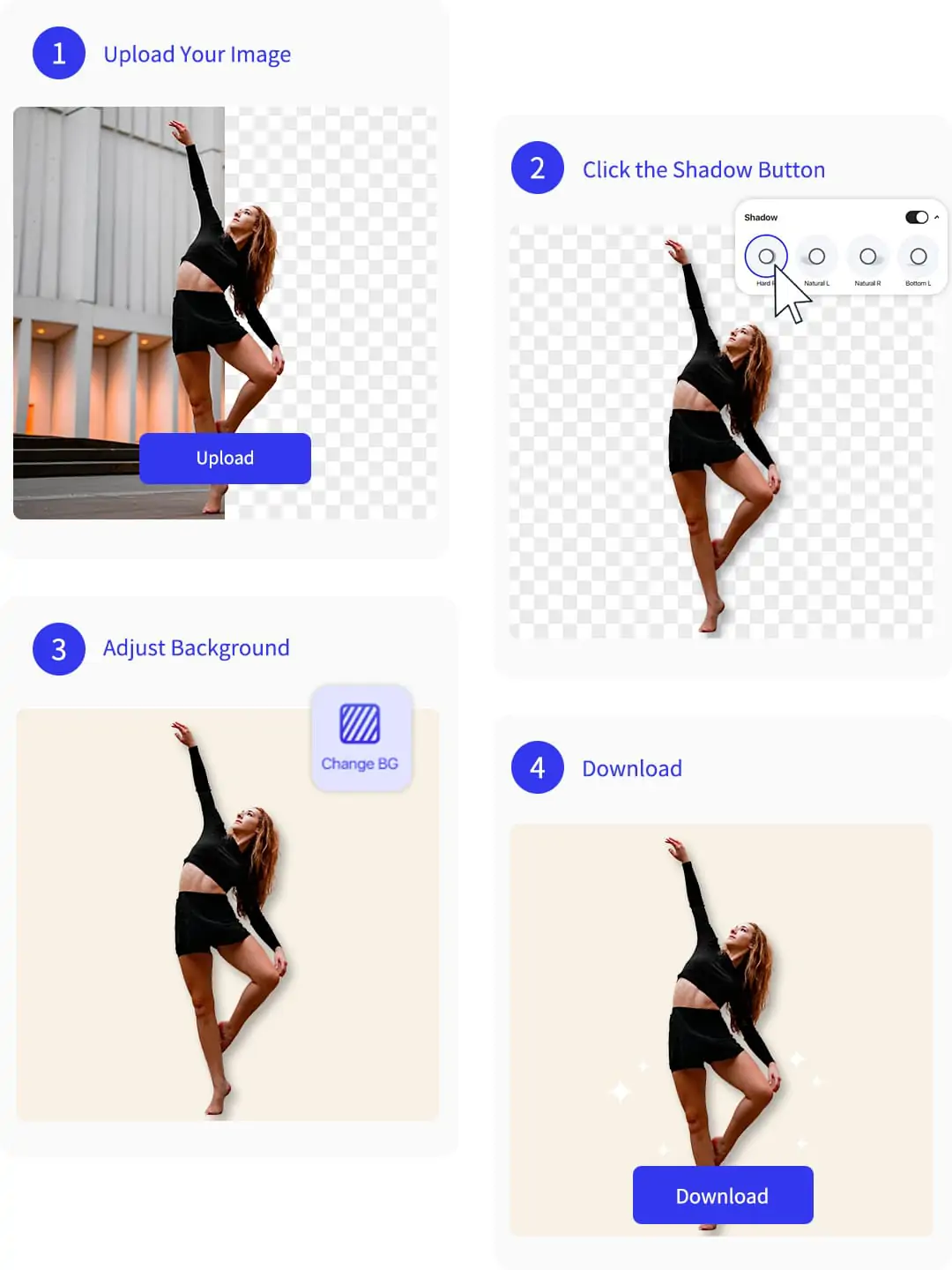
How to Add a Shadow to an Image Online
Step1: Upload Your Image
Upload your image to start. The shadow editor will automatically remove the background. This helps you add shadow to image seamlessly and focus on the main subject.
Step2: Click the Shadow Button
Click the shadow button to add dropshadow to image. Choose your preferred shadow style, adjust position, and select any color for a custom, realistic shadow effect.
Step3: Add or Adjust Background
Add a newbackground or upload your original image to keep its background. Easily match the new shadow effect with your chosen background style.
Step4: Download the Edited Image
Download your finished image in high resolution. Save your work with the new shadow picture effect.
What Users Say About Pokecut's Shadow Generator
Users like how quickly Pokecut adds believable depth to flat images and cutout assets.

Ava L.

"I used it to add shadow to image cutouts for product listings, and the results looked much more grounded than the plain files I started with."
Marcus D.
"The tool worked well as a shadow editor for quick promo graphics, especially when I needed more depth without slowing down the whole layout process."
Nina R.
"What I liked most was being able to test a soft photo shadow and a stronger drop effect without rebuilding the image from scratch."
Jon P.
"We used it on e-commerce visuals, and even a small image shadow made our listings feel cleaner and more professional."
Sophia W.
"I needed a fast shadow maker for mockups, and this gave me results that were much better than basic preset effects."
Ethan C.
"It made everyday cleanup easier because I could add shadow to photo assets in a few passes and stop the subject from looking pasted in."

Reviews from: Reddit, Product Hunt, G2, TrustRadius, Google Play, App Store, and more.
Pokecut Trusted by Millions of Leaders and Users

1M+ Users Worldwide
Pokecut generates over 500,000 images every day


Professional Privacy Protection
Ensure 100% data privacy for every photo

Trusted by Well-known Brands
Apple, Google, PayPal, Stripe, Product Hunt, G2, TrustRadius
FAQs About Pokecut's Shadow Maker
Can I add shadow to image files without Photoshop?
Yes. Pokecut is built for quick browser-based editing, so you can add shadow to image assets online without working through a complex layered design workflow.
Does this tool work for products and portraits?
Yes. It works well for product cutouts, portrait photos, social graphics, and ad layouts where the subject needs a stronger sense of depth and separation.
Is this more like a shadow filter or a full editor?
It can work as both. You can use it like a quick shadow filter for faster edits or treat it more like a shadow editor when you want to guide the final look in detail.
Can I make a softer or darker shadow effect?
Yes. You can guide the result through prompts and regeneration, which makes it easier to create a softer image shadow or a stronger directional effect depending on the project.
Why do people search for shadow maker and shadow generator?
Those phrases usually describe the same need. People want a fast way to make a shadow, add shadow to photo assets, and create more believable depth in a flat image.
 POKECUT




Copyright © 2026 Pokecut All Rights Reserved.